
A website migration is worth it when your current site stops your revenue team doing its job: it cannot publish quickly, track leads reliably or change its structure without a rebuild. It is not worth it when a few fixes would solve the same problem, because the move itself puts search visibility at risk.
This article is for CEOs, founders, CROs and revenue leaders at B2B companies weighing a website migration to a new platform, host or new domain. You will get what a site migration replaces, what staying put costs, what breaks and a decision by stage. Search facts come from Google's documentation, opened on 15 October 2026.
|
Website Migration A website migration is the move of a site from one platform, host, domain or URL structure to another while keeping its pages, search visibility, tracking and forms working. |
The decision: migrate when the old site blocks growth, not when it looks dated
A site that looks dated is a reason to redesign. A site that cannot do what the business needs is a reason to migrate. The test is whether the legacy site limits what you can publish, measure or connect to your sales process, and whether fixing that limit costs more than moving. For the full picture, read our complete guide to b2b website design.
Good reasons to move include a content management system your team cannot edit without a web developer, a hosting provider that keeps the site slow or unreliable, forms that do not reach your CRM, and a site structure that no longer matches how buyers look for you.
Better site performance and a better mobile experience are real gains, but only when they serve a goal you can name. Weak reasons include fashion, a new logo and a competitor's launch.
Migration is also a different job from a redesign. A growth-driven approach to redesign changes how the site looks and works. A site migration changes where and how it lives. Many projects are both, and Google's advice, covered below, is to avoid doing everything at once.
A site migration changes the platform, the address, the site structure or all three
Every site migration swaps something underneath your pages. What you swap decides how much search risk you take on.
- Platform migration. You move from one content management system to another. Pages, templates, forms and tracking all need rebuilding or reconnecting.
- Hosting change. The site stays at the same addresses but runs on a new hosting provider.
- Domain migration. The site moves from one domain name to another, so every old URL must point to its new home.
- Protocol change. The site moves from HTTP to HTTPS, which changes every URL even though the content stays put.
- Structure change. The platform may stay, but the site architecture and paths change, so pages get new URLs.
- Content migration. Pages and media move into a new system, and what is not moved must be retired on purpose.
Google separates these into two groups. A move that changes URLs includes HTTP to HTTPS, a domain name change, merging domains and changes to URL paths. A move that changes only the hosting leaves the user-visible URL alone. The second is lower risk, because nothing a search engine has stored needs to be re-pointed.
Doing nothing has a cost, but it is a hidden one
The case for staying put is real. A working site earns its place, and every website migration brings a period of uncertainty. The case against staying put is that the costs of an old site arrive in small amounts that nobody adds up.
Slow publishing means campaigns wait on a developer. Disconnected forms mean leads reach sales late or not at all. A patchwork of plugins means each update risks breaking something.
Weak analytics means you cannot tell which pages earn pipeline, so you cannot improve them. None of this shows on an invoice, yet all of it shapes how fast the company grows.
Add up what your team works around in a quarter. If the list is short and the site does its job, stay. If the list keeps growing, the cost of waiting is already running.
A website metrics review gives you the baseline for that comparison, and it is also the baseline you will need after the move.
What breaks when a website migration goes wrong
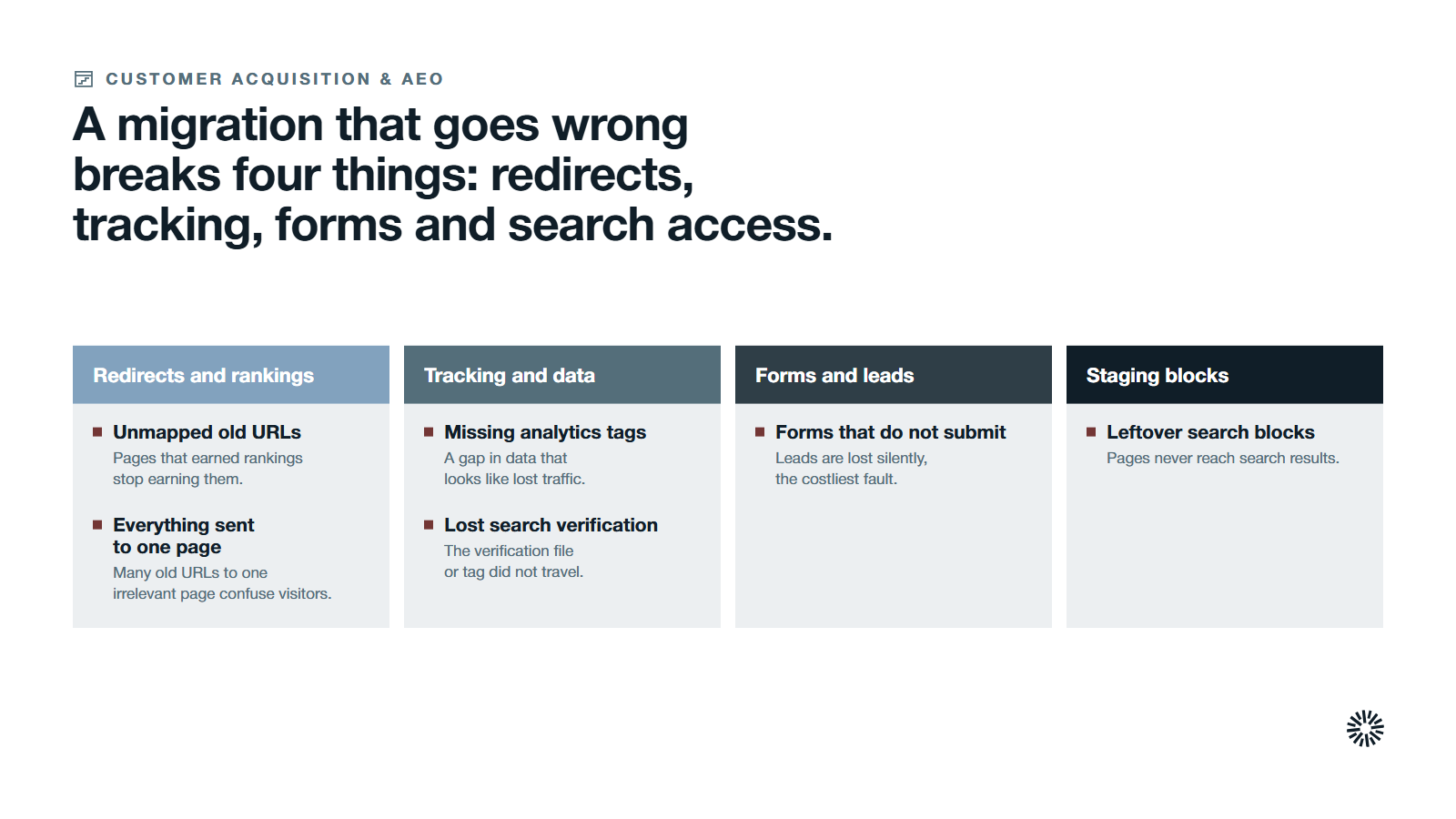
A well-executed website migration needs a migration plan and an audit. Without them, the damage is rarely dramatic on launch day. It shows up weeks later as lost enquiries and a pipeline that quietly thins, and a badly executed move can leave traffic permanently lower. Most of the damage falls into four places.
Redirects and search rankings
Google's guide says a site migration happens per URL, and that it is complete only when Googlebot has visited every URL on both the old site and the new site at least once.
If your old URLs do not point to the right new pages, people and search engines meet dead ends, and the pages that earned your search rankings stop earning them.
Google also warns against sending many old URLs to one irrelevant destination, such as the home page. That can confuse visitors, and Google may treat it as a soft 404. It adds that it frequently sees redirects aimed at the wrong, non-existent URLs on the new site.
Tracking and measurement
A new site often launches without the analytics tags the old one carried, because the analytics software usually lives in the template and the template did not move. Google Analytics then shows a cliff that is really a gap in data, and you cannot tell traffic loss from tracking loss.
Google's guide also reminds owners that Search Console verification can fail after a move if the verification file or tag does not travel with the site.
Forms and lead capture
A form that renders but does not submit, or submits to a dead integration, is the most expensive fault in this list because it loses leads silently. Test every form on the new site end to end, from submission to the CRM record and the notification to the owner, before and after launch.
Blocks that keep search engines out of the new site
While a site is being built, owners often block search engines with a robots.txt rule or a noindex tag, which is sensible because it can prevent search engines from indexing an unfinished site. Google lists leftover blocks as a common mistake, and says to remove any block that was only needed for the migration.
A forgotten block stops search engines from discovering the pages and keeps the entire site out of Google search results.
Audit the legacy site and record a baseline before you change anything
You cannot tell whether a migration worked unless you know what the old site did before it. Start the audit weeks ahead of the move, so the baseline reflects normal traffic and not the launch. Pull it from Google Search Console and Google Analytics, which you will use again after launch.
Crawl the existing site to log every URL, including media files, then record what each of your important pages earns. Document the site architecture and the metadata, canonical tags and structured data that tell search engines what each page is.
Note which pages attract external links, because those pages carry the site's authority and the rankings you most want to keep.
Record the numbers you will compare against later: organic search traffic, conversions, the keyword rankings that matter and the site's performance. The same baseline lets you judge whether the new website improved performance or only matched it.
Redirects decide whether rankings survive the move
Redirects are the part of a website migration that search engines care about most. They tell site visitors and search engine crawlers that a web page has a new location.
Google recommends server-side permanent redirects from old URLs to new ones, such as 301 and 308. It says that 301 and other permanent redirects do not cause a loss in PageRank, so the fear that redirects themselves hurt rankings is not borne out by Google's guidance. Redirects fail when they are missing, wrong or chained.
Google's redirects documentation explains why the type matters. A permanent redirect is a signal that the target should be the canonical page. A temporary redirect is not, and search results may keep showing the source page. Use temporary redirects for temporary situations only.
Build the URL mapping before anything else
A redirect strategy starts with a map of old URLs to new URLs, and the map starts with your sitemaps. Google suggests finding your important URLs from your sitemaps, server logs, analytics and the links report in Search Console, then adding images, videos and downloads that attract traffic of their own.
The redirect mapping process is slow work, and it is where migrations are won. Decide for every old URL whether it moves, merges into another page or retires. Retired pages should return a proper 404 or 410 on the new site, not a redirect to the home page.
Point links straight at the final address
Google advises redirecting to the final destination directly rather than through a chain. Apply the same rule to your own pages: update internal links and any external links you control so they point at the new URLs, not at old ones that then redirect.
Keep canonical tags self-referencing on every new URL, so duplicate content does not confuse the index.
Keep the redirects in place
Google says to keep redirects for as long as possible, generally at least 1 year, so that it can transfer signals and reassign links from other sites. For visitors, consider keeping them indefinitely.
A website migration checklist keeps the whole site migration process predictable
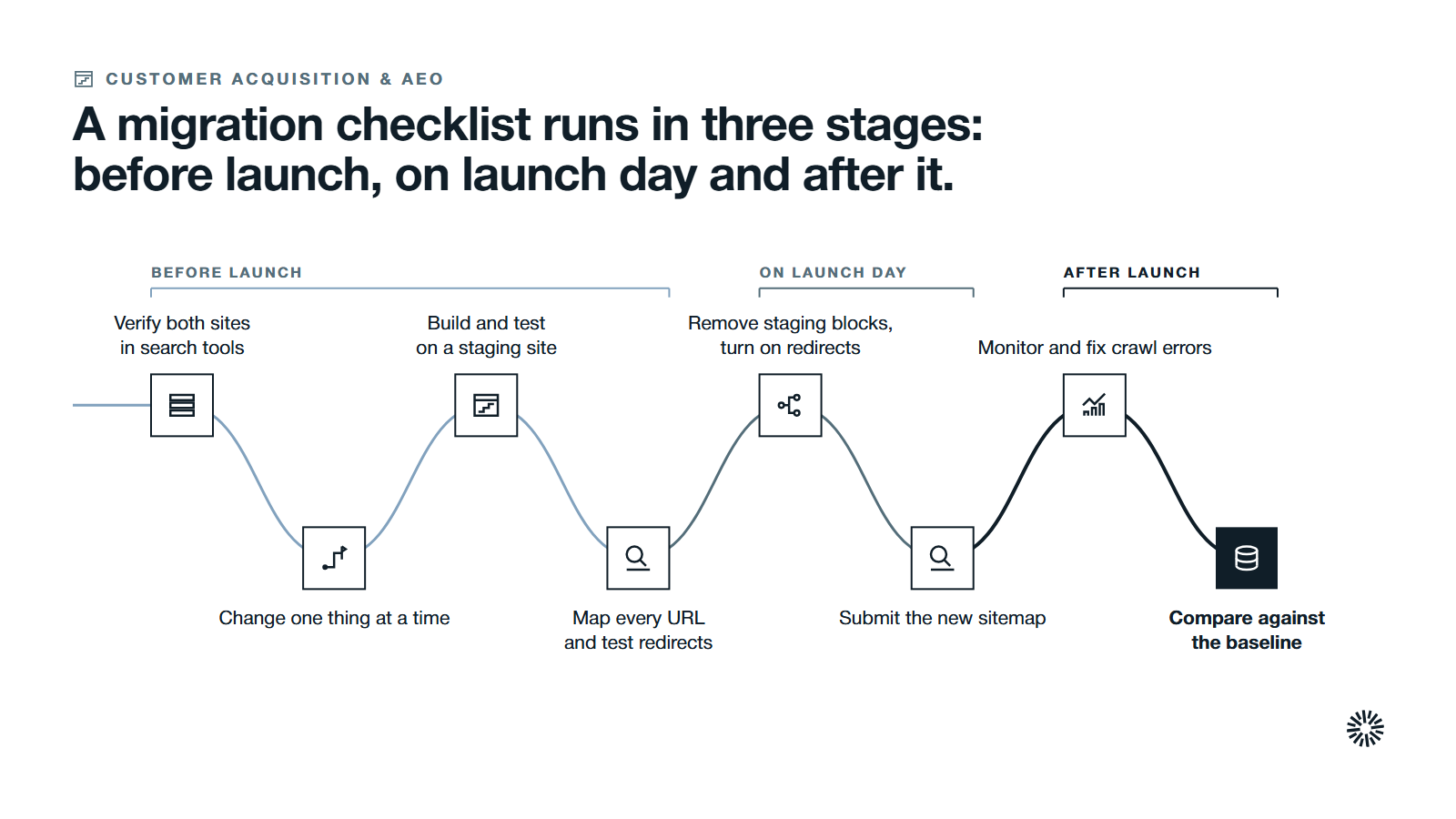
A migration checklist cannot make a bad plan good, but it stops a good plan from failing on a detail. This website migration process follows Google's guide and fits most B2B sites, large or small.
Before launch
- Verify both properties. Add the old site and the new site to Google Search Console, so you can watch both after launch.
- Change one thing at a time. Google advises against changing domain, content management system and layout in the same move.
- Build on a staging site. A staging environment or test site lets you check pages, forms and tracking before anyone sees them. Keep search engines out of it until you are ready.
- Complete pre launch testing. Check internal links, broken links, mobile setup, forms, analytics tags and the XML sitemap, and confirm the new hosting provider and web server can handle extra crawling.
- Prepare the URL map and redirect rules. Test the redirects on the staging site before they go live.
- Lower the DNS time to live. Google's hosting guidance suggests doing this well ahead of the move, so the new settings spread faster.
On launch day
- Time the site launch for a quieter period, as Google advises, so fewer visitors meet any early problem.
- Remove staging restrictions, including any robots.txt or noindex block that was only needed during the build, then turn on the redirects.
- Submit the new XML sitemap in Google Search Console and, if you moved to a new domain, use the Change of Address tool for the old domain.
- Check capacity. Google says it will crawl the new site more heavily than usual after a migration, so confirm your hosting company can cope.
After launch
- Run post launch monitoring in Google Search Console, server logs and your analytics tools. Traffic on the old site should fall as traffic on the new site rises.
- Check for crawl errors regularly. Fix broken links, and watch for unexpected status codes and pages missing from the index.
- Compare against the baseline. Track traffic, conversions and keyword rankings against your pre-migration benchmarks, using the same keywords as before.
- Update links you control. Change profile links and ad destinations to the new URLs, and ask partners to update external links to your highest-traffic pages.
- Be patient. Google says medium-sized sites can take a few weeks or more to settle, and larger sites longer, with temporary ranking fluctuation along the way.
Google's Change of Address tool applies only to a move from one domain or subdomain to another, so you do not need it for a move that keeps the same domain.
Moving from WordPress to HubSpot adds a domain connection step
Many B2B companies weigh a WordPress to HubSpot migration because they want content, forms and CRM data in one place on a new website. The search rules above still apply in full. The platform change adds a domain step.
HubSpot's domain connection guide, last updated 26 June 2026, says: "If migrating a live website to HubSpot, publish HubSpot content and back up existing content before updating DNS records." It also says a domain can host content in only one location, so connecting one that already hosts external pages breaks those links.
In practice, build and test the new pages first, keep a full backup of the old site, and treat the DNS change as the moment the move actually begins. A HubSpot audit before the move shows which forms, properties and workflows the new site must keep feeding.
Match the decision to your company stage
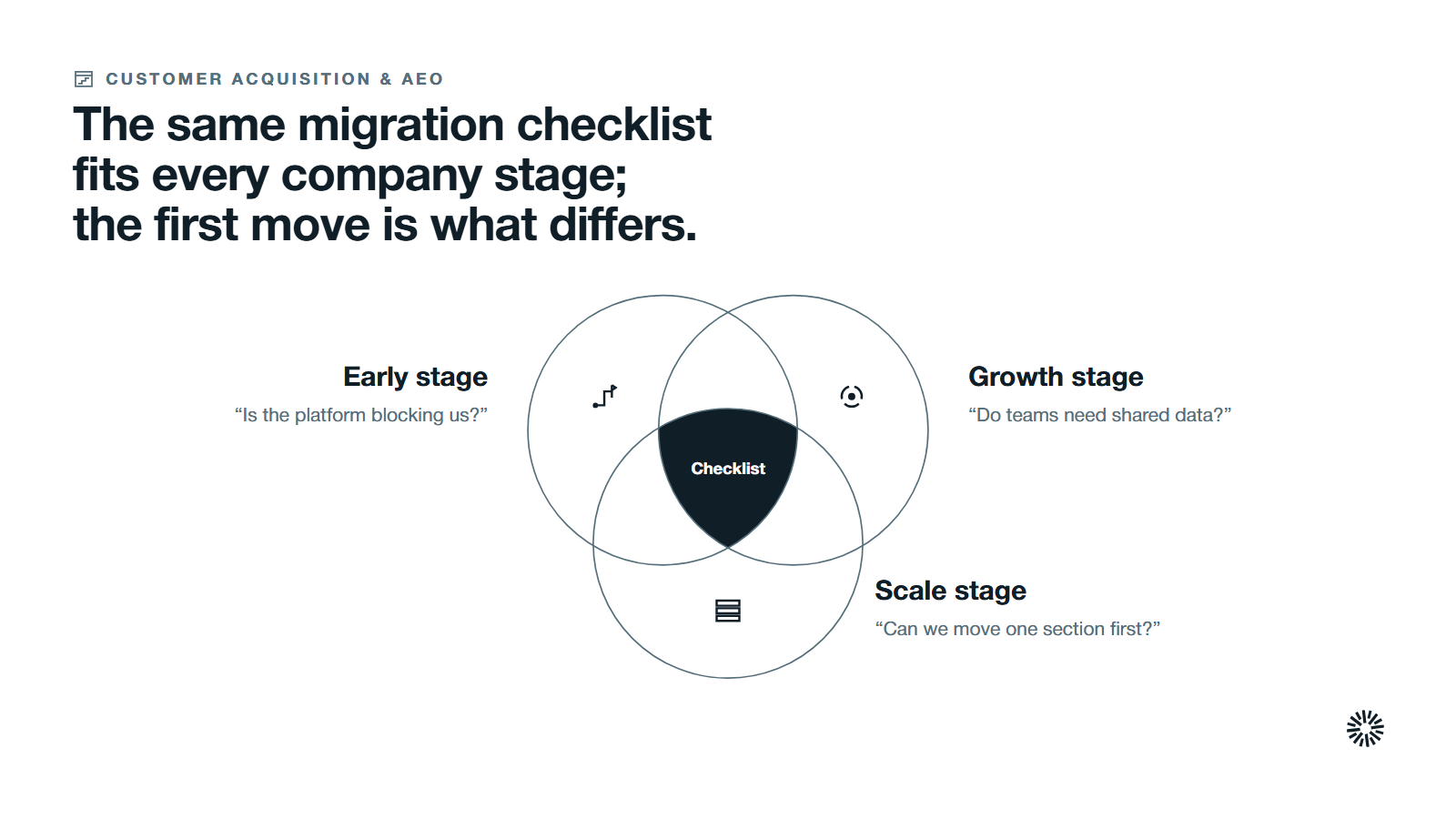
Company stage changes both the case for moving and the safest way to do it. The same checklist applies at every stage, but the first move differs.
Early-stage company with a small site
Migrate only if the platform blocks you from publishing or capturing leads. With a small site and few ranking pages, the URL map is short and the risk is low, so this is the cheapest time to move.
Google suggests that small and medium sites move all URLs at once. Hold back any redesign until the move settles.
Growth-stage company with several teams
Migrate when sales, marketing and service need shared data the current site cannot provide. Search traffic now matters, so protect it: build the URL map from real traffic data, name an owner for tracking, and review results weekly after launch.
A website that generates leads is the target, and your migration plan should name how each lead path is tested on the staging site.
Scale-stage company with several products or regions
Large sites carry the most risk and the most to gain. Google says larger sites may choose to move one section at a time, which makes problems easier to detect and fix.
Move a section that changes less often first, review what happened, then continue. Governance matters here: one owner for redirects, one for tracking and one for sign-off.
What you gain when this is done properly
A migration that keeps search visibility, tracking and forms intact pays back across the revenue team, not only in the web team.
Sales gets leads with context
When forms and tracking survive the move, reps see which page and campaign produced each lead before they call. Lead routing keeps working, and nothing sits in an inbox that no one checks.
Marketing keeps its rankings and its data
Marketing keeps the pages that earned traffic, the search engine visibility they built, and the history that shows what worked. A new platform then lets the team publish faster and test changes without waiting for a developer. A sound SEO strategy carries on across the move rather than restarting.
Customer success finds answers in one place
Support content, onboarding pages and resources keep their addresses or redirect cleanly, so customers do not meet dead links in old emails and documents. The new platform can also make it easier to keep that content current.
Decide on the evidence, then name one owner
The honest answer to whether a website migration is worth it, and what a successful migration needs, depends on what the old site stops you doing and how well you can protect what it already earns.
If the list of blocked work is long and the risks are named and owned, move. If the list is short, fix the site where it stands.
Propello designs and builds connected go-to-market systems on HubSpot, and Propello is a HubSpot partner. If you want help weighing the move against the rest of your revenue system, an audit is the place to start. See what the Propello GTM Audit covers and how to prepare.