
If you lead marketing or revenue at a B2B company, you have probably heard that your website has "technical issues" without anyone saying which ones matter. Technical SEO is the work of making sure search engines can find, understand and serve your pages, so the content you pay for can actually reach buyers and bring in search traffic.
This article is written for marketing leaders, founders and revenue teams who own a B2B website. It explains what technical SEO covers, which technical SEO elements matter, how crawling, indexing and serving work, how technical SEO differs from on-page SEO, and which problems to fix first.
|
Technical SEO Technical SEO is the practice of optimizing a website's infrastructure so search engines can crawl, index and serve its pages, and so visitors get a fast, stable and secure experience. |
Why technical SEO matters for a B2B website
A page that search engines cannot reach earns nothing, however good it is. Technical SEO removes the barriers between your content and the search results where your buyers look for answers. Pages that cannot be crawled cannot earn higher search engine rankings, whatever else you do, so it works as a ranking factor in a practical sense.
For a B2B company, the stakes are practical. Your site is where buyers check your claims before they ever speak to sales. If your best pages are blocked, duplicated, slow or missing from the index, the demand you create elsewhere leaks away at the last step.
Technical SEO also protects the work you do on content and links. Strong pages on a weak foundation sit lower in search rankings than they should, and the cause is rarely visible from the page itself. That is why a technical SEO audit is usually the first step of any serious SEO strategy.
If you are new to the wider discipline, what SEO is and how it works covers the basics. This article stays on the technical aspects and the infrastructure underneath. Sound technical SEO practices also improve user experience, because a site that is easy to crawl is usually easy to use.
One note on the term. The wider term, search engine optimization, includes content and links. Technical SEO is sometimes confused with technical debt or with web development in general. It is neither. It is the part of search engine optimization that concerns the website itself rather than the words on a page.
How search engines crawl, index and serve your pages
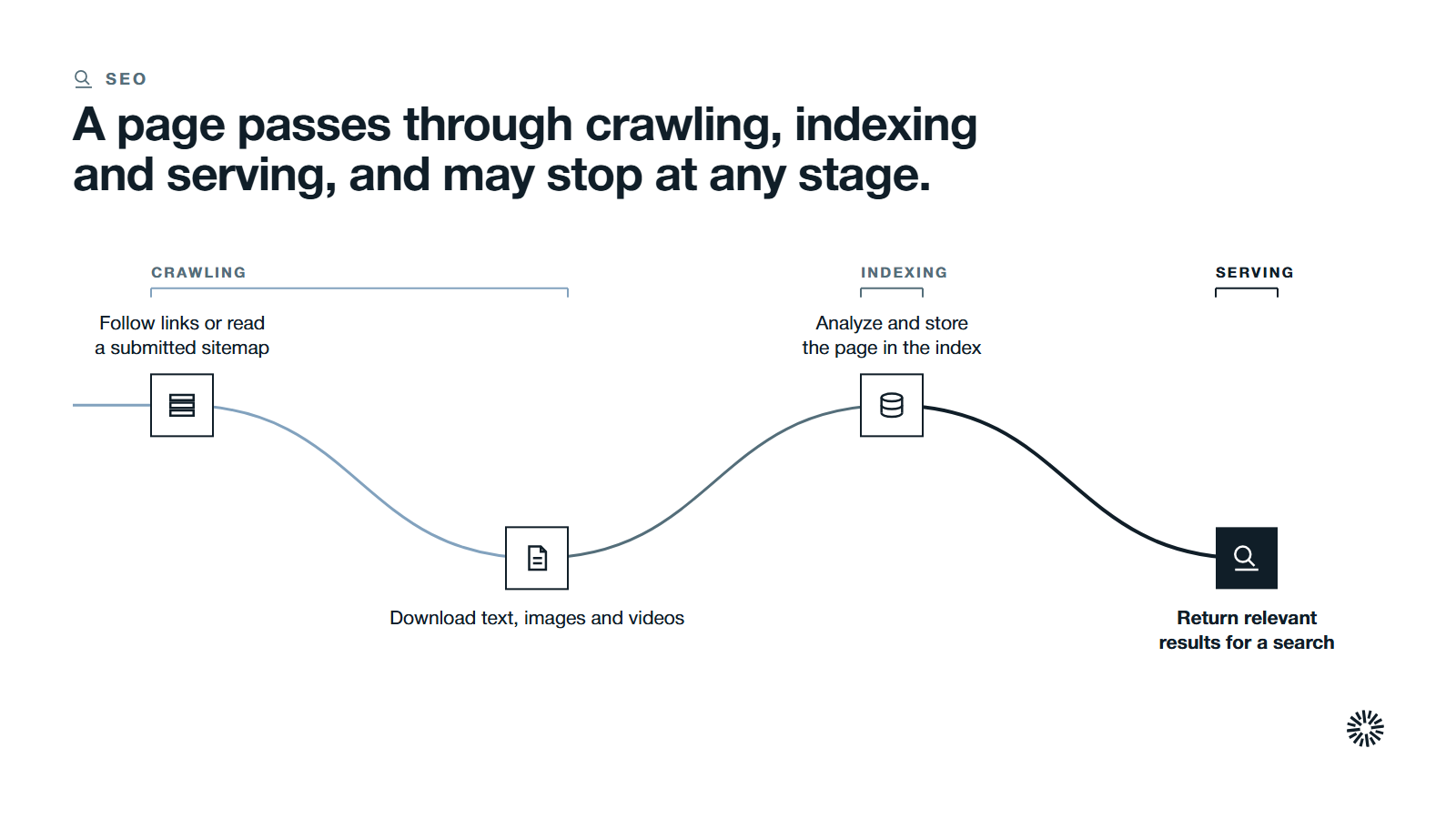
Technical SEO makes sense once you see the path a page takes. Google's own guide to how Search works describes three stages, and not every page makes it through each one.
Crawling is the first stage. Automated programs called crawlers download text, images and videos from pages they have discovered. When Google crawls your site, it follows links from known pages or reads a sitemap you submit, so search engine crawlers can efficiently crawl the pages that matter.
Indexing is the second. Google analyzes what a page contains and stores that information in its index, a very large database. Indexing stores crawled content in the search engine's database, and a page that is crawled can still fail to be indexed.
Serving is the third. When someone searches, Google returns information from the index that is relevant to the query.
Google Search Central also states that it does not guarantee it will crawl, index or serve a page, even when the page follows its guidelines. It does not accept payment to crawl a site more often or rank it higher. Technical SEO therefore removes obstacles. It does not buy outcomes.
The same path matters for AI search systems, which depend on content that is reachable and clearly structured. How that connects to the newer discipline is covered in AEO vs SEO.
The parts of technical SEO
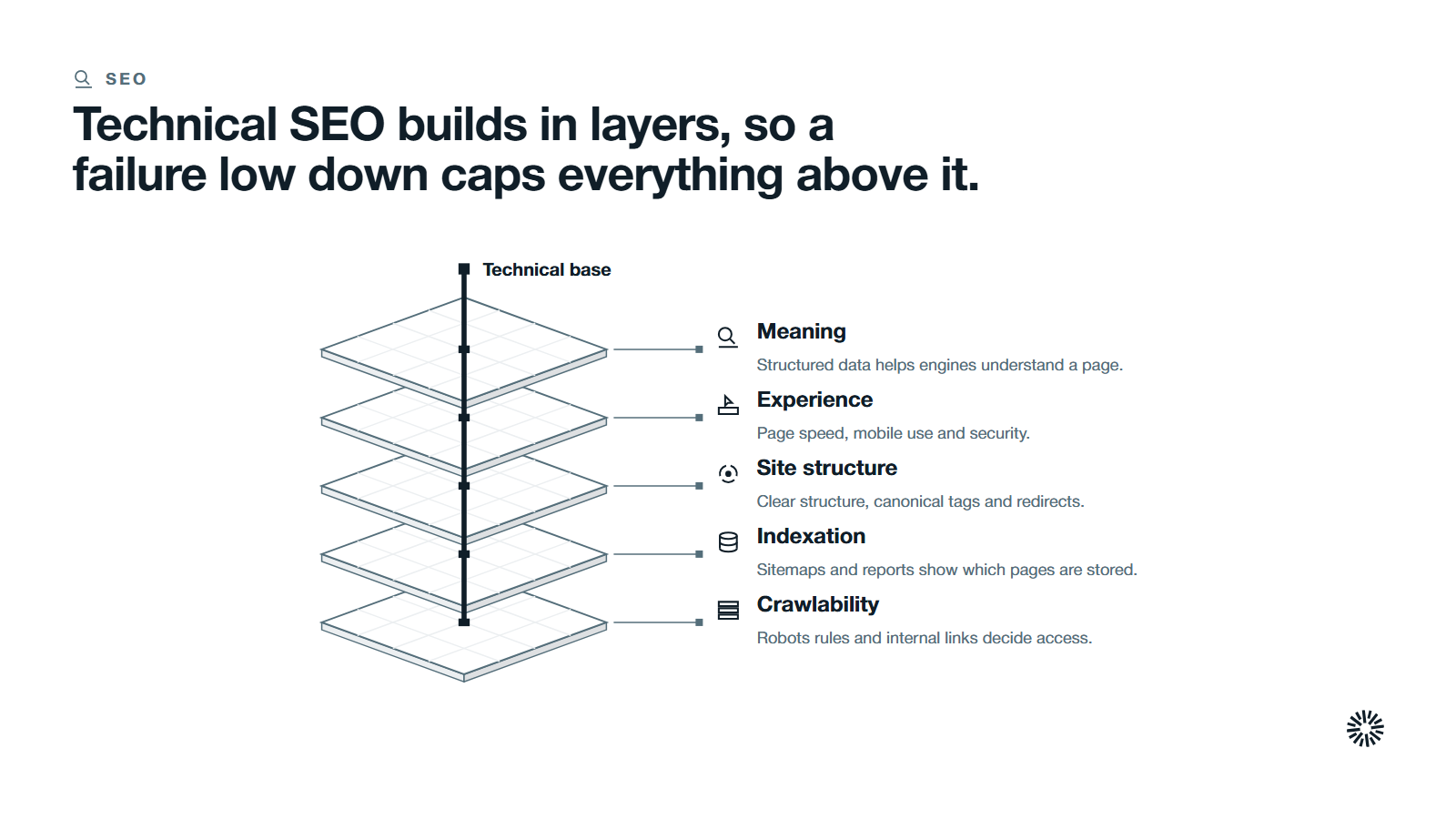
Technical SEO is a set of layers that build on each other. If a lower layer fails, the layers above it cannot compensate. Work from the bottom up.
Crawlability decides whether search engines can reach a page
Crawlability is essential for search engines to discover content, so it is about access. The main tools are the robots.txt file, the robots meta tag and your internal links. Used carelessly, they can block search engines from your entire site.
A robots.txt file tells crawlers which URLs they can reach on your site. Google's robots.txt guide is clear that it is used mainly to manage crawler traffic. It is not a way to keep a page out of Google.
To keep a page out of search results, use a noindex directive or password protection instead. Blocking a page in robots.txt can still leave its URL indexed if other pages point to it.
Internal links are the other half. Crawlers discover your important pages mostly by following links, so a page with no internal links pointing to it is hard to find. Broken links, including broken internal links, and long chains of redirects waste the crawler's effort on pages that lead nowhere.
Indexation decides which pages can appear in results
Indexation is about selection, and many technical SEO issues start here. You want your important pages in the index and your thin or duplicate pages out of it.
An XML sitemap helps here. Google describes a sitemap as a file where you provide information about the pages on your site, so search engines can crawl it more efficiently. It supports crawling. It does not guarantee indexing.
Google Search Console is where you check the result, including whether search results show the pages you expect. Its URL Inspection tool and indexing reports show which pages are indexed and why others are not. Treat it as the source of truth for what Google actually sees.
Site structure and URLs decide how clearly your pages relate
Site architecture, also called site structure, is the way pages are organized and linked across the entire site. A clear structure groups related pages, keeps important pages within a few clicks of the homepage, and uses descriptive, consistent URLs.
A clear site structure helps crawlers find content quickly, and it affects how search engines index your content.
For a B2B site, this usually means a logical path from solution pages to supporting articles and back. Good website architecture also helps crawlers and visitors find relevant pages, which is why internal links matter for ranking as well as for crawling. Internal links also prevent orphan pages, which are hard to discover because nothing points to them.
Duplicate content and canonical tags tell search engines which URL counts
Duplicate content is a common problem. The same page often exists in multiple versions at several addresses: with and without a trailing slash, with tracking parameters, or on both HTTP and HTTPS. Search engines then have to guess which version to show for a given search query. Canonical tags settle the question.
A canonical URL is the version you want to represent the page. Google lists the methods in order of how strongly they influence the choice: redirects and rel="canonical" annotations are strong signals, and sitemap inclusion is a weak one. The methods can stack, so use consistent absolute URLs across all of them.
Redirects and broken pages keep visitors and crawlers on track
Redirects send visitors and crawlers from an old URL to a new one. Google's redirect guidance separates permanent redirects, which signal that the target should become the canonical page, from temporary ones, which keep the source page in search results.
Use a permanent, server-side redirect when a page has moved for good. Fix broken pages by redirecting them to the closest relevant page, or by restoring them. Then update internal links pointing at the old address so they go straight to the final one.
Page speed and Core Web Vitals measure the experience
Core Web Vitals are Google's measures of real-world experience: loading, interactivity and visual stability. web.dev publishes the thresholds for a good experience:
- Largest Contentful Paint (LCP) should occur within 2.5 seconds of the page starting to load.
- Interaction to Next Paint (INP) should be 200 milliseconds or less.
- Cumulative Layout Shift (CLS) should be 0.1 or less.
The target is the 75th percentile of page loads, segmented across mobile and desktop. A page passes when it meets all three targets at that level.
Google Search Central recommends achieving good Core Web Vitals for success with Search, and says this aligns with what its core ranking systems seek to reward. Treat them as one input among many. A fast page with weak content will not win, but a slow page loses visitors before the content is read.
Website speed shapes your website's performance and user experience, and page speed matters for both mobile and desktop devices. Common causes of a slow loading website include oversized images, heavy scripts and no browser caching. Enabling browser caching is one cheap fix. Page speed work is usually a matter of finding the heaviest elements on your key templates and fixing those first.
Mobile and security complete the foundation
Google uses the mobile version of a site's content for indexing and ranking, which it calls mobile-first indexing. Search features and rankings follow the mobile version. If your pages hide content on mobile devices that appears on desktop, search engines may never see it. Mobile pages should carry the same core content as the desktop versions, and mobile optimization is part of user experience.
Serve the site over HTTPS and redirect the HTTP versions to it. A secure website builds user trust, protects visitors and removes one more source of duplicate URLs. HTTPS protects sensitive user information, and keeping software and plugins updated is part of the same security job.
Structured data helps search engines understand a page
Structured data is a standardized format for describing what a page is about. Google's introduction to structured data says it gives explicit clues about the meaning of a page and can enable more engaging results, called rich results.
Schema markup is the common vocabulary for this, and it supports search features. It helps search engines understand relevant content. On a B2B site, the practical uses are organization details, articles, and FAQ or product information where it genuinely applies. Implementing structured data well means the markup matches what visitors can see on the page.
It also supports how engines connect your brand to a topic. That link is explored in knowledge graph SEO and entity authority.
How technical SEO differs from on-page SEO
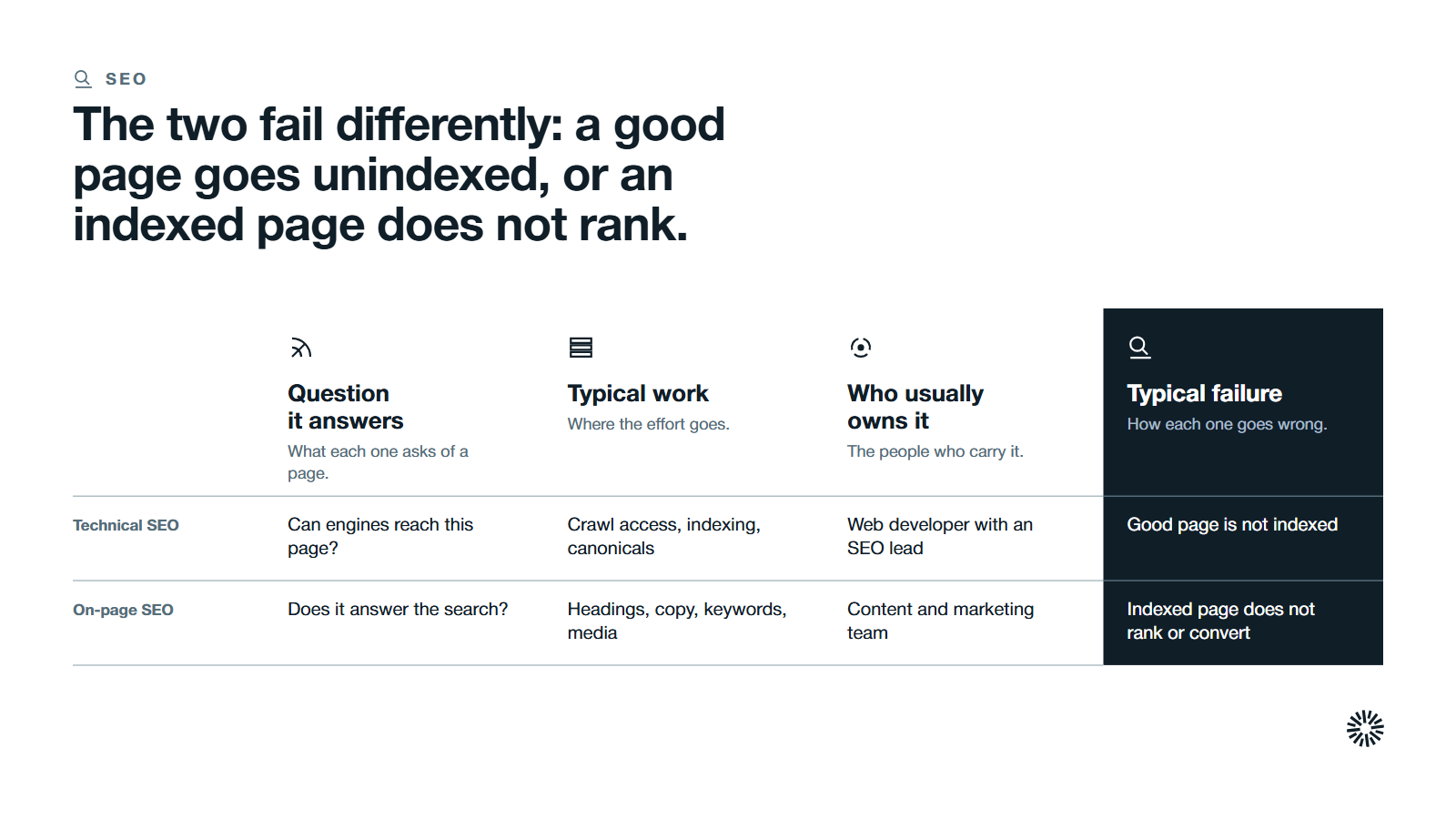
On-page SEO is about what a page says and how it is written. Technical SEO is about whether the page can be found, rendered and understood at all. Both are needed, and they fail in different ways. Relevant keywords and relevant content belong to on-page work, across multiple pages.
| Technical SEO | On-page SEO | |
|---|---|---|
| Question it answers | Can search engines reach and process this page? | Does this page answer the searcher's question? |
| Typical work | Crawl access, indexing, canonicals, speed, structured data | Headings, copy, keywords, internal anchors, media |
| Who usually owns it | Web developer with an SEO lead | Content and marketing team |
| Typical failure | Good page is not indexed | Indexed page does not rank or convert |
A third area, off-page SEO, covers signals from outside your site, such as links and mentions. The difference between those signals is covered in brand mentions vs backlinks.
The practical rule is to fix technical SEO first when pages are missing from results, and to improve on-page work first when pages are indexed but do not perform. Many teams do the reverse and polish copy on pages that search engines cannot index.
What to fix first in a technical SEO audit
A comprehensive technical SEO audit finds many common technical SEO issues. Not all deserve attention at once, and technical SEO health depends on fixing the right ones first. Fix them in the order in which they block value.
- Access. Confirm that your important pages are not blocked by robots.txt or a noindex tag. This is the most damaging common error, and it is often left over from a staging site.
- Indexing. Check in Google Search Console which important pages are not indexed and why. Fix the cause before anything else.
- Duplicates and canonicals. Make sure each important page has one preferred URL, and that HTTP, trailing-slash and parameter versions point to it.
- Broken pages and redirects. Repair broken internal links, remove redirect chains and send removed pages to relevant replacements.
- Speed and mobile. Measure Core Web Vitals on your key templates and fix the worst one first.
- Structured data. Add markup to the page types where it fits, and validate it.
A site audit tool can list these problems, and Search Console shows what Google reports. A tool lists symptoms, though. A person still has to decide which problems affect revenue pages.
Common technical SEO mistakes to avoid
Most technical failures on B2B sites come from the same few causes.
- Treating robots.txt as a privacy tool. Blocked pages can still appear in results. Use noindex or authentication.
- Launching a redesign without a redirect map. Old URLs that disappear take their authority with them.
- Leaving staging rules in place. A noindex tag or crawl block carried over from a test site can hide a whole live site.
- Chasing a perfect score. Pass the thresholds on your important templates. Do not spend months on pages that carry no demand.
- Fixing once and never rechecking. New pages, plugins and scripts reintroduce issues. Review on a schedule. Technical SEO needs continuous monitoring and maintenance: regular audits help identify issues early, and new issues arise as a website grows in complexity.
What you gain when technical SEO is done properly
Technical SEO is not a one-off project, and it matters as much for an ecommerce site as for a services firm. When it is maintained, each team gets something it does not have today.
Sales gains a site buyers can actually reach
Sales teams benefit when the pages that answer buyer questions are indexed and fast. Prospects arrive better informed, and fewer first conversations are spent correcting what they could not find.
Marketing gains content that can perform
Marketing gets a technical foundation that lets content reach its potential. Publishing no longer depends on luck about whether a page gets indexed, and reporting separates technical causes from content causes.
Customer success gains a reliable help and resource layer
Customer success benefits when help articles, onboarding guides and resources are findable by search. Customers solve more problems on their own, and the team spends time on the cases that need a person.
Build technical SEO into your go-to-market system
Technical SEO works best when it is part of how your go-to-market system runs, not a quarterly cleanup. The same site feeds search, content, forms and your CRM, so a fault in one place often shows up in the others.
Propello is a HubSpot partner (see about Propello). Propello designs and builds connected go-to-market systems on HubSpot. If you are not sure which technical problems are holding back your site, an audit is the right place to start.
