If you lead sales or marketing at a B2B company, your website probably gets steady traffic while your contact list stays small. Website visitor identification closes part of that gap by matching a visit to a known contact, or to the company behind it, so your team can see who is reading.
This article is for CEOs, founders and revenue leaders who want to understand what the method can and cannot tell them before they buy anything. It explains how to identify website visitors, how accurate the result is, what privacy rules expect and how to use it without crossing a line.
|
Website Visitor Identification Website visitor identification is the practice of matching activity on your site to a known contact or to the company behind the visit, so your team knows who is showing interest. |
Why anonymous website visitors hide real buying interest
Most buyers research before they speak to anyone. 6sense's 2025 B2B Buyer Experience Report, a global study of nearly 4,000 buyers, found that the point of first contact with sellers shifted from 69% of the journey to 61%. More than half of the journey has passed before a seller hears from them.
The same report found that in 95% of cases the winning vendor was already on the buyer's Day One shortlist. If your company is on that list, someone may already be reading your pricing page, and you will not know unless something identifies them.
Gartner's 2026 survey of 646 B2B buyers found that 67% prefer a rep-free experience. A buyer who prefers to research alone may read your site and leave without filling out a form. When visitors leave this way they stay unnamed, and that anonymous traffic is where early buying interest hides.
Website visitor tracking tells you how many visitors arrived and what they viewed. Identification goes one step further and tries to say which company visited, or who the person was. That second step is where the value, and the risk, sit.
How website visitor identification works
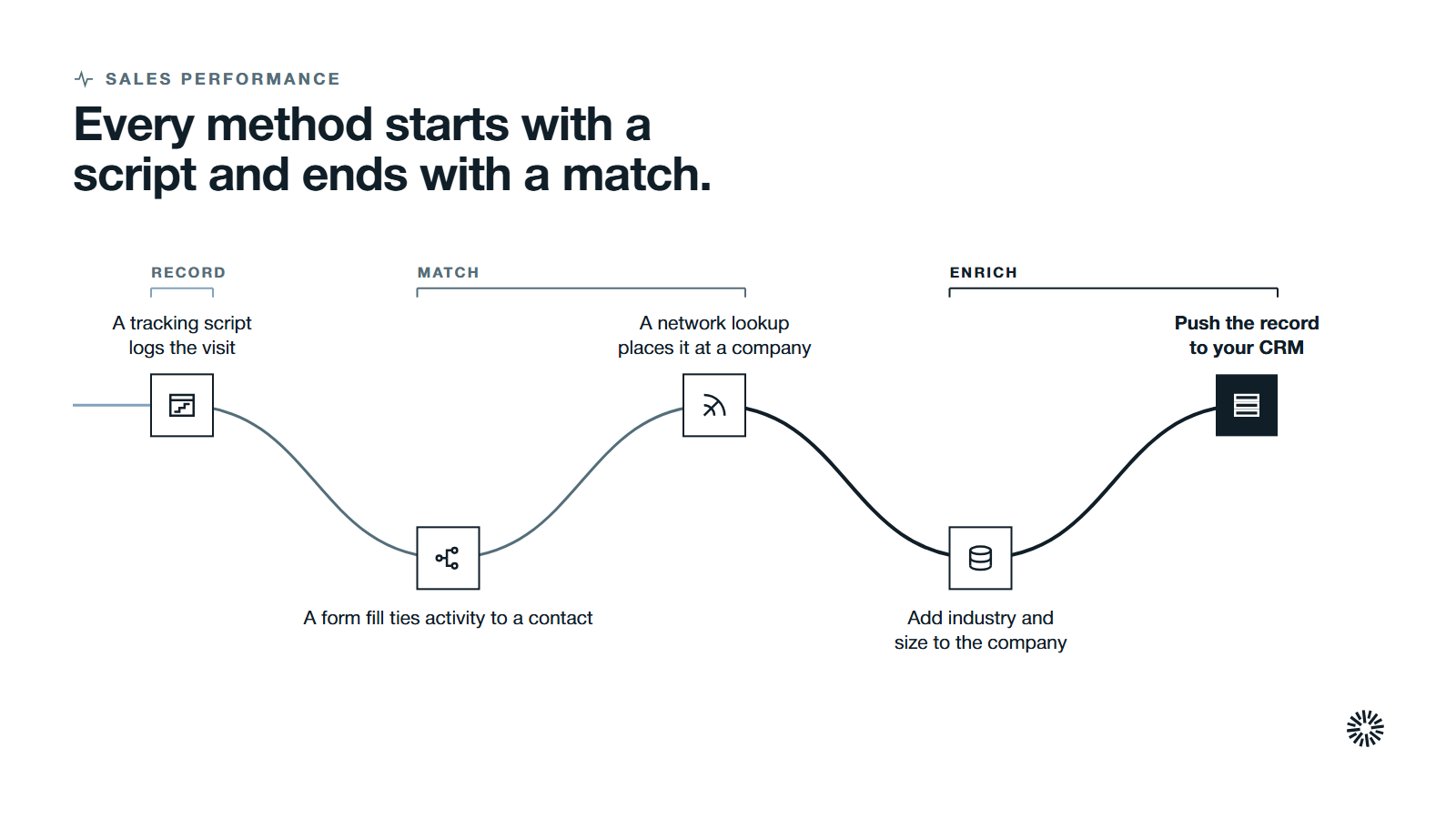
Every method starts with a tracking script, a small piece of code in your page header that loads when someone visits. It records non-personal details such as the pages viewed, the browser and the network address. Then something tries to attach a name to that visit. The methods differ in what that something is.
Known visitors are matched when they fill out a form
The most reliable route is the one your visitors choose themselves. A cookie in the browser tags the visit, and when the visitor later submits a form, the earlier activity is attached to their contact record.
HubSpot's documentation on tracking visitors describes it this way: visitors are tracked anonymously before they become contacts, and when someone fills out a form, previous page views are associated with them through the tracking cookie.
The link follows the browser, not the person. HubSpot's documentation notes that a visitor who deletes their cookies is treated as new, and that two people sharing a computer can end up on the same contact record. That is a fair picture of what cookie-based recognition can do.
Anonymous website visitor identification works at company level
Visitors who never fill out a form can still be placed at a company. The visit comes from an IP address, and a reverse IP lookup checks who that address was assigned to. When the address belongs to a business network, the result is a company name.
HubSpot's page on data collected by its tracking code lists the IP address as how it identifies which companies are visiting your website. The company domain, by contrast, is collected only when visitors identify themselves through a form or sign-up.
That is the heart of this approach: you learn which company visited, not which person. On its own it reveals just their company, with no name attached to the person. For many B2B decisions, though, the company is the question that matters first.
Data enrichment then adds firmographic details, such as industry and size, to the identified company. That enriched record can be pushed to your CRM and marketing tools, where it joins contact details you already hold.
Person-level identification relies on linked records
Some vendors claim to name an actual person without a form. They match signals from the visit, such as a hashed email address or a device identifier, against a large database of linked records often called an identity graph. For the full picture, read our complete guide to signal based selling.
Person-level results can include a name, email address, job title and phone numbers, which is why the consent questions below matter.
Treat these claims with care. The match is a probability, not a fact, and the visitor never agreed to your site doing it. That second point is where privacy law applies, which is covered below.
B2B tools tend to focus on company-level matching, while consumer-focused ones focus on individuals, because consumers browse from home networks that say little about an employer.
Company-level and person-level identification compared
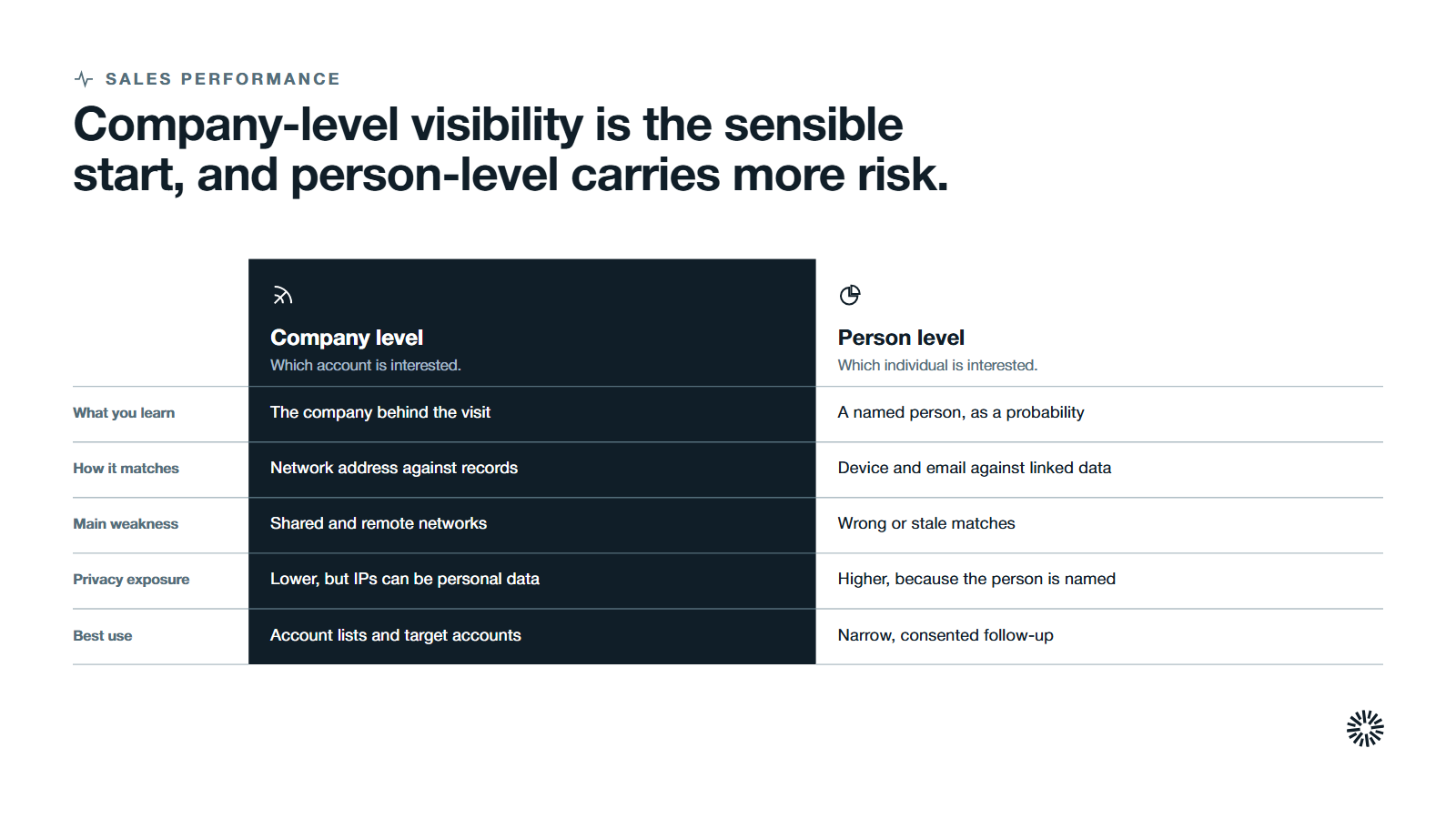
The two approaches answer different questions. Company-level identification tells you which account is interested. Person-level identification tries to tell you which individual is, and it carries more privacy risk.
| Company level | Person level | |
|---|---|---|
| What you learn | The company behind the visit | A named individual, with a probability |
| How it matches | Network address against company records | Device and email signals against linked records |
| Main weakness | Shared and remote networks | Wrong or stale matches |
| Privacy exposure | Lower, but IP addresses can still be personal data | Higher, because the person is named |
| Best use | Account lists and target accounts | Narrow, consented follow-up |
A company-level result is enough to answer the question most revenue teams ask first: is anyone from an account we care about reading our site?
A job title and contact details are a separate step. Your team can get them from the account's known contacts in your CRM instead of from a guess about individual visitors.
For most B2B teams, the sensible starting point is company-level visibility joined to the contacts you already hold. Add person-level data and demographic data only if you can explain, in your privacy notice, exactly where it comes from.
Accuracy has limits you should plan around
No visitor identification software can promise certainty. Several things reduce what any tool can resolve, and you should assume each applies to a share of your website traffic.
- Shared and consumer networks. A visit from a home connection or mobile network resolves to a provider, not an employer.
- Remote work. A buyer reading your site from a home office does not appear as their company.
- VPNs and proxies. These hide the real network address.
- Cookie deletion and blocked scripts. A visitor who clears cookies or refuses tracking looks new, and a blocked tracking script records nothing.
- Shared devices. One browser used by two people merges them into one record.
Because of these gaps, only part of your traffic will be matched, and the rest stays anonymous. Your identified traffic is a sample of what happened, not a full count.
The practical rule is to treat a match as a lead to check. Look at the pages viewed, compare the company to your target accounts and confirm with a human before anyone is contacted.
Getting this wrong has a cost. Gartner's 2025 survey of 632 B2B buyers found that 73% actively avoid suppliers who send irrelevant outreach. An outreach message aimed at the wrong company, or at someone who only wandered onto your site, is exactly that.
Consent and privacy set the boundaries for visitor data
Identification depends on data collection, and the rules for that collection differ by place. This section points to the official sources. It is not legal advice, and you should confirm your own position, including data usage rules for visitors based in each region you sell to, with counsel.
The GDPR. The regulation defines personal data as information relating to an identifiable person, and lists an online identifier among the ways someone can be identified. Its recitals add that online identifiers such as internet protocol addresses and cookie identifiers may be used to create profiles of people and identify them. Read the text of the GDPR before assuming that company-level data is outside it.
Two articles matter most to a marketing team. Article 6 allows processing on the basis of consent or, in some cases, legitimate interests, unless those interests are overridden by the person's rights and freedoms. Article 21 gives people the right to object at any time to processing for direct marketing.
California. The Attorney General's CCPA page lists the rights of California consumers, including the right to know what personal information a business collects and the right to opt out of its sale or sharing. A visitor identification program has to be able to honor those requests.
Cookie rules. Reading or storing information on a visitor's device is regulated separately in several places. The UK's Information Commissioner's Office explains in its guidance on storage and access technologies that a person must not store or gain access to information on a user's equipment unless clear information is given and consent is obtained.
South Africa. The Information Regulator's POPIA page states that responsible parties must obtain consent for direct marketing through unsolicited electronic communication, and that the first communication must ask for consent, with the exceptions the Regulator sets out.
Google Analytics. If you use it, Google's guidance asks you to avoid sending data that Google could recognize as personally identifiable information. Keep identified visitor data in your CRM, not in your analytics.
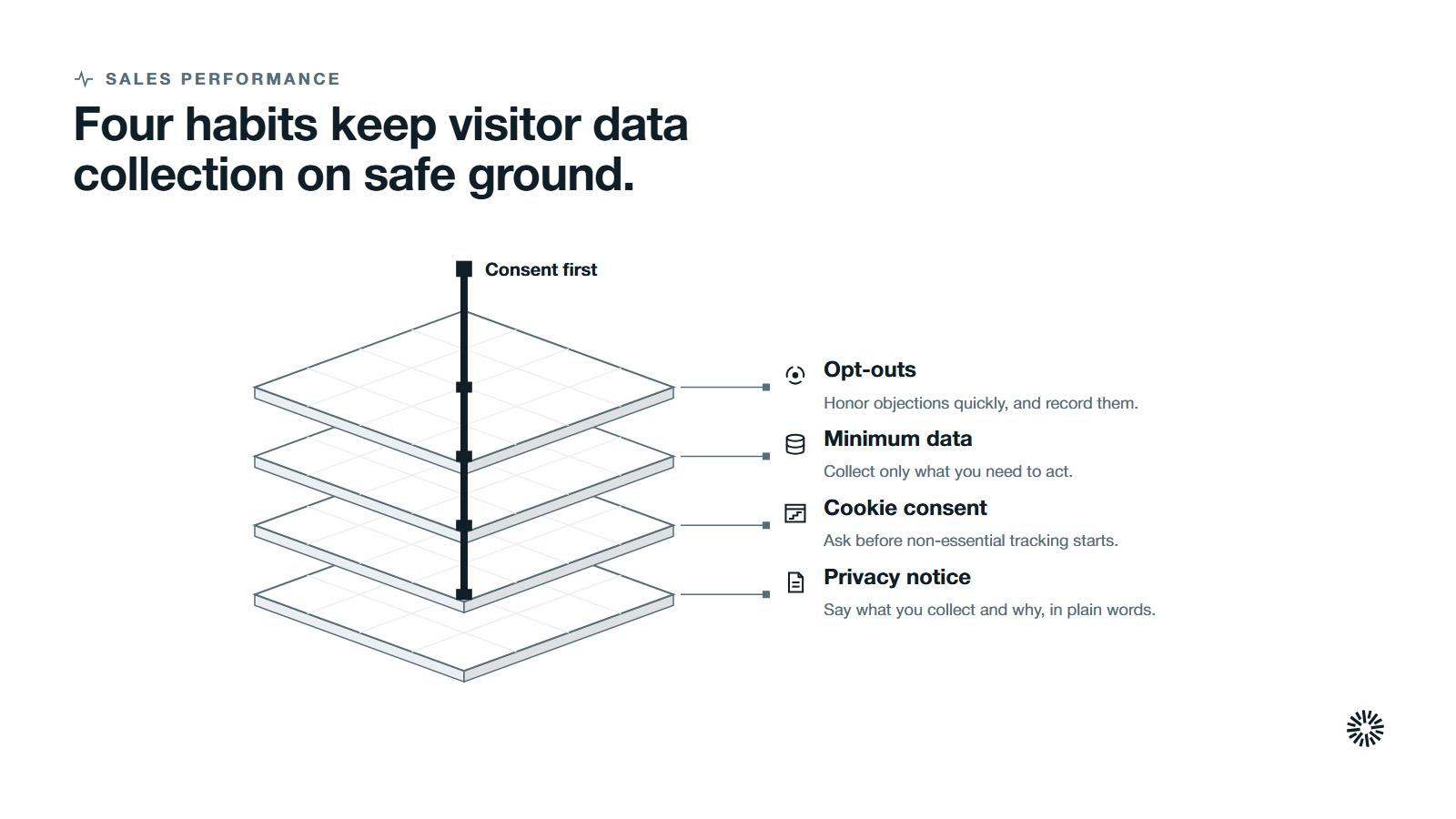
In practice, four habits keep you on safe ground:
- Say what you collect and why in a plain privacy notice.
- Ask for cookie consent before non-essential tracking starts.
- Collect the minimum visitor data you need to act.
- Honor opt-outs and objections quickly, and record them.
What you can and cannot do with identified visitors
Identification is only useful if it changes what your team does next. These are the uses that hold up, and the ones that do not.
What you can do
- Alert the account owner when a target account visits specific pages, such as pricing or integration pages. Real time visitor identification matters only when someone acts on the alert.
- Prioritize warm leads by combining page views with other intent signals, such as email engagement and form activity. See lead scoring for how to build a model sales will use.
- Watch how engagement spreads across several decision-makers at one account. Visits from different roles are stronger evidence than a single visit.
- Learn what high intent visitors read before a conversation starts. Behavioral data such as repeat visits to specific pages is a stronger sign of buyer intent than a single visit, and it shows which high value visitors deserve a closer look.
- Use tailored outreach that reflects the topic the account was reading, without saying you watched them read it.
- Connect traffic sources to conversions, so you can see which campaign brought the accounts that later opened a deal.
What you cannot do
- Treat one of many website visits as buying intent. The visitor may be a student, a competitor, a customer or a recruiter.
- Name an individual to a prospect from a company-level match.
- Email a person-level match where the rules require consent you do not have.
- Send identified visits straight into automated outreach without a human check.
- Build ad audiences from identified visitors without a lawful basis.
Visits to your own site are first-party signals. Intent data covers the wider set that includes activity away from your own traffic, and the two work best when read together. Treat all intent data as a reason to look closer, not proof of a deal.
What to look for in website visitor identification software
Website visitor tracking software records what visitors do. Visitor identification platforms add a layer that tries to say who they are.
If you decide to buy, judge a visitor tracking tool on what it can prove and how it fits your systems, not on how many names it claims to reveal. Visitor identification tools differ in how they handle website visitor data once it arrives, so these are the key features to ask about:
- Level of resolution. Does it resolve companies, people or both, and how does it describe its confidence in a match?
- Source of the data. Where do the records behind person-level matches come from, and what lawful basis do they rest on?
- Consent handling. Does it respect cookie consent choices and honor opt-outs automatically?
- System fit. Does identified visitor data land in your CRM with the account and contact fields your team already uses?
- Alerts and routing. Can it notify the right owner when a target account shows interest?
- Visitor insights. Does it show visitor behavior by page and account, so you can see what drew attention?
- Cost model. Visitor identification cost usually depends on traffic volume, identified records or both, so ask which one drives your bill and what happens when traffic grows.
A free plan can be enough to test whether the data is useful, but check what it resolves and how it handles your visitor data. A tool that cannot answer the first three questions plainly is a risk, whatever its features look like.
What you gain when this is done properly
When visitor identification is built on consented data and connected to your CRM, sales and marketing teams share one view of who is showing interest, and each team gets something it does not have today.
Sales sees which accounts are reading
Sales teams stop guessing which accounts are warm. An account owner sees that a target account has been reading integration pages and can prepare a relevant message before the first call.
Marketing sees which content draws target accounts
Marketing teams learn which pages and campaigns bring in the accounts they want, not just the largest number of visitors. That shapes what to publish next and where to spend.
Customer success sees interest from existing customers
Existing customers browse too. A customer reading pages about a product they do not own is an early signal of expansion, and customer success can raise it in the next check-in.
Start with what your own site already knows
Before buying software, check what you can already see: which forms capture contacts, which cookies you have consent for and how visits reach your CRM.
Propello designs and builds connected GTM systems on HubSpot. If you cannot yet say which accounts are reading your site, or what should happen when they do, an audit is the place to start.