Most growing B2B companies do not need a marketing automation platform today. They need clean customer data, a few clear segments and a written follow-up process first. If those three exist, buy. If they do not, a CRM and an email tool will do the job while you build them. For the full picture, read our complete guide to marketing automation strategy.
This article is for CEOs, founders, CROs and marketing leaders deciding whether to buy marketing automation software now. You will see what a platform replaces, what it costs in kind, when a CRM plus an email tool is enough, what breaks if you buy too early, and a decision by company stage. It quotes no prices and no return figures.
|
Marketing Automation Platform A marketing automation platform is software that runs repetitive marketing tasks, such as email follow-up, lead nurturing and lead scoring, automatically from rules and customer data instead of manual work. |
A marketing automation platform replaces manual follow-up, not strategy
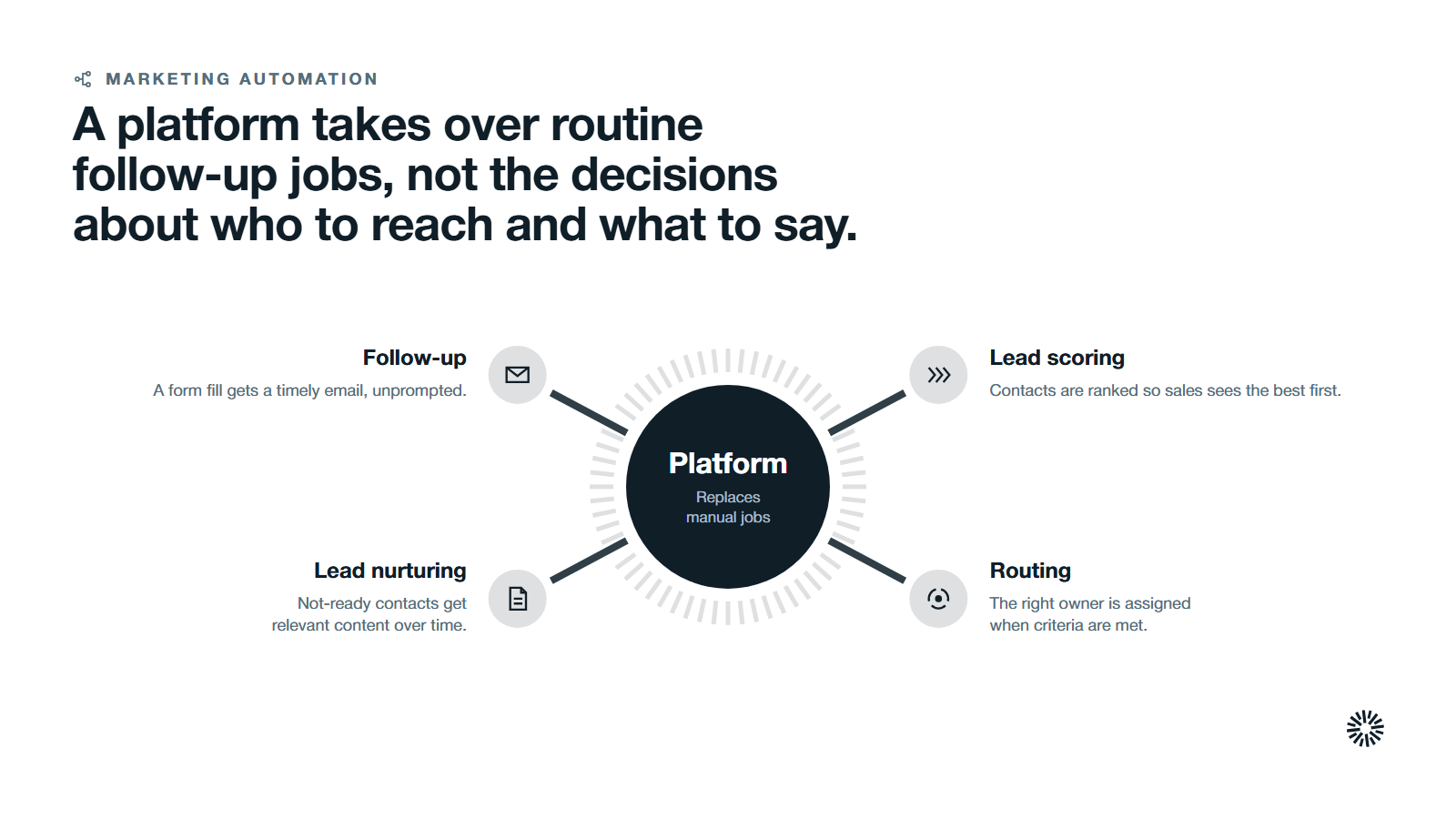
A platform takes over the repetitive marketing tasks that people do by hand today, so teams can automate tasks that eat their week. HubSpot's marketing automation page describes it this way: "Create targeted workflows with ease to handle routine tasks and give every contact the attention they deserve."
Read that sentence closely. The tool handles routine tasks. It does not decide who your best customer is or what you should say to them. Those choices still belong to your marketing teams and your sales and marketing leaders.
In practice a platform replaces five manual jobs:
- Follow-up. Someone fills in a form and receives a timely email without a person remembering to send it.
- Lead nurturing. Contacts who are not ready to buy get relevant content over time.
- Lead scoring. Contacts are ranked so sales sees the most qualified leads first.
- List building. Segments update on their own as customer data changes.
- Routing. The right owner is assigned when a contact meets agreed criteria.
HubSpot's page names several of these directly. It speaks of using "lead scoring to automatically organize and prioritize contacts," and of email triggers that "nurture leads with relevant content."
If your team sends only a handful of emails a month, those jobs are small. The case for buying grows with the number of contacts, campaigns and handoffs you manage.
A platform adds triggers, workflows and scoring to a CRM and an email tool
Most companies already own two things: a CRM that stores contacts and deals, and an email marketing tool that sends messages. A marketing automation platform sits between them and connects what a contact does to what happens next.
The difference is the trigger. An email tool sends when a person presses send. A platform sends when a record meets a rule. HubSpot's workflow knowledge base page defines the idea: "Enrollment triggers are a set of criteria that automatically enroll records in a workflow."
That is why the platform needs good CRM data. The rule can only act on what the record knows.
Typical marketing automation features include:
- A visual workflow builder, often with drag and drop steps, for automated workflows.
- Email marketing automation for welcome series, follow-up and re-engagement.
- Lead scoring and lead management rules.
- Landing pages and forms that feed the same contact record.
- Links to sales automation, so a task or deal is created when a lead is ready.
- Reporting that ties a marketing campaign to what happened after it.
A platform can also capture leads through digital forms and landing pages, update customer records automatically when a contact acts, and use segmentation to send personalized messages by group.
Reporting and analytics show which campaigns were followed by pipeline, and predictive analytics or AI-driven analytics can help rank what to do next.
Data hygiene and consent tools help a team follow privacy rules such as GDPR and CCPA. Automated tasks also free up staff for strategy work, because workflow automation links different tools without manual copying.
Some platforms also reach social media, SMS marketing and push notifications. Those channels matter only if your buyers use them. Most B2B teams start with email and add channels later. Plain email marketing tools cover only part of this.
The cost in kind comes from people, data and process, not the license
The invoice is the smallest part of the decision. The larger cost is the work the platform demands before it pays back. That is the cost in kind.
Three costs show up in almost every purchase:
- Data work. Someone cleans duplicates, fills gaps and agrees field definitions.
- Design work. Someone writes the segments, the scoring rules and the workflows.
- Running work. Someone owns the platform, tests changes, fixes errors and retires old automations. Marketing automation work does not end at launch.
HubSpot says the same in plain words on its marketing automation information page: "Marketing teams need to invest in data quality and cleaning workflows to ensure automation success." The page checked on 15 October 2026 also advises: "Document what should happen first."
A small business with one marketer feels this most. Every hour spent building workflows is an hour not spent on campaigns. If nobody has that time, a platform sits half used.
Price the people time before you compare tools. Our guide to automation ROI shows how to count the hours a workflow saves against the hours it takes to run.
A CRM plus an email tool is enough when volume and complexity are low
Buying nothing new is often the right answer. A CRM with basic automation and an email marketing tool can carry a small team a long way.
You are likely fine without a platform when most of these are true:
- You have a small contact list and a short sales cycle.
- One person sends the emails and knows every contact.
- Follow-up is a handful of messages that a person can send on time.
- You run few campaigns and do not need to change messages by segment.
- Sales and marketing already agree who owns each lead.
In that setting, the better first step is to write the follow-up down and run it by hand. Our guide to how to get started with marketing automation covers that first step. Our explainer on what email marketing is and the guide to the types of email marketing help you pick which messages to send first.
A manual process also teaches you what to automate. You will see which messages get replies, which handoffs stall and which segments matter.
One signal says the opposite. When follow-up is late because people are busy, not because the process is unclear, automation starts to earn its place.
What breaks when you buy before data, segments and process exist
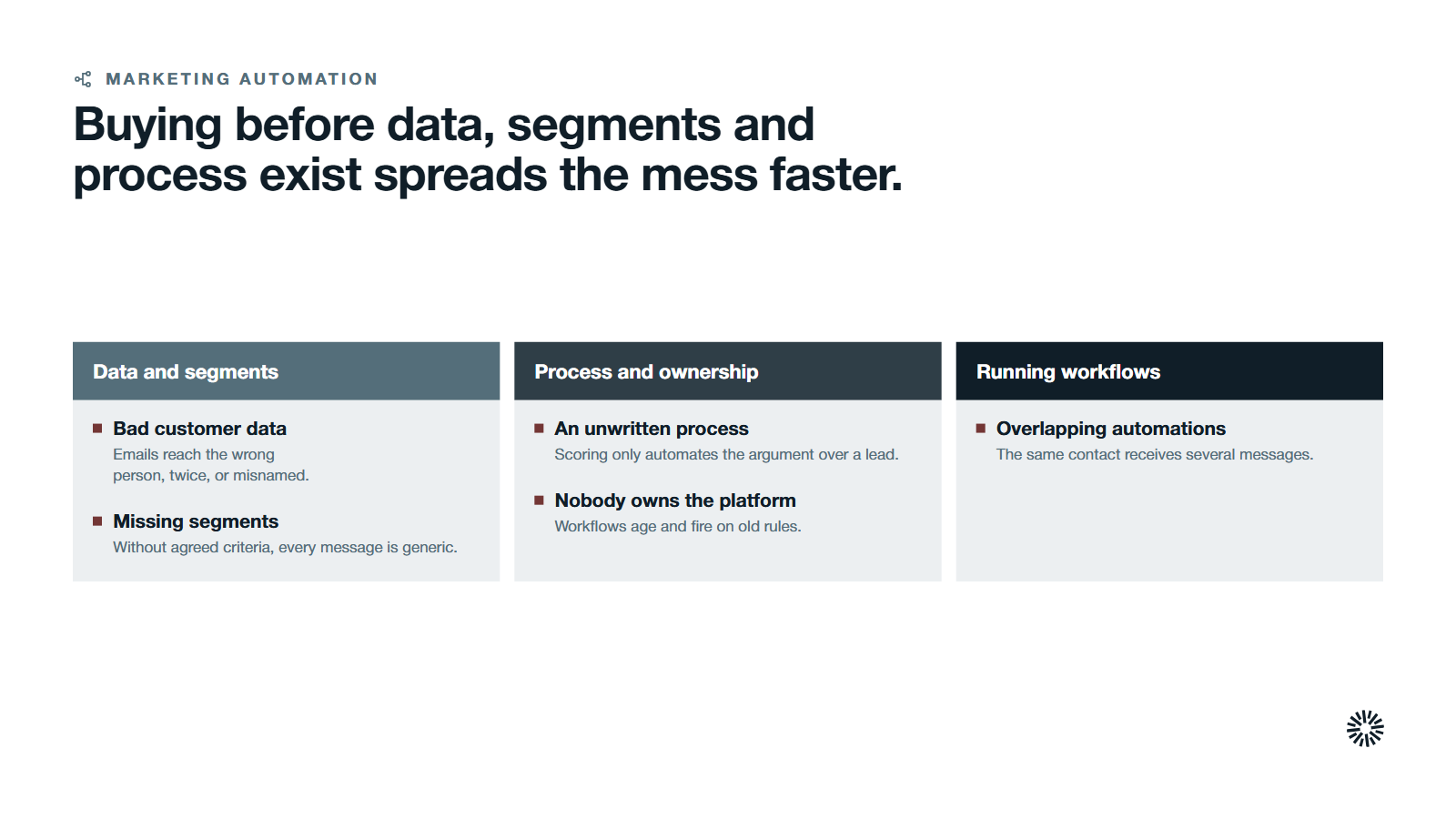
A platform multiplies whatever you feed it. Feed it a clear process and it saves time. Feed it duplicates and guesses and it spreads the mess faster. HubSpot's page makes the same point: "Don't invest in marketing automation before you have fertile ground for nurturing campaigns to blossom."
Bad customer data sends the wrong message
If contact records are duplicated or incomplete, automated emails go to the wrong person, twice, or with the wrong name. A rule that fires on a missing field never fires at all. The failure is quiet, so teams often notice it only when a prospect complains.
Missing segments make every message generic
Segments decide who gets what. HubSpot's segment knowledge base page explains that active segments "automatically update their members based on its criteria," while static segments "do not update automatically." Without agreed criteria, you either send one message to everyone or build lists by hand each time. Our guide to behavioral segmentation shows how to define groups from what contacts do.
An unwritten process automates confusion
If sales and marketing do not agree what a qualified lead is, scoring only automates the argument. The same goes for lifecycle stages. Settle the definitions in your HubSpot lifecycle stages first, and then build rules that use them. A scoring model needs the same agreement. See our guide to lead scoring.
Nobody owns the platform
Workflows age. Offers change, fields are renamed and a workflow built last year keeps firing on old rules. Without an owner, a platform becomes a source of errors that nobody trusts.
Too many overlapping automations cause fatigue
Overlapping workflows send the same contact several messages. Fewer, clearer workflows protect the customer journey better than many, and each one needs a rule for when it stops.
Settle these five readiness checks before you buy
The checks are short. Answer each in writing, and the buying decision gets much easier.
- Data. Can you trust the contact and company records the platform will act on?
- Segments. Have you named the groups you will treat differently, and the rule that puts a contact in each?
- Process. Have you written the follow-up steps and the handoff to sales, step by step?
- Owner. Does one named person have the time and the access to build and maintain it?
- First workflow. Do you know the one workflow that would help most if it ran tomorrow?
Our guide to lead routing as the first go-to-market workflow is a good example of a first build that pays off early. Our guide on what to automate in a CRM helps you rank the candidates.
When you can answer all five, you are ready to compare tools. When you cannot, fix the weakest answer first.
How to judge the best marketing automation tool once you are ready
Once the readiness checks pass, judge marketing automation tools against your own process, not against a ranked list. A marketing platform that suits another company's marketing stack may not suit yours.
No single best marketing automation software fits every company, and no list of the best marketing automation platforms can tell you which one suits you. Most marketing automation tools in the marketing automation space offer similar automation features. The right marketing automation tool is the one your team will use every week. HubSpot's Marketing Hub is one example of software that sits on a shared CRM, so the sales and marketing teams and the wider sales department work from one record.
A CRM with basic CRM features, or a dedicated sales CRM, can include some automation already. A growth marketing platform or a comprehensive marketing suite bundles more. You do not need all the features on day one, and your favorite marketing automation tool may not be the one that fits your team. Ask each software company how it handles multiple channels, email campaigns and web push campaigns.
Use five questions:
- CRM fit. Does the marketing software share one customer relationship management record with sales, or copy data between two systems? A shared record keeps CRM data current and sales pipelines accurate.
- Channels. Does it cover the marketing channels you use today, such as email marketing campaigns and landing pages, and the multi channel work you may add later, including social media management or web push notifications?
- Ease of building. Can your team build and edit marketing workflows in a visual workflow builder without a developer?
- Reporting. Can it show which marketing efforts led to pipeline?
- Other tools. Does it connect to the other tools in your stack, so the entire tech stack stays in step with the sales process?
Enterprise marketing automation tools add needs of their own, such as roles, approvals and audit trails. Check whether plain email marketing software covers them. Small businesses can skip many advanced features at first. Ask which features you will use in the first year, and set the rest aside.
AI tools and AI powered drafting are worth a look. Treat them as a bonus, not a reason to buy, because they still depend on the same data and process.
Match the decision to your company stage
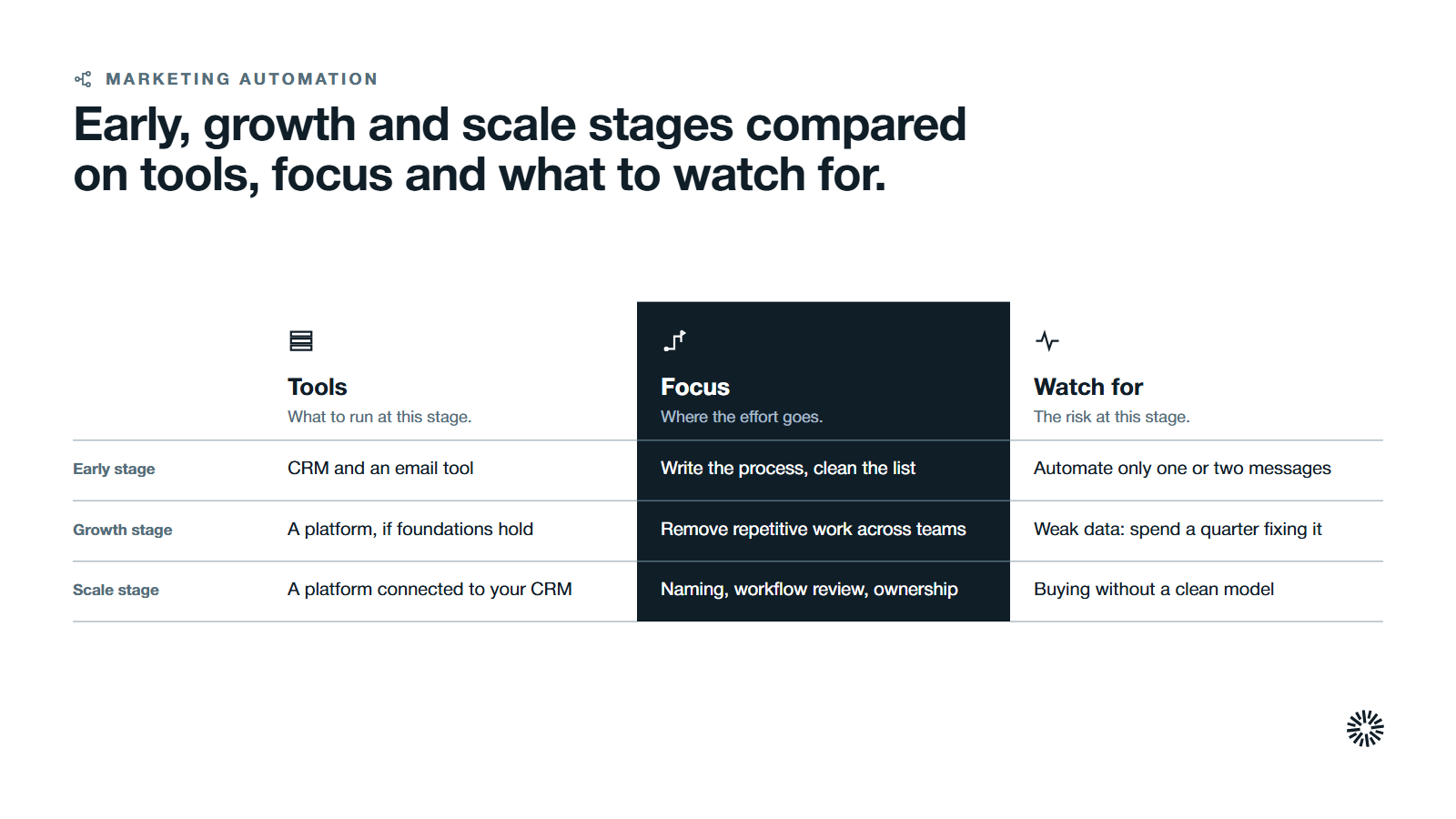
The right answer changes as the company grows. Use the stage below that fits you best.
Early stage with a small team
Use your CRM and an email tool. Write the follow-up process, clean the contact list and agree the lead definition. Automate only one or two messages, such as a welcome email, using the CRM's basic automation. The goal is to learn what works before you commit to a platform.
Growth stage with several teams
This is usually the point to buy. Volume is rising, several people touch each lead, and follow-up is slipping. If your data, segments and process are in place, a platform removes repetitive work and keeps the customer journey consistent across teams. If they are not, spend a quarter fixing them first.
Scale stage with several products or regions
Complexity is the issue now. You need governance: naming rules, a review of every live workflow, and clear ownership by product or region. Choose a marketing automation solution that connects to your CRM so that sales and marketing see one record. Buying here without a clean model only scales the confusion.
What you gain when this is done properly
Buying at the right moment, with the groundwork done, pays back across the revenue team.
Sales follows up on leads that are ready
Lead scoring and routing put the most qualified leads in front of the right rep at the right time. Reps see what a contact read or clicked before the call, and fewer good leads wait in a queue.
Marketing can run more campaigns with the same team
Repetitive tasks move to automated workflows, so marketing teams spend their hours on messages and offers. Reports tie a campaign to what followed, which makes the next decision easier to defend.
Customer success sees the whole relationship
When marketing, sales and service share one record, the customer success team knows what a customer has been sent and promised. That helps with onboarding, renewals and customer retention.
Decide now, then build the first workflow
The honest answer is a sequence. Fix data, name your segments and write the process. Then buy a platform that fits the way you sell, and build one workflow before you build ten. Skip the tool comparison until the readiness checks pass, because a tool cannot fix what you have not defined.
Propello designs and builds connected go-to-market systems on HubSpot, and Propello is a HubSpot partner. If you want help checking your readiness before you buy, an audit is the place to start. See our guide on how to implement marketing automation for the build, and our explainer on what marketing automation is for the basics.