HubSpot Breeze AI is the AI layer inside HubSpot: an assistant you chat with and a set of agents that do defined jobs, all working from your CRM data. This guide is for CEOs, founders and marketing leaders at B2B companies who use HubSpot, or are weighing it, and want to know what Breeze does.
You will see how the pieces fit, what each does in the four stages of HubSpot's Loop Marketing framework, and what to settle first. It matters because these tools read your customer data and spend credits. For the framework itself, read what Loop Marketing is.
|
HubSpot Breeze HubSpot's name for the AI built into its customer platform, covering Breeze Assistant, which answers and builds from your CRM data, and the agents that carry out marketing, sales and service work. For the revenue operations side, our article on RevOps AI covers what to automate and what to keep human. |
HubSpot Breeze AI is an assistant, a set of agents and a place to manage them
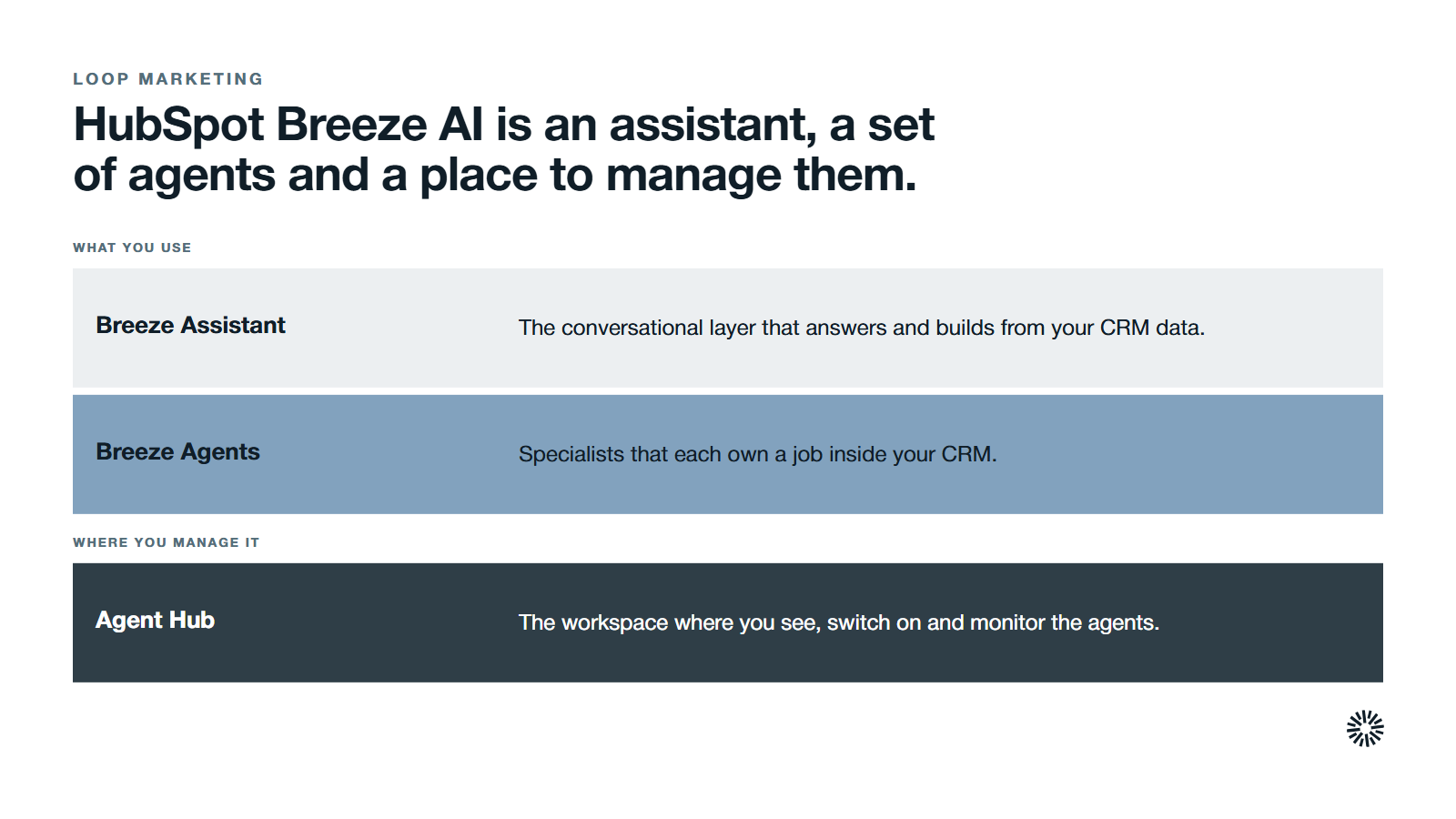
Think of HubSpot Breeze as three layers rather than one product. Breeze Assistant is the conversational layer. The Breeze agents are specialists that each own a job. Agent Hub is the workspace where you see, switch on and monitor them. Together they make up the HubSpot AI tools worth knowing.
Because they sit inside the customer platform and its Smart CRM rather than on top of it, marketing, sales and service work from one record.
HubSpot's Agent Hub page describes it as a home for the AI agents that run across marketing, sales and customer service, built on your CRM data so they have context. HubSpot's knowledge base says you can activate, configure and monitor pre-built and custom agents from one workspace.
Data enrichment sits alongside these. Older guides call it Breeze Intelligence, and the name still circulates. HubSpot's current help pages call the feature data enrichment: it fills in contact and company properties and keeps each contact record current.
The common thread is the HubSpot CRM. Every layer reads the contacts, companies, deals and conversations you already hold, which is why the quality of your customer data matters more than the model behind it.
Breeze Assistant answers and builds from your CRM data
Breeze Assistant is the conversational part. According to HubSpot's guide to using it, you use it to generate content, summarize records, prepare for meetings and complete tasks across your account. You can save prompts, group chats into projects and store preferences as memories.
The assistant pulls from your CRM data, customer records and HubSpot's knowledge base, which is why its answers fit your account.
Two features matter for marketing teams. Projects keep related work together, and knowledge vaults hold extra context about your brand. HubSpot's Loop Marketing guide strongly recommends creating a project and a knowledge vault before you start.
There is a practical limit to know about. HubSpot's help page states that content generation is capped at 100 requests per account in a rolling one-minute window.
Review what it writes. HubSpot's own Loop Marketing guide strongly recommends checking AI output throughout and noting patterns of errors, which then sharpen your style guide and prompts.
Agent Hub runs the Breeze agents, and agent builder lets you create your own
An agent is software that takes a defined job and carries it out inside your CRM, rather than waiting for you to ask each question.
Chained together in an agentic workflow, agents can handle multi-step tasks such as research, a record update and a follow-up draft. HubSpot lists several, and it helps to group them by who uses them.
- Data agent. Answers custom questions about contacts and companies, fills gaps in company data and other CRM records and cleans them up using calls, emails and documents.
- Prospecting agent. Watches accounts for buying signals and drafts personalized outreach for your sales team.
- Customer agent. Resolves common support questions around the clock, drawing on real contact and contract history.
- Nurture agent and campaign agent. The Agent Hub page says the campaign agent plans a campaign from one goal and the nurture agent personalizes each nurture email.
Agent Hub also lists a content agent for blog posts, social content and landing pages in your brand voice. A content agent is only as on-brand as the brand voice and style guidelines you give it.
Agent Hub shows live status for each agent, so you keep what works and adjust what does not.
Its Context tab holds the company messaging, tone, brand and ideal customer profiles that every agent draws on. To turn on an agent you have not used yet, you click Activate on its card, and it works from live customer information with no extra step to connect your data.
Agent builder is the route to custom agents. HubSpot says you can build custom agents and agentic workflows on one canvas using your own prompts, knowledge and CRM data, with no coding. That puts workflow automation and AI in one place. Agent builder was formerly known as Breeze studio.
Custom agents consume HubSpot Credits each time they run, so cost depends on use. Credits can be bought up front in packs or on a pay as you go basis.
HubSpot's credits help page uses an Enterprise account with 5,000 included credits and a Marketing Hub Professional account with 3,000 as its examples, and bills overages in increments of 10.
Breeze agents also serve sales and customer support, so marketing should not roll them out alone
Breeze agents are not only a marketing tool. The prospecting agent helps a sales rep by researching target companies, monitoring buying signals and launching personalized outreach. Smart deal progression suggests next steps after every call, and deal progression in Agent Hub helps move deals through the pipeline.
With that in place, your sales team spends less time on manual work and more time on sales conversations.
On the service side, the customer agent frees support teams for complex cases, and the revenue agent automates invoice follow up and payment reminders. The data agent supports customer research across the sales team, so reps know which accounts to pursue first and why.
That reach is a reason to plan across Marketing Hub, Sales Hub and Service Hub at once. A single owner for the rollout and one shared view of your customer data stop each team from building its own version.
What Breeze AI does in each stage of Loop Marketing
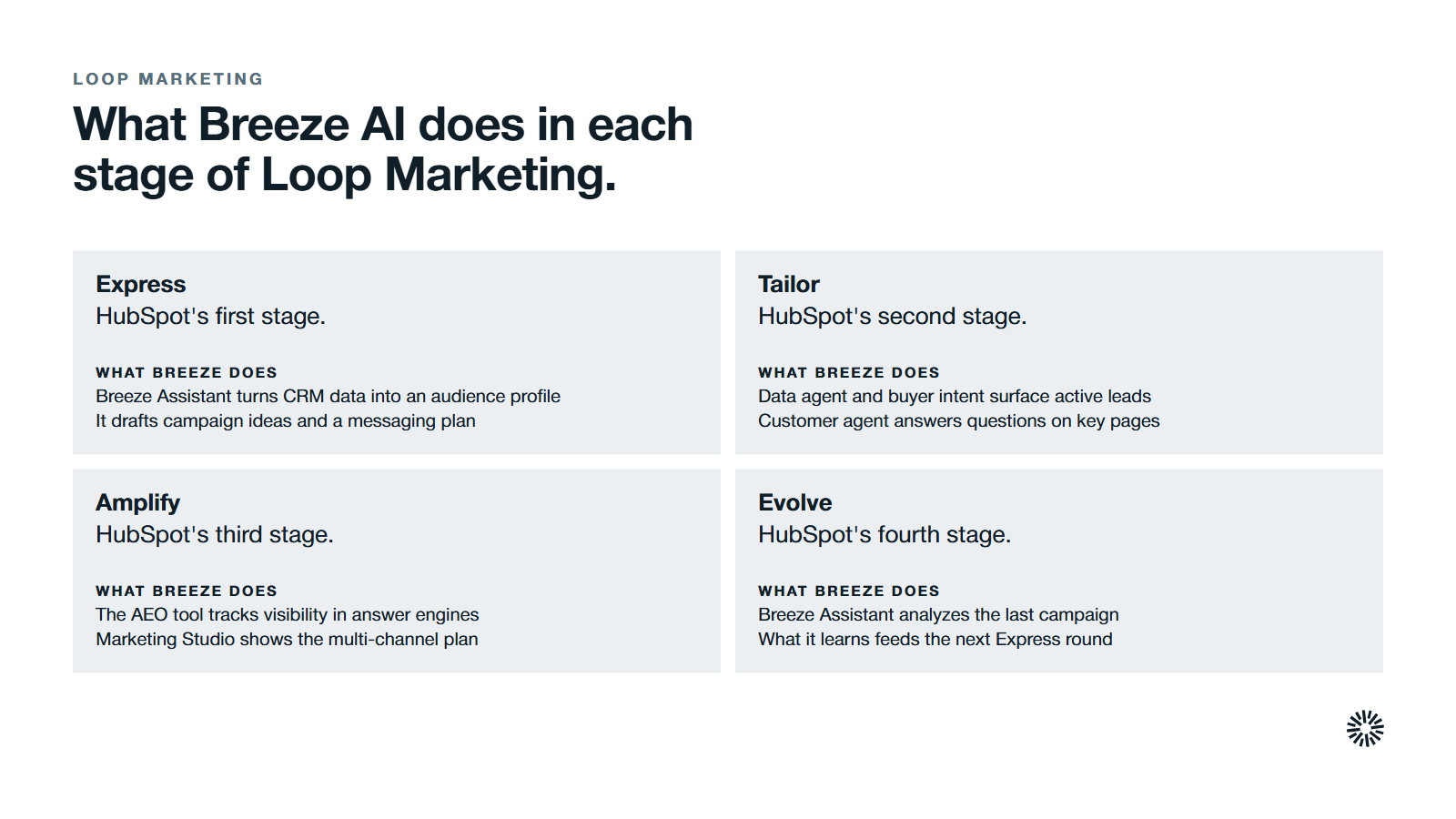
HubSpot describes Loop Marketing as a four-stage framework that helps marketers grow in the AI era, and says to use Breeze at every stage. Breeze is the toolset. Loop Marketing is the method. Here is how the two meet.
Express: Breeze Assistant helps you define your audience and story
Express starts with a Taste Profile, which HubSpot defines as a picture of your customer and your brand that gives AI the context to sound like you. HubSpot suggests using Breeze Assistant to summarize CRM data from your best customers into an audience profile.
From there, Breeze Assistant generates campaign ideas, a core asset and a messaging and channel strategy. HubSpot lists Brand Identity (Beta) for the style guide and Marketing Studio (Beta) for planning the campaign.
Tailor: data agent, buyer intent and customer agent make messages personal
Tailor turns the strategy into content for specific people. HubSpot's guide pairs it with data enrichment (the feature older guides call Breeze Intelligence), data agent and buyer intent, which find leads showing active signals so you can build segments.
It also names AI-Powered Segmentation (Beta) and Nurture Agent (Beta), which rewrites each nurture email for its recipient. HubSpot suggests placing a customer agent on high-intent pages such as pricing and comparison pages to answer questions quickly.
Amplify: reach people and answer engines
Amplify is about being found across channels, including the answer engines buyers now use. HubSpot's AEO tool (Beta) tracks your brand's visibility in answers from ChatGPT, Perplexity and Gemini, compares you with competitors and recommends changes.
HubSpot also lists Marketing Studio (Beta) for a view of your multi-channel plan and Ads Management for running ad campaigns in one place.
Evolve: Breeze Assistant reads results and suggests the next move
Evolve is the live feedback stage. HubSpot's guide says to use Breeze Assistant to analyze your last campaign and recommend what to change, alongside custom reports and the marketing analytics suite.
It lists Breeze-powered A/B testing (Beta) for suggested landing page copy, and journey analytics to see where prospects drop off. The learning feeds the next Express round, which is what makes it a loop.
Breeze AI is only as good as the data and context behind it
Agents read your CRM, so thin or messy records produce thin or messy output. The numbers from HubSpot's own research show why this deserves attention.
In HubSpot's 2026 State of Marketing, based on more than 1,500 marketers, 86.4% of teams said they use AI in at least a few marketing areas. Yet only 65% said they have high-quality audience data, a share that did not change from the year before.
The same report found that only 12.6% of brands use hyper-personalization, such as behavior-based messaging, while most still rely on basic dynamic fields. That gap is where the Tailor stage and your data work pay off.
HubSpot's Loop Marketing guide gives the fix in plain steps: define your audience from your best customers, write a brand style guide and unify your data. Our guide to first-party data and a unified customer record covers that groundwork.
Breeze is the toolset and Loop Marketing is the method
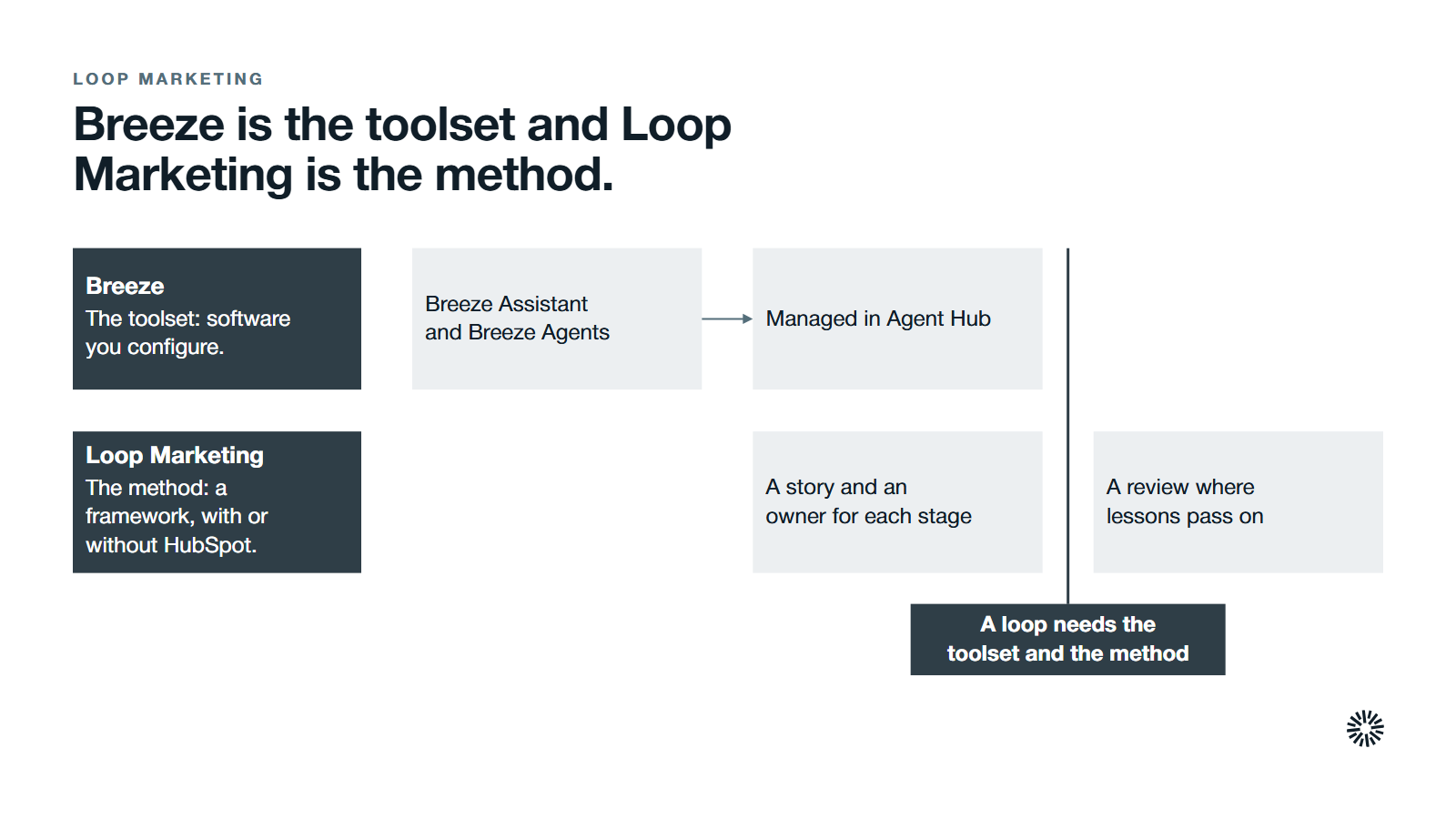
A common mistake is treating the two as the same thing. HubSpot's help page says Loop Marketing is not a product or feature in HubSpot: it is a framework that can be used with or without HubSpot, though HubSpot provides a unified platform for running it.
Breeze is the opposite kind of thing. It is software you configure. You can switch on every agent and still have no Loop, because a loop needs a story, an owner for each stage and a review where lessons move to the next round.
This is also why Breeze does not replace judgment. HubSpot recommends reviewing AI output for brand voice, accuracy and fit with real customer needs. Our Loop Marketing playbook shows how the stages run day to day, and our guide to implementing Loop Marketing in HubSpot covers the setup.
What to settle before you switch agents on
Most disappointments with AI agents come from skipped decisions, not weak software. Settle these first.
- Permissions. HubSpot notes that user permissions decide what actions Breeze Assistant can take in your HubSpot account, so check them before rollout.
- Data access. HubSpot says you can manage AI feature access in your AI settings and choose what data is shared, and that third-party AI providers are contractually barred from training on your data.
- Credits. HubSpot's credits help page says credits reset monthly, unused credits do not roll over, and usage-based HubSpot AI agents pause when credits run out. Agree a limit and an owner.
- Ownership. Give one person responsibility for Agent Hub, so your team switches on, configures and retires every agent on purpose.
- Review. Name who checks what a content agent or any other agent produces, and for which assets a human always signs off before anything is sent.
- Beta features. Several Loop tools are labelled Beta on HubSpot's pages, so treat them as a test, not a dependency.
Start with one job. A prospecting agent for one segment or a customer agent for one pricing page is easier to judge than a dozen agents at once. Most teams judge one agent fairly and a dozen badly.
If that first job needs a custom agent, build it in agent builder, the tool older guides call Breeze studio, only after the pre-built Breeze agents fall short.
What you gain when this is done properly
Set up with clean data and clear owners, Breeze takes the repeatable work off people and gives them back time for judgment.
Sales: better preparation and faster follow-up
Reps get account history and talking points before a meeting, drafted follow-ups afterward and prospecting agent signals about which accounts are ready. Deal progression keeps next steps visible, so reps can qualify leads with the context in front of them and save time for conversations with buyers.
Marketing: faster campaigns that sound like you
With Agent Hub in view, the marketing team moves from brief to campaign plan quickly, personalizes at a scale it could not by hand and sees results sooner. The Taste Profile and style guide keep output close to your voice.
Customer success: quicker answers and fuller context
A customer agent handles common questions with answers grounded in contact and contract history. Your team keeps the complex cases, with the support conversations and the record in front of them, which helps you delight customers where it counts.
Start with one stage and one agent
You do not need to adopt everything. Pick the Loop stage where you lose the most time, review the key features built for it, choose one Breeze AI tool, fix the data it reads and review its output with your team for a few weeks before you add another.
Check Agent Hub each week, because its live status shows whether each agent earns its place.
Propello is a HubSpot partner and designs and builds connected GTM systems on HubSpot (see about Propello). If you want to see where your data, ownership and setup would hold Breeze back, an audit is the place to start.