If you run marketing or revenue at a B2B company, you can write a strong email and still never reach the buyer. A message that lands in the spam folder, or is blocked before it arrives, does no work at all. Email deliverability refers to whether each email message reaches your subscribers' inboxes, and it is the reason some email campaigns reach the inbox and others vanish. For the full picture, read our complete guide to marketing automation strategy.
This article is written for marketing leaders, marketing operations managers and founders who send marketing emails at scale. It explains what email deliverability is, which factors influence email deliverability, how to check it, which failures hit B2B senders most often and what to fix first.
|
Email Deliverability Email deliverability is a sender's ability to place email in the recipient's inbox rather than the spam folder or a block, which depends on authentication, reputation, list quality and content. |
Why email deliverability matters to B2B revenue
Every email program rests on one assumption: that the people you write to will see what you send. Email deliverability decides whether that assumption holds. When it slips, nothing in your campaign looks broken. The send goes out, the report shows it was sent, and the pipeline is quietly short of replies.
That is what makes poor deliverability hard to spot. A message can be accepted by a receiving server and still be filed in the spam folder. From your side, the email left. From the buyer's side, it never arrived.
For B2B teams the stakes are higher than a lost newsletter. Nurture sequences, event invitations, product updates and the follow-ups that sales depends on all travel by email. If the channel degrades, every marketing automation workflow built on it degrades with it.
Reputation also builds over time, and unwanted mail is judged harshly. Google notes that user spam reports can lower your domain's reputation over time, so deliverability is a discipline you maintain rather than a setting you switch on once.
How an email gets from your system to the inbox
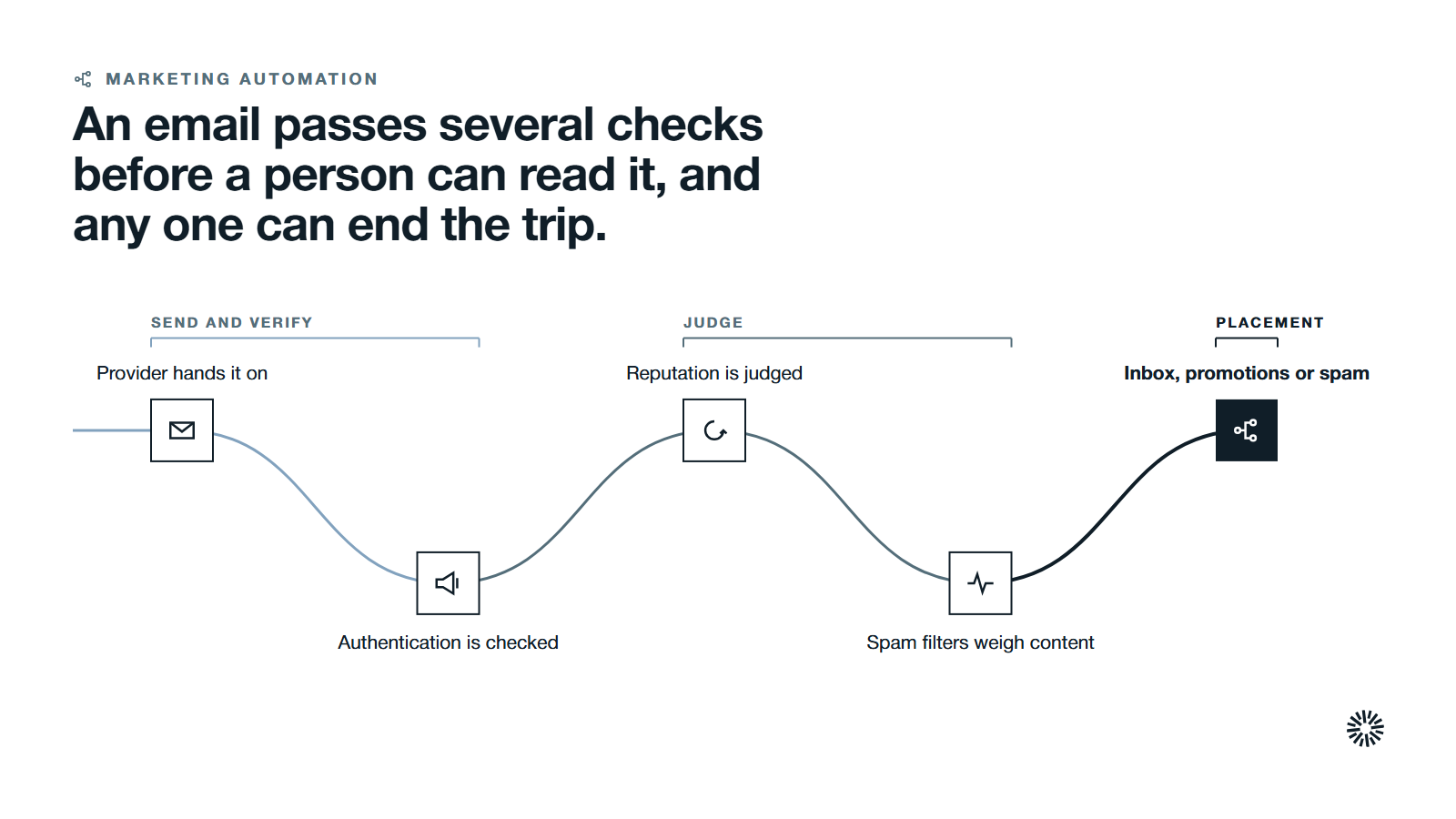
Seeing the journey makes the failure points easier to find. An email passes through several checks before a person can read it, and a problem at any one of them can end the trip.
First, your email service provider starts sending messages by handing each one to the receiving mail servers of internet service providers and other inbox providers. Second, the receiving server checks who you claim to be, using your authentication records. Third, it judges your reputation: how this domain and these IP addresses have behaved before. Fourth, spam filters weigh the content and the signals from past recipients. Only then is the message placed in an inbox, a promotions tab or the spam folder.
Notice that you control different parts of this at different points. You control your records and your list. You influence your reputation through habits. You control your content. Mailbox providers control the final decision, and the major inbox providers each apply their own judgment of which senders are trustworthy.
Four parts decide where your email lands
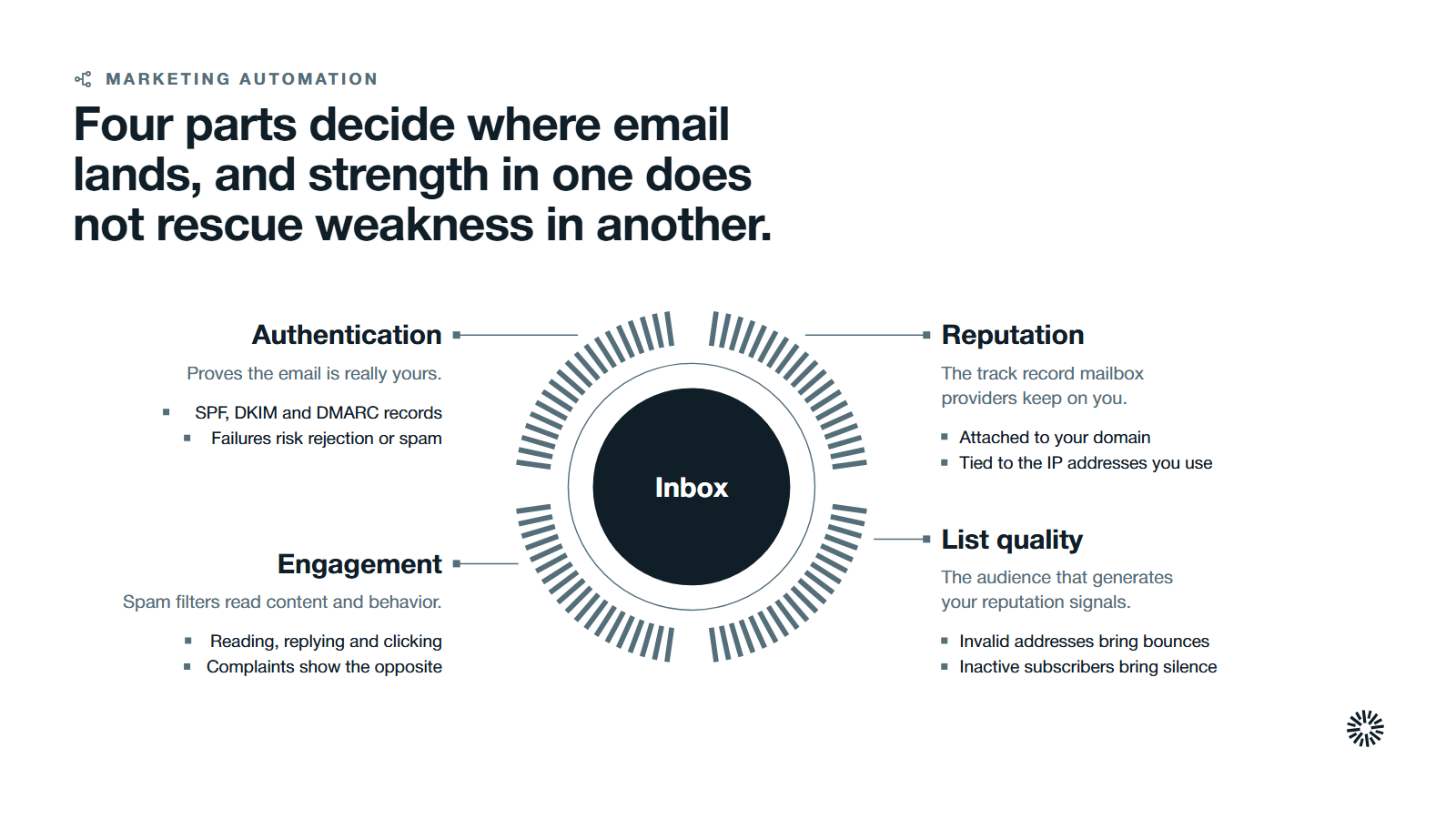
Many things affect email deliverability, but they group into four parts. Treat them as a set, because strength in one does not rescue weakness in another.
Authentication proves the email is really yours
Email authentication is the first test a legitimate sender must pass. It lets a receiving server confirm that a message is from the domain it says it is from. Three authentication protocols do the work, and you will often see them written as SPF, DKIM and DMARC. If an email fails authentication, it is more likely to be rejected or filed as spam.
Sender Policy Framework, or SPF, is a record you publish that lists the servers allowed to send for your domain. Google explains that SPF prevents spammers from sending unauthorized messages that appear to be from your domain, and that mail from third-party senders missing from the record is more likely to be marked as spam.
DomainKeys Identified Mail, or DKIM, adds a signature to each message. Receiving servers use it to verify that the domain owner actually sent the message. Google also states that sending to personal Gmail accounts requires a DKIM key of 1024 bits or longer, and recommends 2048 bits where your provider supports it.
Domain-based Message Authentication, Reporting and Conformance, or DMARC, tells receiving servers what to do with messages that fail SPF or DKIM. To pass, the authenticating domain must match the domain in the From: header. DMARC reports also let you see who is sending mail in your name.
Sender reputation records how you have behaved
Sender reputation is the track record that mailbox providers keep about you. It attaches to your domain and to the IP addresses you send from, which is why people talk about both domain reputation and IP reputation.
Yahoo's sender guidance states that each IP and DKIM domain has a reputation, and that this can affect the delivery of your email. It advises against sending bulk marketing email from the same IPs used for user mail, transactional mail and alerts.
That leads to a practical choice. A dedicated IP address is used by one sender only, so its reputation is yours alone. A shared IP address is used by several senders, so other senders' habits can touch yours. Google advises that if you use an email service provider on a shared IP, you should check that IP's reputation in Postmaster Tools.
List quality decides who you are asking to judge you
Your list is the audience that generates the signals your reputation is built from. Addresses that never asked to hear from you, no longer exist or no longer read your mail all work against you.
Spam traps are addresses that do not belong to a real, engaged subscriber. A trap hit is a sign that addresses were collected carelessly or never cleaned. Invalid email addresses produce bounces, and inactive subscribers produce silence. Both tell mailbox providers that your list is poorly kept.
Yahoo's guidance is direct on this point. It asks senders to verify they send only to people who requested the mail, advises against purchasing mailing lists, and recommends removing invalid recipients promptly. Yahoo also suggests double or confirmed opt-in to reduce the number of invalid recipients. Good list hygiene, meaning regular list cleaning, is the habit of doing this on a schedule.
Content and engagement show whether people want the mail
Spam filters read content, but they also read behavior, so engagement metrics matter as much as wording. Recipient engagement, such as reading, replying and clicking, shows that people want your messages. Spam complaints and deletions without reading show the opposite.
Content still matters at the edges. A misleading email subject line, a message that is one large image, or links that point to unrelated domains can trigger spam filters. Lists of spam trigger words circulate widely, but avoiding spam trigger words is no substitute for a believable subject line that matches what you promised. Promotional emails and other marketing messages are judged by the same signals.
Sending volume belongs here too. Google advises sending at a consistent rate and avoiding bursts, and starting with a low sending volume to engaged users and slowly increasing it, while watching server responses, spam rate and domain reputation. Avoid sudden spikes if you have no history of large sends.
What Gmail and Yahoo require from senders
Mailbox providers have moved from advice to rules, and every high volume sender now has clearer obligations. If you send to Gmail or Yahoo Mail addresses, which many B2B lists include, their published requirements now shape your setup.
Google's email sender guidelines say that starting February 1, 2024, all senders to Gmail accounts must set up SPF or DKIM, have valid forward and reverse DNS records, use a TLS connection and keep spam rates reported in Postmaster Tools below 0.3%.
Bulk senders face more. Google defines this as sending more than 5,000 messages per day to Gmail accounts. These senders must set up SPF, DKIM and DMARC, align the From: domain with the SPF or DKIM domain, and support one-click unsubscribe for marketing and subscribed messages, with a visible unsubscribe link in the body.
Google's sender guidelines FAQ adds two points worth knowing. A bulk sender counts all messages sent from the same primary domain, and once a sender is classed as bulk, that status does not expire. The same page says Gmail began ramping up enforcement on non-compliant traffic in November 2025, with temporary and permanent rejections.
Yahoo's requirements follow the same pattern. All senders must implement SPF or DKIM and keep the spam rate below 0.3%. Bulk senders must implement both SPF and DKIM, publish a DMARC policy of at least p=none, support one-click unsubscribe and honor unsubscribes within two days.
Google separately recommends keeping the spam rate below 0.10% and avoiding ever reaching 0.30%. Treat the lower number as your working target and the higher one as a hard ceiling.
These pages are updated over time, so confirm the current wording before you rely on a detail. The direction is stable: authenticate every message, send only to people who want it and make leaving easy.
Email deliverability versus email delivery
The two terms sound alike and are often swapped. They describe different outcomes, and mixing them up hides real problems.
Email delivery means the receiving server accepted the message. It did not bounce. Email deliverability asks where the accepted message went: the inbox, a promotions tab or the spam folder.
A campaign can show a high delivery rate and poor inbox placement at the same time. Your sending platform reports acceptance because that is what it can see. It cannot see the folder.
Inbox placement rate is a key metric and the measure closer to deliverability, because it estimates how much of your mail reaches the inbox. Because it cannot be read directly from your platform, you have to test for it, which the next section covers.
One short note on a second meaning. Deliverability is also used in other fields for the work products a project must hand over. This article uses it only for email.
How to check your email deliverability
You cannot fix what you cannot see. To monitor email deliverability, combine several signals, because no single report tells the whole story.
Start with authentication and DNS
Confirm that your SPF, DKIM and DMARC records exist, cover every system that sends mail for your domain and align with your From: address. Check the forward and reverse DNS records for the IPs you send from. A sending tool that someone added without updating the records is a frequent cause. Email deliverability tools, including free checkers, can read these records for you.
Read the data mailbox providers give you
Google Postmaster Tools shows your domain's spam rate and reputation signals for mail sent to Gmail. Google's FAQ notes a compliance status dashboard in Postmaster Tools that helps senders see whether they meet the requirements. Yahoo's guidance describes a complaint feedback loop that sends you a copy of spam complaints once you sign your mail with DKIM.
These sources tell you what a mailbox provider sees. Read them regularly, not only after a campaign misses.
Run inbox placement tests
Inbox placement tests send a message to a set of seed email addresses at different providers and report whether each copy reached the inbox, a promotions tab or the spam folder. They give you a view your own platform cannot. Treat the result as a sample, not a verdict, because seed addresses do not behave like your real subscribers.
An email deliverability test can also check your message for known problems, such as broken authentication or risky links, before you send to the full list. Use test email addresses you control as a basic habit for any new template or new sending system.
Watch your own metrics
Hard bounces, soft bounces, spam complaints, unsubscribes and engagement trends are the key metrics you control directly. A rising bounce rate points to list problems. A falling reply rate points to relevance or placement. Track them by segment and by sending domain so a problem in one stream does not hide inside an average. Our guide to email marketing statistics shows how to read common benchmarks with care.
Common failures in B2B email sending
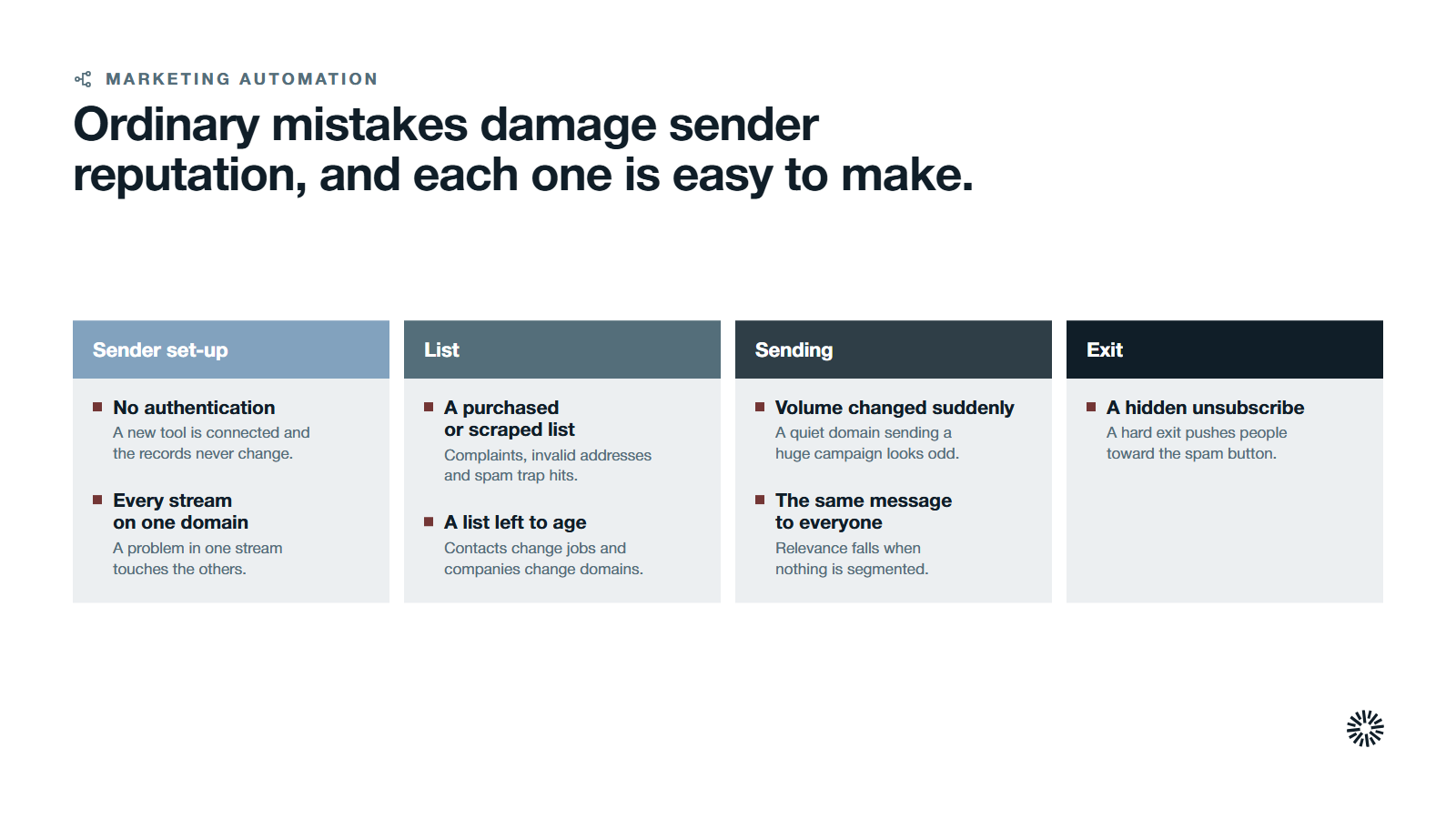
Several ordinary mistakes cause many deliverability issues in B2B programs, and each one damages sender reputation, domain reputation or IP reputation. They are easy to make, which is why they last.
Sending from a domain with no authentication. A new sending tool is connected, nobody updates the records, and mail starts failing alignment. This is the quickest cause to fix and the easiest to miss.
Mixing every stream on one domain and IP. Marketing emails, sales sequences, transactional messages such as password resets and system alerts all share one reputation. A problem in one stream then touches the others. Yahoo's advice to separate email types by IP or DKIM domain exists for this reason.
Importing a purchased or scraped list. B2B teams are tempted by lists of job titles. Both Google and Yahoo ask senders to mail only people who want the messages, and Yahoo advises against purchasing lists. Mailing people who never asked invites complaints, invalid addresses and spam trap hits.
Letting the list age. Contacts change jobs, and companies change domains. A list that was clean two years ago is not clean now. Without a rule for retiring inactive subscribers, a growing share of every send goes to people who do not read it.
Hiding the exit. Both providers ask for an easy, visible unsubscribe. Google notes that letting people opt out can improve open rates, click-through rates and sending efficiency. A hard exit pushes people toward the spam button instead, so making unsubscribing easy helps keep spam complaints down.
Changing volume suddenly. A quiet domain that sends a very large campaign looks unusual. Google warns that immediately doubling previously sent volumes could result in rate limiting or reputation drops. Raise volume in steps and watch the response.
Sending the same message to everyone. Segmenting by behavior and interest keeps messages relevant. The pages on behavioral segmentation and lead scoring show how to decide who should receive which message.
What to fix first
Start with the cause that is cheapest to fix and most damaging if ignored. In most B2B programs the order below works.
- Authenticate every sending system. Publish SPF, DKIM and DMARC for each domain, and add the reporting address so you can see failures. Begin DMARC at a monitoring policy and tighten it once reports are clean.
- Make unsubscribing one click. Add the list-unsubscribe header and a visible link, and honor requests quickly.
- Clean the list. Remove invalid addresses and hard bounces, suppress contacts who have not engaged for a long period and stop mailing anyone who did not opt in.
- Separate your streams. Keep marketing, sales and transactional mail on different sending domains or subdomains where you can.
- Set up monitoring. Register your sending domain in Postmaster Tools, and review spam rate and bounce trends on a fixed schedule.
- Control volume and content. Ramp new domains slowly and keep subject lines honest.
Then connect it to the rest of your system. The setup guides on getting started with marketing automation and implementing marketing automation put sending rules at the start of the build, where they are cheaper to get right. If you are new to the channel, what is email marketing and types of email marketing explain the message types you will be separating.
What you gain when this is done properly
When authentication, list quality and monitoring are in place, email stops being a source of surprises and becomes a channel the other teams can plan around.
Sales gains reliable follow-up
Sales depends on timely follow-up reaching the buyer. When handoff emails and meeting confirmations arrive in the inbox, reps spend less time guessing why a prospect went silent. Clean routing, as described in lead routing as a first go-to-market workflow, is easier to trust when the messages that follow it are being seen.
Marketing gains data it can believe
Marketing gets engagement data that reflects real behavior rather than filtered mail. That makes lifecycle stages in HubSpot and scoring models more honest, since a contact who never saw a message is not a cold lead. It also supports a fairer reading of automation ROI.
Customer success gains a dependable channel
Customer success relies on onboarding messages, renewal notices and service updates. When the sending domain has a healthy reputation, those messages arrive. Deciding what to automate in your CRM becomes safer, because the automations rest on a channel that works.
Treat deliverability as part of one go-to-market system
Email deliverability is not a separate technical project. It is the result of how your data, consent, sending rules and reporting work together.
Propello designs and builds connected go-to-market systems on HubSpot. Propello is a HubSpot partner. If you cannot say which sending domains you use, whether they are authenticated or how much of your mail reaches the inbox, an audit is the place to start.