Most B2B companies do not need a dedicated customer success platform on day one. If your accounts live in a clean CRM, your health signals fit in a handful of properties and one or two people manage the book, a CRM plus a disciplined routine is enough.
Buy customer success software when the manual routine has demonstrably stopped working, and not before you can say what a healthy account looks like.
This article is for founders, CROs, heads of customer success and operations leaders at growing B2B companies who are being pitched customer success tools and have to decide.
You will get what the software replaces, what it costs in kind, when a CRM and a spreadsheet are enough, what breaks when you buy before health and process are defined, and a decision rule by company stage. It quotes no prices and no return-on-investment figures, because neither can be verified for your business.
|
Customer Success Platform A customer success platform is software that collects customer data from your CRM, product and support systems, scores account health and prompts the customer success team to act on renewals, adoption and risk. |
The decision comes down to whether your process outgrew your CRM
Customer success software is a tool for running a process, so it only helps once a process exists. The real question is not which customer success platform to pick. It is whether the work your customer success managers do now has become too large or too scattered for the system they use.
Three signs say yes. Account data sits in several places and nobody trusts the combined picture. Renewals and risks are found late because nobody is watching customer behavior across customer accounts. And the team has agreed what a healthy account looks like, so the software can score it.
Three signs say wait. The team has fewer accounts than one person can hold in their head. Nobody has written down what a good customer looks like. Or the CRM itself is still untidy, because a platform fed by messy records only spreads the mess faster.
Customer success management is a discipline before it is a product category. Many teams meet the decision from the other side. A vendor demo looks impressive, a manager sees clean dashboards, and the purchase starts before anyone has defined the signals those dashboards would show. Reverse the order.
Define the process, test it on the tools you already own, and let the gaps you find write the shopping list.
What customer success software replaces
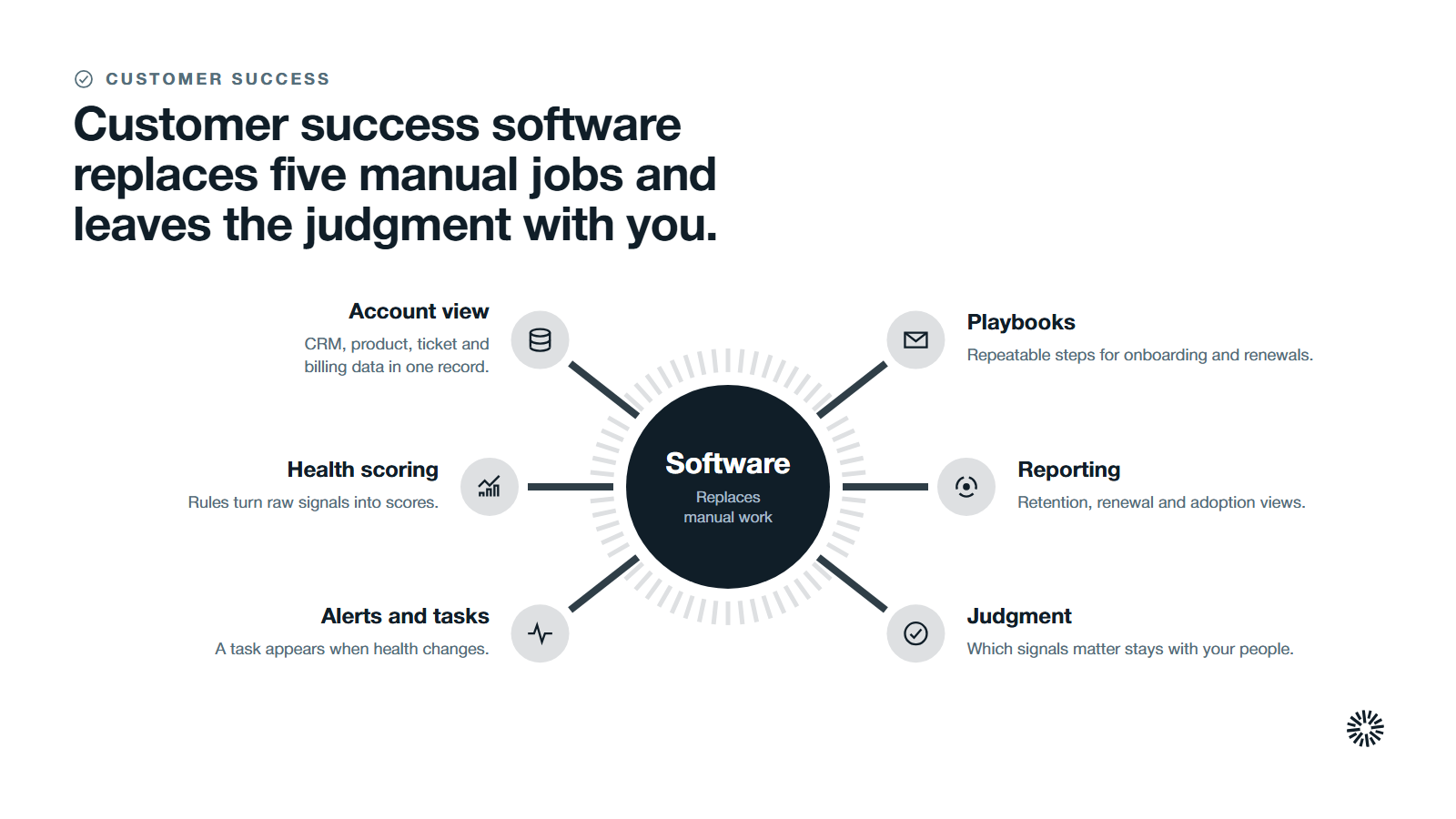
Customer success software does not create a customer success strategy. It replaces the manual work that sits underneath one. Most platforms bundle the same five jobs, and it helps to name them separately because you may need only one or two. For the full picture, read our complete guide to customer success strategy.
- A single account view. Customer success software centralizes data from multiple sources. CRM, product, ticket and billing data lands in one record, which removes data silos and unifies customer interactions. Account managers can manage customer relationships and keep client relationships in context without opening six tabs.
- Health scoring. Rules turn raw signals such as customer behavior and product usage into customer health scores so the CS teams can see which accounts need attention first. Health scores often use color-coding to show account status.
- Alerts and tasks. For proactive account management, when an account's health changes, a task or alert appears without anyone running a report. Automated alerts notify the team when health scores drop below a threshold, which moves relationship management from reactive to proactive.
- Playbooks and automated workflows. Repeatable steps for onboarding, renewals and at-risk accounts run the same way every time.
- Reporting. Retention, renewal and adoption views, including customer churn, come from the same account data the team works in.
If you can already do each of these in your CRM, even clumsily, you are not starting from nothing. The software replaces effort, not judgment, and it cannot rescue weak customer success efforts. The judgment about which signals matter and what to do about them stays with your people.
A customer success team with a clear customer success strategy gets more from any tool. Our overview of what customer success is and how it works explains the function the software supports, and what customer success operations covers shows who usually owns tools like this.
In practice, customer success operations administers the CS tool and keeps its data honest. A weak customer success system in the CRM becomes a weak one in a platform.
Customer success tools come in categories, and you may need only one
"Customer success tools" is a loose label. It covers several kinds of software that solve different problems, and a full customer success platform is only one of them. Sorting them first stops you buying a large system to fix a small gap.
- Customer success platforms. A CS platform combines account views, health scoring, playbooks and reporting in one place. It is the broadest option and the one with the most setup.
- Onboarding and user onboarding tools. These guide new customers through setup, track product adoption and automate onboarding workflows so each user follows the same path to first value.
- Product analytics. These show user behavior inside the product, and advanced analytics can turn it into data-driven insights. It becomes the behavioral half of a health score, and product teams can read the same signals.
- Support and communication tools. Helpdesk and communication platforms hold customer conversations and tickets. Omnichannel communication means customer interactions arrive by email, chat and calls, and the team should see them next to the account, not in a separate window.
- Data tools. A customer data platform or data warehouse centralizes customer data from many systems when the sources are too numerous for point-to-point connections.
- Feedback tools. Customer feedback tools collect sentiment data from surveys and replies, so customer feedback reaches the account record and feeds the satisfaction half of a score.
- Education and self-serve resources. Customer education content lets teams create self serve resources and self service resources, so customers answer routine questions without waiting for a customer success manager.
Most teams start with the problem, not the category. If the pain is that customers stall during setup, you may need better onboarding, not a platform. If the pain is that nobody can see the whole account, your CRM and one integration may close the gap.
What it costs in kind, beyond the subscription
The subscription is the visible cost and the smallest part of the decision. Every customer success tool also costs you things that never appear on an invoice, and those decide whether the purchase pays back.
- Data work. The platform is only as good as the records it reads. Duplicate accounts, missing owners and inconsistent fields have to be fixed before launch, and the same cleanup has to continue afterward.
- Integration work. Connecting the CRM, product usage, support and billing takes design, testing and monitoring. A connection that breaks quietly produces health scores that look confident and are wrong.
- Definition work. Someone has to decide which signals count, how much each is worth and what threshold means at risk. That is a leadership conversation, not a configuration task.
- Adoption work. Customer success managers must change how they plan their day. A tool that nobody opens becomes another system of record to maintain.
- Ownership. One person needs to administer the platform, update the scoring rules and answer questions. In a small team that person is also doing their main job.
Trust in data is the clearest warning. Salesforce's 2024 State of Sales report, a survey of 5,500 sales professionals, found that only 35% completely trust the accuracy of their organization's data. A customer success platform built on data your own people half-trust will not earn more trust by displaying it in a dashboard.
When a CRM and a spreadsheet are enough
A customer relationship management system plus a simple routine is a legitimate customer success system for longer than vendors admit. Subscription businesses with recurring renewals feel the limits sooner than most. It works when four conditions hold.
- The book is small. One person can name every account, its owner and its next renewal without opening a tool.
- The signals are few. You track perhaps four or five things: recent contact, support volume, product use, stakeholder changes and renewal date.
- The CRM is clean. Each customer has one record, one owner and a current lifecycle stage.
- The cadence exists. There is a weekly review of at-risk accounts and a calendar of renewals and quarterly business reviews.
In this setup the CRM holds the record, a few properties hold the signals, tasks drive the follow-up and a saved view lists accounts that need a call. A spreadsheet is useful for the one thing a CRM does badly, which is sketching a scoring idea before you commit to it.
Your CRM may also go further than you expect. HubSpot, for example, describes its customer success workspace as a central location in your HubSpot account designed to help Customer Success Managers stay organized and streamline daily workflows.
The same page says you can review reminders for daily tasks, create custom views and monitor activity from key accounts. HubSpot's separate guidance on creating a health score says health scores assign numerical values to records based on selected property values and tracked event activities.
Check what your own CRM offers before you assume you need another system.
If you run HubSpot, our guides to what a unified customer record changes and to keeping a HubSpot CRM clean cover the groundwork.
Where the manual routine starts to fail
The CRM-and-routine approach does not fail on a date. It fails by degrees, and the signals are practical.
- Accounts get found late. Customer health tracking is patchy, a renewal is at risk, and you learn about it from the customer, not from your own data.
- Scoring lives in someone's head. One customer success manager knows which accounts are shaky and the knowledge leaves with them.
- Data arrives from many systems. Product usage, tickets and billing sit outside the CRM, and combining them is a monthly spreadsheet exercise.
- Handoffs drop context. What sales promised does not reach the person onboarding the customer, so customer context is lost.
- Reporting takes days. Leadership asks about retention and the answer needs a manual export.
When two or three of these are true across your existing accounts at once, the cost of doing it by hand has become real, and the case for software is concrete. When none are true, a purchase solves a problem you do not have.
Tracking customer health scores starts with a definition, not a tool
Tracking customer health scores is the feature that sells most platforms, and it is also the one most often built on a guess. A score is only useful if the people reading it believe the inputs. That belief comes from deciding, before any software is involved, what separates a healthy account from a risky one.
Start with the signals you can already observe. Product usage and product adoption show whether customers get value. Customer satisfaction, from surveys and the tone of customer conversations, shows how they feel. Support volume, stakeholder changes and the date of the next renewal show risk.
Each signal needs a weight and a threshold, and the weights should be tested against accounts whose outcome you already know.
Then check what your current system can do. HubSpot's workspace guidance says that, once health scores exist, the summary tab shows the average score and the share of customers in the at-risk, neutral or healthy categories, and that an alert tracks when a customer's health status changes.
The scoring guide adds that score decay can reduce a score based on how long ago a scored event occurred.
Those are the same building blocks a dedicated platform sells: rules, categories, alerts and time. If your CRM already offers them, you can monitor customer health and track account health for a quarter at no extra system cost. If it cannot combine your product and support data, you have learned exactly what a new tool must do.
What breaks when you buy before health and process are defined
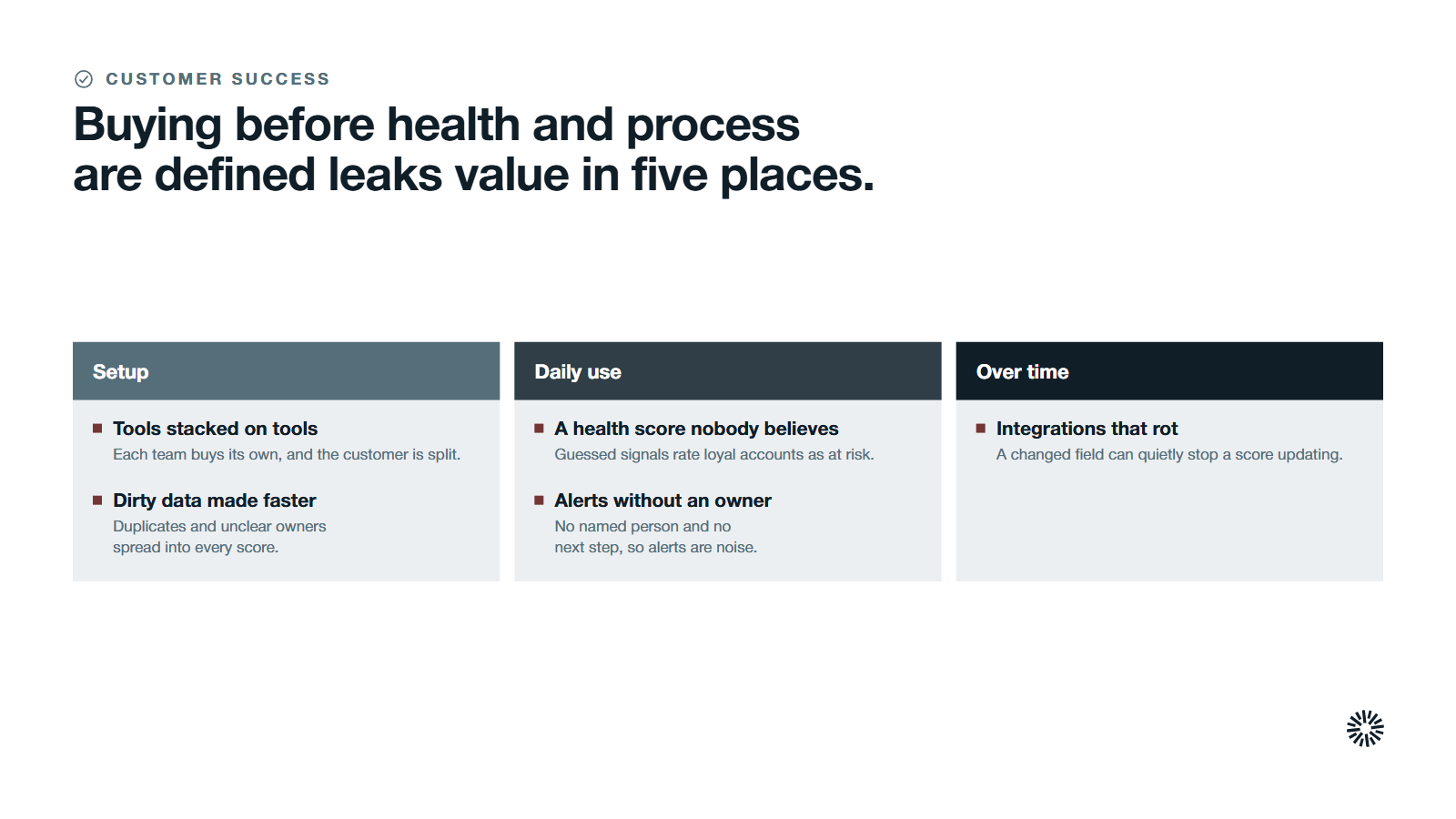
The most common failure is not a bad tool. It is a good tool bought too early. The platform arrives, the team spends months configuring it, and what it displays has little connection to what actually predicts trouble in your accounts.
A health score nobody believes
A customer health score is a model of what a healthy account looks like. If the signals were guessed instead of agreed, the score will rate a quiet, loyal account as at risk and a noisy, unhappy one as fine.
Managers learn to ignore it within weeks, and the platform becomes a place where scores are shown and not used. Our explainer on the customer feedback loop shows how real customer signals should feed the model.
Alerts without an owner
An alert that fires with no named person and no agreed next step is noise. The platform can tell you an account changed, and good customer communications still need a person. It cannot decide who calls, what they say or when. If those answers are missing, alerts pile up and the team stops reading them.
Customer outreach turns reactive, and customer experience suffers across the customer lifecycle.
Dirty data made faster
Duplicate records and unclear ownership do not disappear when you connect a platform. They spread into every score, report and playbook. You pay for the software and for the workaround spreadsheets people keep because they do not trust it.
Integrations that rot
Each connection needs an owner. When a field changes in the CRM or a product event is renamed, a score can quietly stop updating. Without monitoring, the first sign is a customer who should have been flagged and was not.
Tools stacked on tools
If sales, marketing and customer success each buy their own system, the customer is split across three views. The result is the disconnected stack the purchase was meant to remove, and a second source of truth that disagrees with the first.
Match the decision to your company stage
Company size changes the answer. The logic is the same at each stage, but the first move differs.
Early stage with a small book of accounts
Stay in the CRM. Name an owner for customer success, define four or five signals, build one saved view of accounts to call this week and review it every week. Hold back from any platform purchase. Watch whether the weekly review happens without being chased and whether anyone is surprised by a renewal.
Growth stage with a team and rising account volume
This is where the decision gets real. Write down your health definition and run it by hand for a quarter. If your CRM can hold the score and fire tasks, extend it first.
If product usage and support data have to be combined for the score to mean anything, you have found a real reason for a platform. Hold back from complex automation before the basic score earns trust.
Watch whether managers act on the score without being told to, and whether they anticipate customer needs before a renewal call.
Scale stage with several segments or regions
At this point manual routines usually cost more than software. Different customer segments need different scores, and leadership needs consistent reporting across regions. A platform, or a CRM configured to behave like one, becomes the system of record for health, renewals and playbooks. The risk shifts from too early to too fragmented.
Hold back from letting each region choose its own tool. Watch for records and scores that mean different things in different places.
Questions to settle before you request a demo
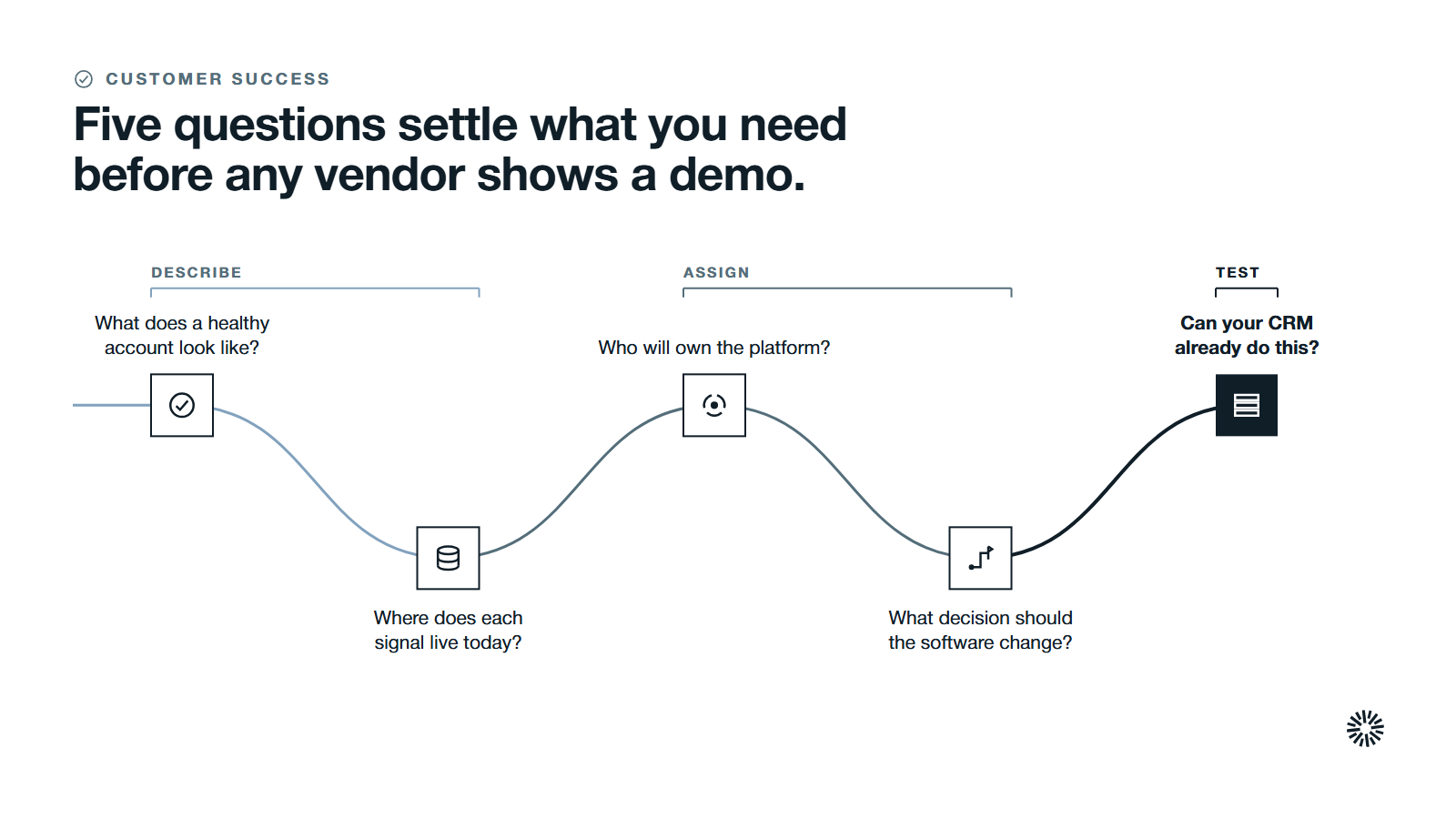
A demo shows what a product can do. These questions show what you need it to do, so you can judge any vendor against your own answers.
- What does a healthy account look like? Write the three or four signals that separate accounts that renew and expand from accounts that leave.
- Where does each signal live today? List the systems that hold customer data and mark which ones can connect.
- Who will own the platform? Name the administrator and the person who acts on its alerts.
- What decision should the software change? Define one concrete action it should trigger, such as a task for a renewal at risk.
- Can your CRM already do this? Test the manual version first and record exactly where it breaks.
If you cannot answer the first question, you are not ready to buy. If you can answer all five, you can run a fair trial and judge it on your own data.
How to choose the right customer success tool when the time comes
If your trial of the manual version shows a real gap, the work shifts to choosing the right customer success tool. There is no single best customer success software, only the best fit for your accounts, data and team. The same applies to the best customer success platforms on any review list: the ranking cannot know your process.
Judge each option on key features that map to your answers above, and ignore the rest of the feature list.
- Fit with your existing tech stack. Integrations with existing systems decide whether the tool works at all. Native integrations let health scores update in real time and unify customer context, so check that it connects to your CRM, product data and support system without custom work you cannot maintain.
- Customer insights you can act on. Dashboards should lead to a task or a decision. Ask for actionable insights, not extra charts.
- Configurable health scoring. You should be able to change signals, weights and thresholds yourself, as the business learns.
- Task management and automated workflows. Playbooks should create work for a named owner, with due dates.
- Renewal management. Renewal dates, risk and quarterly business reviews should sit on the same record.
- Admin effort. Ask who maintains it, how long a change takes and what happens when a field is renamed.
Run a pilot as a proof of concept on your own data for a defined period, with the success measure agreed beforehand. Evaluate each tool against your specific business needs, not the vendor's demo script. A tool that looks strong on a demo account and weak on yours has answered the question.
What you gain when this is done properly
Making the decision in the right order pays off across the revenue team, whether you end up buying a platform or extending your CRM.
Sales sees the customer after the deal
Account teams see which customers are healthy, which renewals are at risk and what was promised. Handoffs carry context, customer interactions are visible to everyone who needs them, and expansion conversations start from real signals and long-term customer value. Our piece on customer success practices that grow sales shows how that link works.
Marketing works from real customer signals
When customer health and adoption sit next to campaign data, marketing can build programs for the customers that matter. Customer marketing, advocacy and reference programs rely on knowing which existing customers are happy and where they sit on the customer journey. See how to grow revenue from existing customers.
Customer success works the right accounts first
Customer success managers spend their time on accounts that need them, and customer engagement follows the signals instead of the calendar. Usage patterns can point to upsell opportunities, and proactive playbooks standardize the repeatable steps of customer engagement.
Playbooks and tasks make the routine repeatable, quarterly business reviews rest on current data, and the team can show leadership what it is doing and why.
Decide the process first, then the tool
The honest answer to whether you need customer success software is that it depends on whether you have a process worth automating. Define health, test it in your CRM, and let the gaps you find justify the purchase. If a platform is warranted, you will know what it must do and how to measure it.
Propello designs and builds connected go-to-market systems on HubSpot, and Propello is a HubSpot partner. If you want help seeing where your customer data, ownership and process stand before you buy anything, the next step is an audit. See what the Propello GTM Audit covers and how to prepare.