
If you lead a growing B2B business and your marketing, sales and service teams work in separate tools, you are probably asking whether your CRM setup can support a connected go-to-market motion. The answer turns on one thing: whether your teams share one CRM record per customer, or stitch separate records together with integrations.
This article is for CEOs, founders, CROs and revenue leaders who must decide how CRM software should work across the organization. You will see how the two approaches compare, which HubSpot CRM features make a shared record work, what separate systems cost you, and what to fix if you keep your current tools.
|
Unified Customer Record A unified customer record is one contact or company record, shared by marketing, sales and service, that holds every interaction, deal and ticket for that customer in a single timeline. |
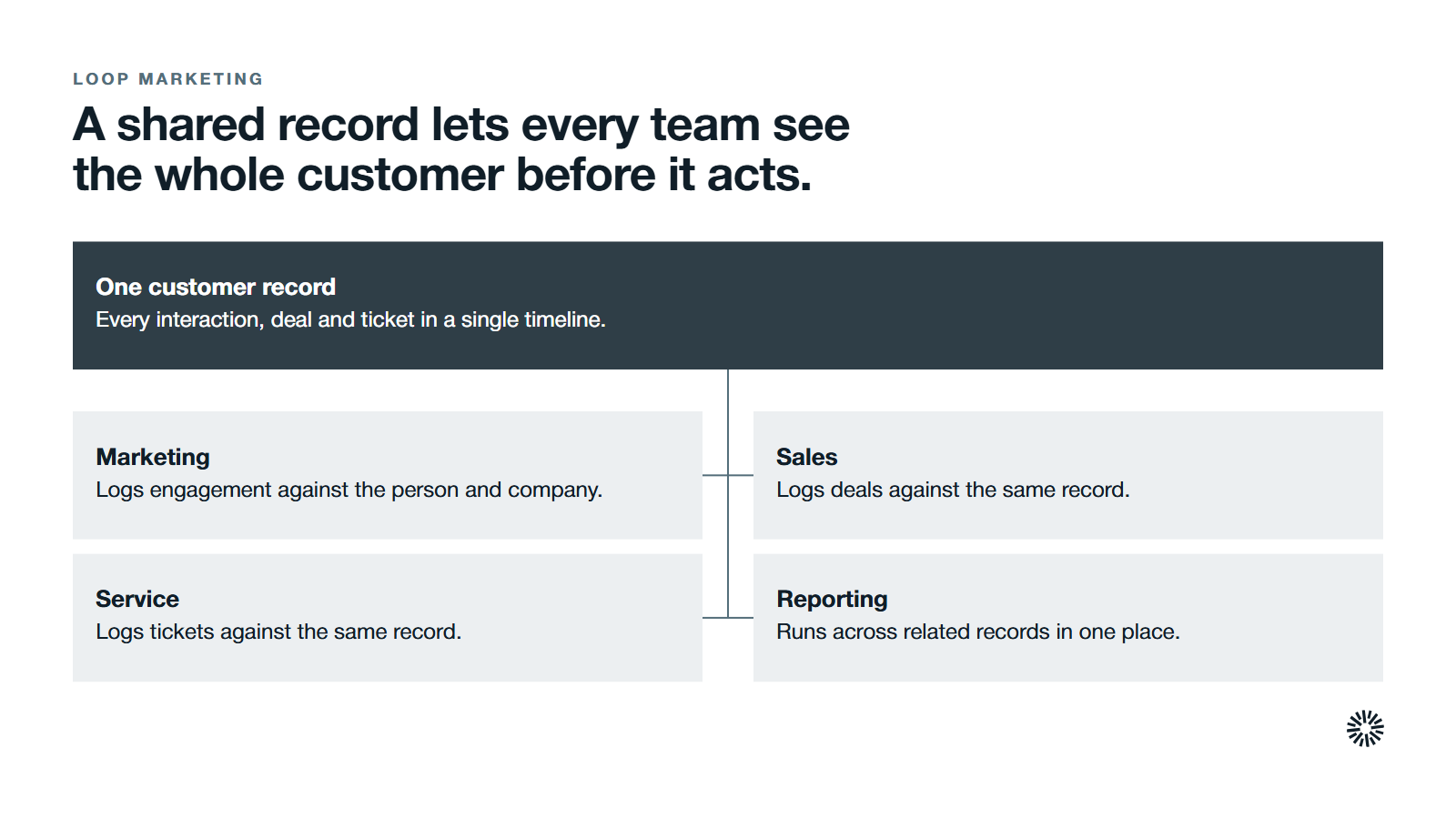
A shared record lets every team see the whole customer before it acts
A unified customer record is what makes Loop Marketing practical. HubSpot describes Loop Marketing as a four-stage framework of Express, Tailor, Amplify and Evolve, and it starts from a picture of your customer built on CRM data.
Separate systems make that picture slow to assemble and easy to get wrong, because the customer data behind it is spread across tools. When marketing, sales and service read the same data, handoffs get cleaner and reporting gets honest.
If your teams already share one record, the question is whether you govern it well. If they do not, the question is what it costs your business to keep things apart. A customer-centric approach starts with agreeing which record is the truth.
What a unified customer record looks like in HubSpot
Customer relationship management is the practice of managing every interaction a business has with its customers, and CRM software is where those customer interactions get recorded. In a unified CRM, marketing logs engagement, sales logs deals and service logs tickets, all against the same person and company.
Cloud-based CRM software keeps a single record of customer interactions that every team can open, which is what lets departments collaborate instead of guessing.
HubSpot builds this into a single platform. Its Smart CRM is described as a central system of record that unifies, enriches and de-duplicates customer data, and each product connects to it. So Marketing Hub, Sales Hub and Service Hub work from one CRM database instead of three.
How HubSpot connects contacts, companies, deals and tickets
HubSpot stores each type of record as an object: contacts for people, companies for organizations, deals for sales opportunities and tickets for service issues. Associations link them, and they always run both ways. If a deal is associated with a contact, the contact is associated with the deal.
That matters in B2B, where one sale often involves several people at one company. Associate the deal with each of them and the company, and anyone sees the same account story.
What a customer 360 view means in practice
A customer 360 view is one place where every team sees the whole relationship: who the person is, what they have read and bought, and what they have asked for. It is a comprehensive view of the customer, not a stack of partial ones.
You get it when every touchpoint, from a first form to a renewal call, lands on one timeline, not when you export from three tools into a spreadsheet each Monday. A customer journey map built from that record also helps engagement and loyalty, because the interactions after the sale are on it too.
What can HubSpot CRM do for marketing, sales and service?
The HubSpot CRM features below turn one database into a shared working record, and each does its job only as well as the definitions and ownership behind it. CRM technology can enhance alignment among customer-facing teams, but only when they agree on what the record means.
One record with a single activity timeline
On a HubSpot record, the Activities tab shows a timeline of customer interactions in time order, including logged activities, pipeline stage changes, form submissions and analytic events.
Before a call, a rep can see which form the contact submitted and what has changed since the last conversation. Nobody has to ask other team members for a summary.
Lifecycle stages that show the handoff
The lifecycle stage property shows where a contact or company sits in your processes and how leads are handed off between marketing and sales. The defaults run from subscriber and lead through marketing qualified lead, sales qualified lead, opportunity, customer and evangelist.
The stages only help if your teams agree on what each one means.
Properties that every team reads
Properties are fields that store information on records. Each object comes with defaults, and you can create custom properties to capture business data of your own, such as renewal date or customer segment.
The risk is duplicate fields: if marketing creates Lead Source and sales creates Source, you have rebuilt the silo inside one tool. Give each property an owner and a clear use, so team members know which field to trust and how to manage it.
Workflows and automation across record types
Workflows automate your processes. HubSpot's own example enrolls contacts who submitted a form, sends a marketing email and assigns the contacts to a user, and a workflow can also act on associated records such as the company.
Because the records are associated, one workflow can follow the customer across teams. That automation removes repetitive administrative tasks such as lead routing and record updates, and it spans marketing, sales and customer service. A service escalation can update the company record, and the account owner can be told the same day.
Tickets and a shared inbox for service
HubSpot offers a help desk where a ticket's right sidebar shows the associated contacts, companies and deals, and you can edit those associations from there. The conversations inbox collects team email, chat and form submissions in one place.
If someone emails the inbox from an address that is not yet a contact, HubSpot creates a contact record for it. HubSpot's CRM overview also lists ticketing, live chat, a chatbot builder and a form builder, so inbound marketing leads reach the same records as support requests.
Deals, pipeline management and lead scoring
Sales Hub is HubSpot's sales software, and it works from the same contact and deal records. HubSpot describes it as a place to add, score and track deals, and to use AI to score, rank and prioritize the deals most likely to close.
For your sales teams, pipeline management then runs on the same data marketing and service use. The sales pipeline stops being a separate story that only one team can read, and everyone can see what helps close deals.
Reporting on one set of data
HubSpot's CRM overview describes a single source of truth for marketing, sales and customer service data, with a reporting dashboard on top. Custom reports analyze a primary data source together with related objects, and you can add them to a dashboard.
That lets a revenue leader connect marketing source to pipeline stage, or ticket volume to customer segment, and track results through to revenue without reconciling exports first. Because everyone has access to the same figures, the insights are easier to trust and act on.
How a unified record compares with separate systems
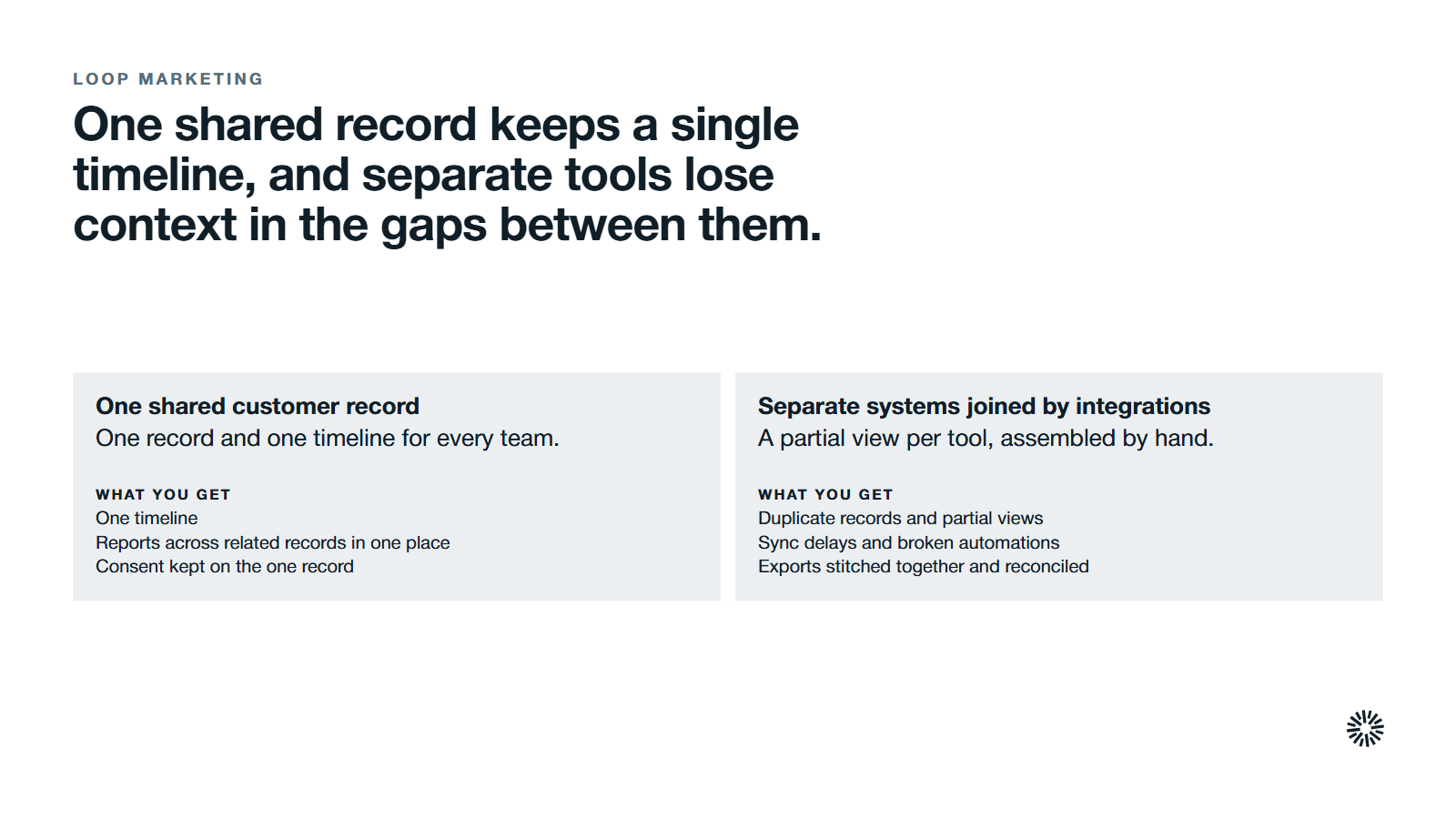
This table compares two approaches, not two software products.
| Criterion | One shared customer record | Separate systems joined by integrations |
|---|---|---|
| What it solves | Fragmented customer context across teams | Specialist depth inside each function |
| Who owns it | A RevOps or GTM Engineering lead accountable to revenue leadership | Often unclear, shared between tool administrators |
| Setup | Needs a data model, definitions and migration up front | Already running, with ongoing sync upkeep |
| What teams see | One record and one timeline | A partial view per tool, assembled by hand |
| Reporting | Reports across related records in one place | Exports stitched together and reconciled |
| Ongoing work | Property governance and workflow upkeep | Monitoring syncs, mapping fields, fixing errors |
| Best fit | Teams that share customers and need clean handoffs | Specialist needs, with strong governance in place |
The pros and cons in plain terms
One shared record gives you a single timeline, simpler reporting and one place to enforce consent, at the cost of design work up front and some specialist depth.
Separate systems keep that depth and a setup that already works, but the cost arrives later, as syncs to monitor and context that no single person can see.
What separate systems cost you in practice
The licenses are rarely the main cost. The cost sits in the gaps between tools, where customer context gets lost, and the ability to act on the whole customer goes with it.
Duplicate records and partial views
When the same person exists in three tools, messages get misrouted and owners conflict. A contact who unsubscribes in one tool can keep receiving email marketing from another, because the consent change never crossed the gap.
That is a compliance problem as well as an annoyance, since privacy rules expect you to honor the change everywhere. Effective CRM systems keep consent on the one record, so data security obligations are easier to meet.
Sync delays and broken automations
A lead fills out a form and the sync runs minutes later. When an API changes or a token expires, leads can sit unrouted for hours, and automations built on a record arriving from another tool fail without a warning. The challenge is what happens when sync does not work.
Integration upkeep that nobody owns
Connectors need monitoring, field mapping updates and credential renewals. Someone does this work, but often nobody owns it. Salesforce's 2025 MuleSoft Connectivity Benchmark, a survey of more than 1,050 IT leaders, found that the average enterprise manages 897 applications and only 29% are integrated.
Teams working from different versions of the customer
Sales promises one thing, service sees another, and marketing runs a campaign unaware of an open issue.
HubSpot's State of Sales in 2026 report found that 72% of revenue leaders say their tools do not have access to the complete, accurate revenue data they need to take action. The same HubSpot report found that 43% of teams spend six to 10 hours a month reconciling revenue data.
Salesforce's 2024 State of Sales research found that only 35% of sales professionals completely trust the accuracy of their organization's data.
When separate systems are fine, and what to fix if you keep them
You do not have to consolidate everything, and more tools are not necessarily a problem. The goal is coherence, and several tools can reach it if you manage the connections deliberately.
Situations where separate systems make sense
- A specialist support platform handles service rules your CRM does not.
- A finance system wired into billing would be costly to replace.
- Legal or data residency rules require certain records to stay apart.
In each case, the condition is clear ownership of which system is the source of truth for which field.
How to reduce the damage when you keep several tools
- Pick one system of record for each field. Lifecycle stage lives in one place, and so does deal amount.
- Align definitions. "Customer," "opportunity" and "renewal" should mean the same thing everywhere.
- Audit properties each quarter, archive unused ones and enforce naming rules.
- Alert on sync failures so drift gets caught early.
How to move to one shared customer record in stages
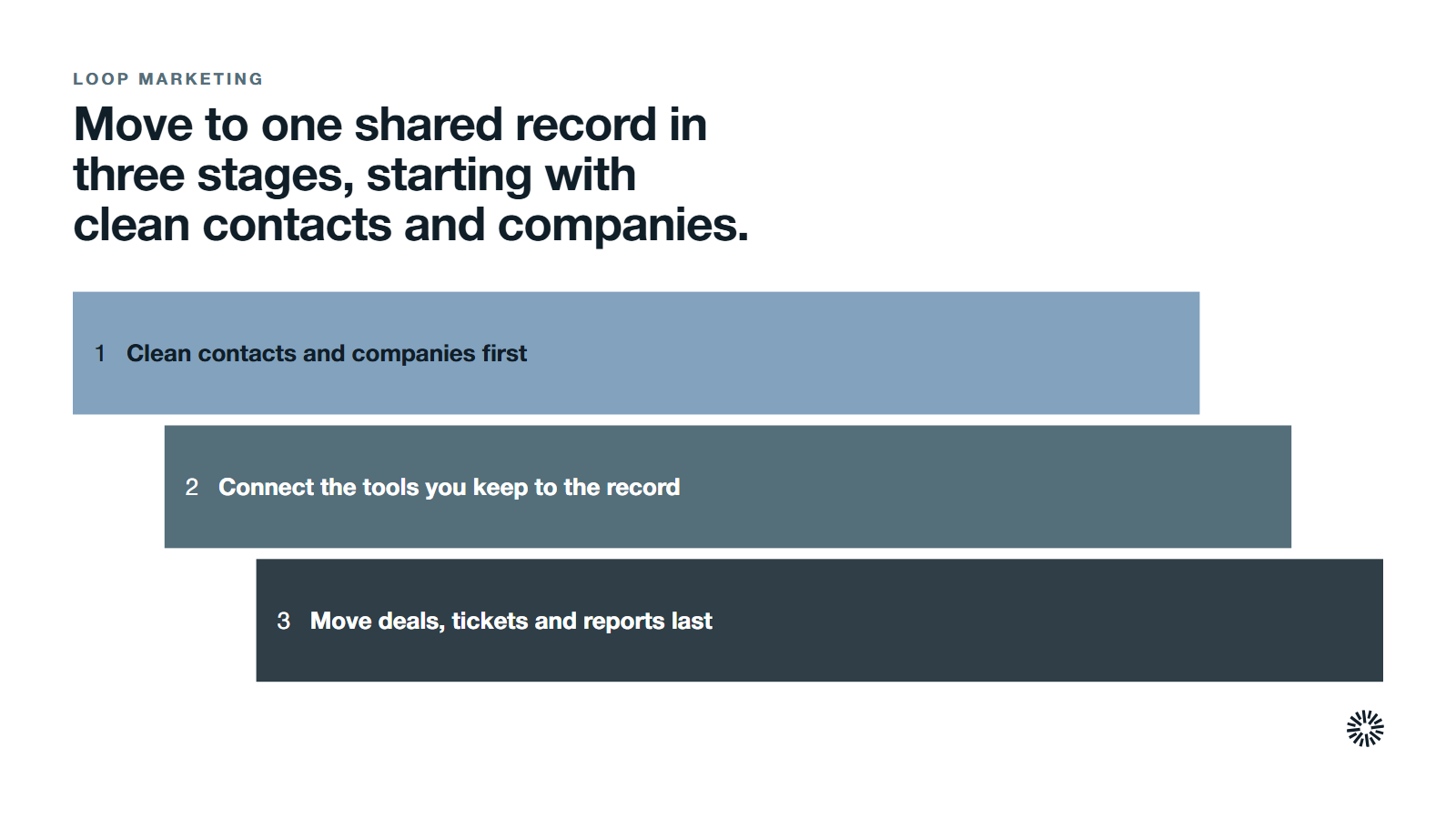
Treat the move as a business project, not an IT task. Moving your CRM solutions in stages protects the processes that already work, and each stage should deliver a benefit your teams can see.
Clean contacts and companies first
Create one clean set of contact and company records before anything else. Match records on a shared identifier, remove duplicates and decide which property wins when two tools disagree. Clean customer data is the essential foundation, because every later workflow and report depends on it.
Connect the tools you keep to the record
HubSpot can act as the central customer record while specialist tools stay connected around it. Through the App Marketplace you can connect apps, and HubSpot marks whether data syncs in one direction or both.
Assign someone to maintaining each connection, and write down which tool wins a conflict. In an enterprise with many apps, this critical step is easy to skip.
Move deals, tickets and reports last
Bring the sales pipeline and service tickets across once the records are clean, then rebuild the reports your leaders use.
Track a few measures of success, such as how long a handoff takes, and optimize from there. Outside consulting can help design the data model, but your own team should keep the ability to change it.
Why AI makes a clean customer record more important
HubSpot's AI features include the Breeze Assistant, which researches companies, prepares you for sales calls and summarizes CRM records, and Sales Hub offers AI-powered pipeline projections. Both are described on HubSpot's CRM overview and Sales Hub pages.
An assistant can only summarize what the record holds. If the data is split across tools, the summary is partial. So will AI replace the CRM? Not in this picture: it sits on top of the record, which makes the record matter more.
What you gain when this is done properly
The benefits of a unified CRM do not come from software alone. They arrive when the record, the definitions and the ownership are designed together. Five stand out: one timeline, cleaner handoffs, honest reporting, safer consent handling and fewer repetitive tasks.
For sales
Your sales teams see marketing engagement, earlier deals and open tickets before they pick up the phone. The handoff from marketing qualified lead to sales qualified lead reads off the same lifecycle stage everyone sees.
Reps spend less time asking colleagues for context, and more time on conversations that can close deals.
For marketing
Marketing can see which campaigns and inbound marketing sources produced customers, not only leads, because the source is recorded against the same record that carries the deal. Converting leads becomes a process you can inspect. Better data segmentation also lets you tailor outreach to each customer segment, which improves the relationship.
Those insights show where to put your next campaign, and they are the feedback Loop Marketing needs when it asks you to evolve what you say and who you say it to.
For customer success
Customer success teams see tickets, deal history and the people involved in one CRM record, so a renewal conversation starts with the real history. They can spot a risk, such as unresolved tickets, before it becomes a cancellation.
How to choose a CRM for marketing, sales and service
Treat the choice as an investment in how your business runs, not a feature checklist. Point solutions can be fine for one job; the critical question is where their output is recorded. These checks apply to any CRM software, whether or not it is HubSpot.
- Ability to share one timeline: can a rep, a marketer and a support agent open the same record and see the same history?
- Control over data: who can create properties, change lifecycle stages or merge duplicates, and is every change traceable?
- Clean integration: for instance, if a specialist tool stays, does it write back to the customer record, and who is maintaining that connection?
- Reporting that crosses teams, so insights reach the people who set strategies for growth.
- Resources to run it: no CRM will optimize itself. Someone keeps developing the data model as the business changes, in-house or through outside consulting.
The essential test is delivering one consistent experience to the customer, which also enhances how you manage every account. Technology alone will not transform your handoffs; agreed definitions and a named owner will. If you serve clients on retainers, treat each client account as a company record so service and sales history stay together.
Choose based on how your teams share customers
Evaluate the choice against your business strategy and your business needs: who your customers are, how they buy and who serves them. If demand on your service team rises, sales and marketing should see it too.
If your teams all need the same customer in front of them, one shared record is the more reliable base for a loop. If they work on separate customers, separate tools can stay, as long as you govern the joins.
Propello builds on HubSpot and treats it as revenue infrastructure for go-to-market execution, which is why this article describes HubSpot features. The points about definitions, ownership and integration hygiene apply to any CRM you run. For the platform side, see our HubSpot services.
Propello designs and builds connected GTM systems on HubSpot. If you are not sure whether your current setup can support a loop, an audit is the place to start, because it shows where your customer data and handoffs break.
