If you lead marketing, sales or growth at a B2B company, you probably hear "UX" in every website and product meeting. This guide explains what UX design is, how the UX design process works, how it differs from UI design, and why it affects the pipeline your revenue team can build.
The short answer: UX design is the practice of shaping how a person experiences a website, app or other digital product, so that it is useful, easy and pleasant to use. You will leave knowing the parts of good UX design, how to start, and how to measure the result.
|
UX Design UX design is the process of shaping how a person experiences a digital product by improving its usability, accessibility and pleasure of use, so it meets real user needs and business goals. |
What is UX design, and what does a UX designer actually do?
User experience design covers every point where a person meets your product or company. For a website, that includes how a visitor finds you, what they read, how they move between pages and what happens after they fill in a form.
Don Norman coined the term "user experience" because human interface and usability seemed too narrow to describe everything a person feels when using something.
He and Jakob Nielsen later set out the idea in a Nielsen Norman Group definition that says user experience encompasses all aspects of the end user's interaction with the company, its services and its products.
The field is multidisciplinary: it draws on interaction design, usability, human-computer interaction, research and visual design.
A UX designer is the person who makes those moments work. Rather than starting with colors or layouts, a user experience designer starts with people: who they are, what they want to do and what gets in their way. The aim is both functional and emotional: a clear path through the task, and customers who feel confident and respected along it.
UX design is not limited to screens. It applies to mobile apps, software, physical products and services alike. Anywhere a person uses something to get a job done, someone has made choices about how it feels to use it, whether or not they called it UX.
Good UX design connects user needs with business goals, so it serves both the person and the company.
For B2B teams, the most common place this shows up is the website and the product. Both decide whether a buyer finds an answer, trusts you and takes the next step. A site that is built on an inbound-ready website foundation gives UX work something solid to improve.
How the UX design process works from research to launch
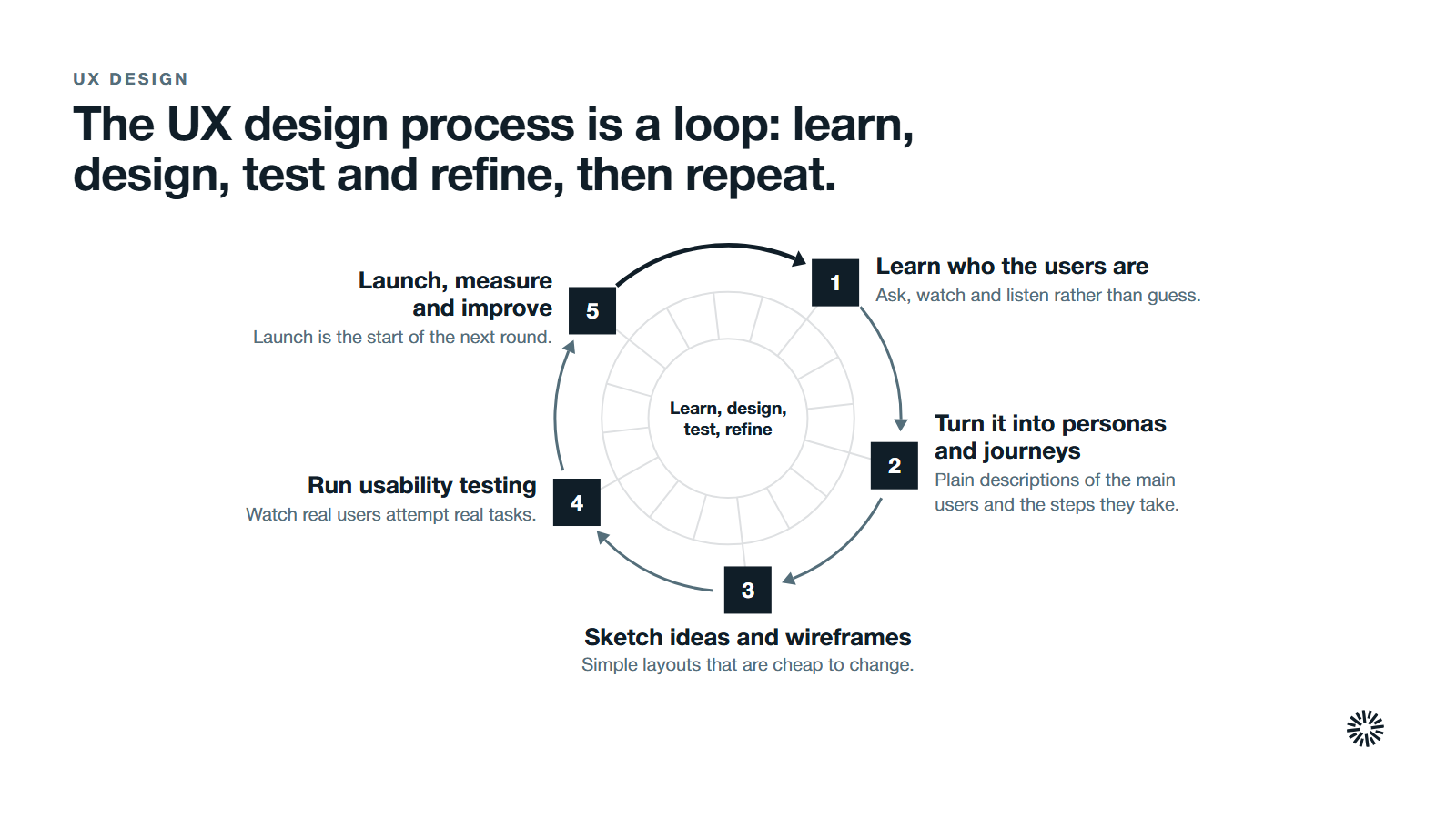
The UX design process is an iterative process: you learn, design, test and refine, then repeat.
Learn who the users are through user research
Every project starts with understanding the people. User research is how a design team finds out about user needs, habits and pain points before anyone draws a screen. Conducting user research means asking, watching and listening rather than guessing.
Common methods include user interviews, user surveys and a contextual inquiry, where a researcher observes someone doing a task in their own setting. Each method produces deeper insights than internal opinion can, and it is worth being curious enough to dig deeper when an answer surprises you.
A user experience researcher or a team of user researchers often leads this work, and in smaller companies the designer does it.
Turn what you learned into personas and user journeys
Research findings become something the whole team can use. User personas describe the main groups of people who will use the product, in plain terms. User journeys map the steps a person takes, from first need to finished task, and show where they get stuck.
A user flow goes one level lower. It shows the path through a specific task, such as requesting a demo, with every decision and screen along the way. These maps keep other stakeholders and product managers talking about the same person.
Sketch design ideas and create wireframes
With the problem clear, the team generates design ideas and tests design concepts on paper. Then they create wireframes: simple layouts that show structure, content and the placement of buttons without any styling.
Wireframes are cheap to change, and that is the point. It is far easier to move a form on a sketch than on a live site. Prototyping lets you test design ideas before development begins, and wireframing makes the structure of a product visible to everyone involved.
Design tools make wireframes and clickable prototypes quick to produce, so real users can try the concept before developers build it.
Run usability testing and gather feedback from real users
Usability testing means watching real users attempt real tasks with a prototype or the live product. User testing exposes confusing labels, hidden buttons and missing steps that the team can no longer see. It is how you gather feedback directly instead of assuming.
You do not need a large sample. Jakob Nielsen's analysis for Nielsen Norman Group found that testing with five users uncovers about 85% of usability problems in a single round. The advice that follows from it is to test small, fix what you find, and test again.
Iterative testing reveals usability issues early, and fixing them in the design phase costs far less than fixing them after launch.
Launch, measure and keep improving
Launch is the start of the next round, and iteration after launch is how the experience keeps getting better. Direct feedback from customers, support conversations and analytics tell you whether the final product works as intended.
Teams that treat design as ongoing, rather than a one-off project, reflect the approach described in our guide to growth-driven design.
The core parts of UX design work together
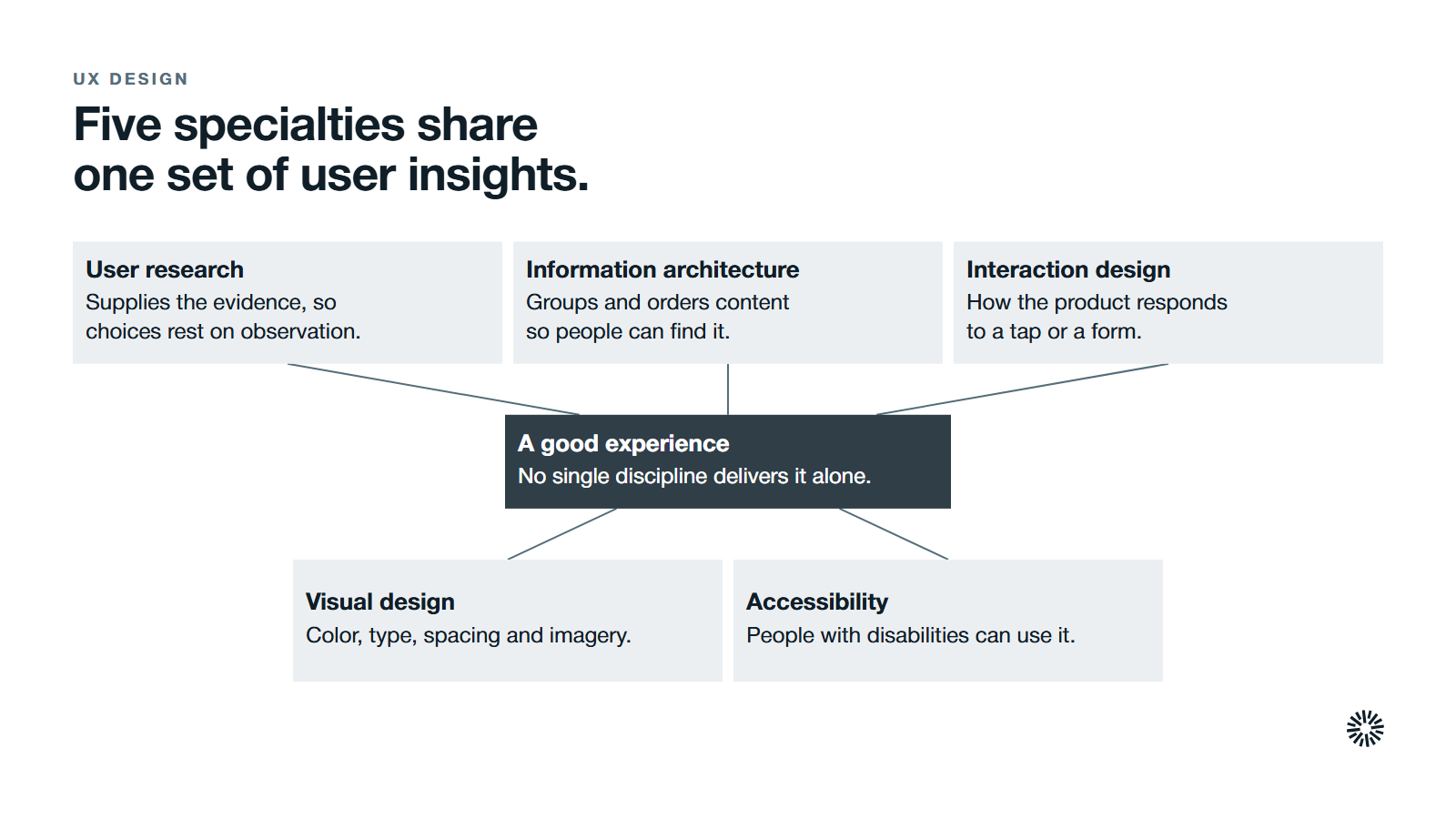
No single discipline delivers a good experience on its own. The best results come when specialties share one set of user insights.
User research and UX research keep decisions honest
UX research supplies the evidence. It tells the design team what users expect and why they behave as they do, so choices rest on observation. It also gives product teams a shared reference when opinions differ, which aligns the design team around objective data.
User feedback from interviews and tests validates design choices and shows whether they meet real user expectations.
Information architecture organizes what people need to find
Information architecture is how content is grouped, labeled and ordered so people can find it. Clear categories, a logical hierarchy and predictable navigation guide users without making them think. A page can look excellent and still fail if visitors cannot tell where to go next.
Good structure improves findability and clarity, and it shapes how pages and navigation are organized across a site or product.
Interaction design shapes how the product responds
Interaction design defines how a user interacts with each element: what happens when someone taps a button, opens a menu or submits a form. Interaction designers aim for responses that are predictable and fast, so the product behaves the way users expect.
Visual design and graphic design give the experience a face
Visual design covers the visual elements people see: color, typography, spacing and imagery. It builds on graphic design skills and brand identity, and it helps guide users through the page by showing what matters most.
Accessibility lets everyone use what you build
Accessible design means people with disabilities can perceive, operate and understand your product. The scale of the gap is visible in WebAIM's annual accessibility analysis. Its WebAIM Million report found detectable WCAG 2 failures on 95.9% of the home pages it checked in 2026, with low contrast text the most common failure.
UX design and UI design are two sides of the same coin
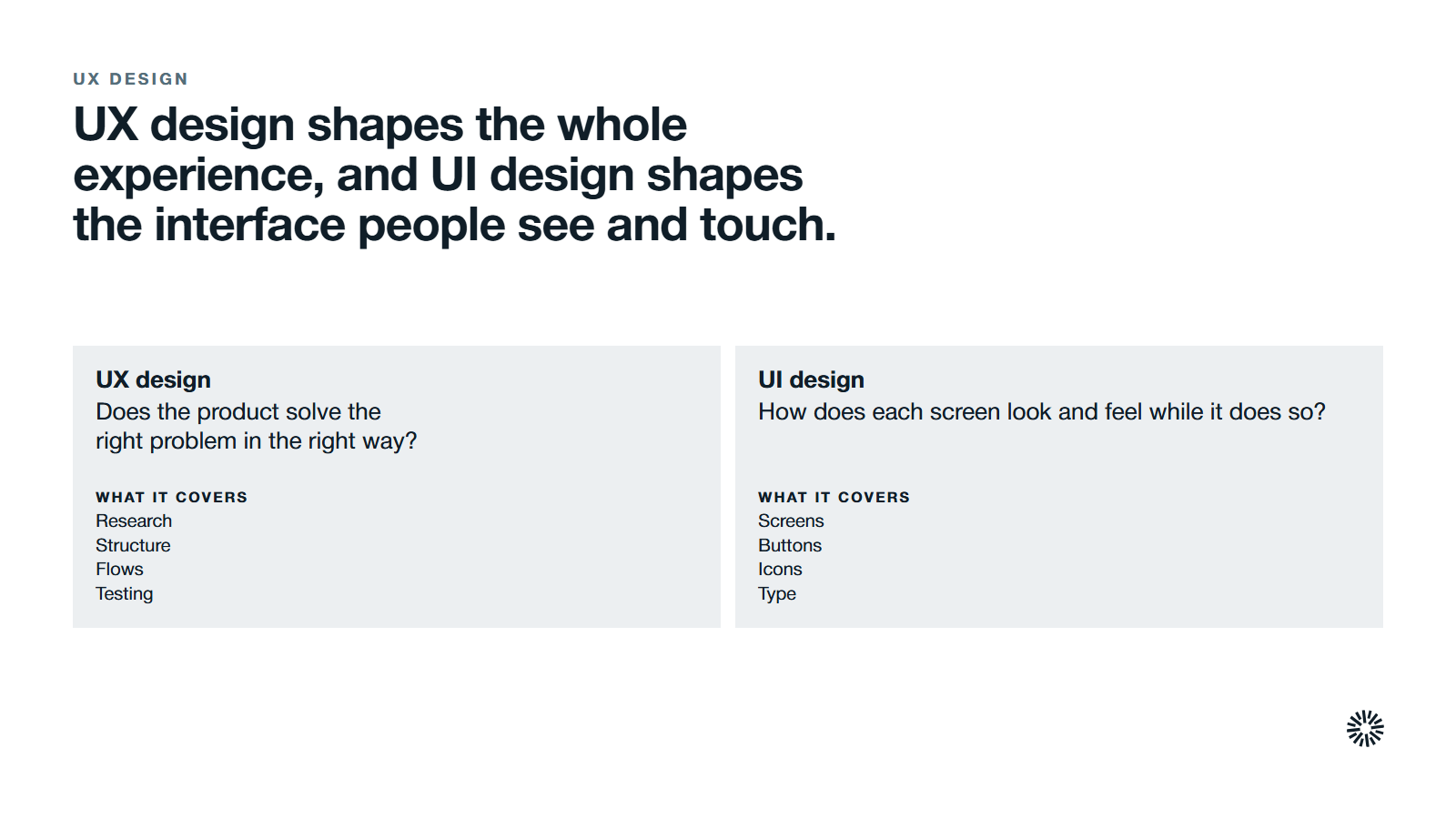
People use the two terms as if they mean the same thing. They are related, but they cover different work, and knowing the difference helps you brief the right people.
UX design is the whole experience: research, structure, flows and testing. UI design is the craft of the user interface itself, meaning the screens, buttons, icons and type that make up the graphic user interface. UX asks whether the product solves the right problem in the right way.
UI asks how each screen looks and feels while it does so.
UI designers focus on layout, color, consistency and visual hierarchy. They work from the structure that UX designers define. In practice the two disciplines overlap, and in smaller teams one person covers both. A beautiful interface cannot rescue a confusing journey, and a perfect journey feels cheap in a poor interface.
Good UX design follows principles you can check
You do not need a design degree to review a page. These principles hold across different platforms.
Design for the end user, not for the company
User centered design means each decision starts from the end user's goals and context. Describe the target audience using what customers and sales conversations reveal, then check each page against it.
Make the next step obvious
A visitor should always know where to go next. Clear calls to action, plain labels and a sensible page order guide users toward the outcome you want. If people ask your sales team how to find something, your navigation has already failed.
Respect speed and stability
Slow or shifting pages break trust. Google's Core Web Vitals guidance recommends that the largest content element loads within 2.5 seconds of when the page starts loading, which gives a concrete target for your developers. Speed is part of the experience, not a separate technical topic.
Keep it consistent and easy to learn
Consistent patterns, readable type and sufficient contrast reduce effort. When the same action looks the same everywhere, users learn once and move faster. A product that is easy to learn for first-time users, yet efficient for people who return often, has good learnability.
Give feedback and reduce effort
Every action deserves a clear, immediate response, such as a confirmation message after a form is sent. Efficiency matters too: the fewer decisions and fields a task needs, the lower the cognitive load on the person completing it. Value and utility come first, since content or functionality that people do not need is noise.
Make it accessible and desirable
Accessibility means people with a range of abilities can use the product, and it also helps everyone else. Desirability is the emotional side: delighting users with a polished, respectful experience builds an emotional connection and brand trust, because it shows the company values their time.
UX design supports search, conversion and measurement
Good UX design shows up in results you already track. The link between experience and numbers is why revenue teams care.
For search, Google says its ranking systems look to reward content that provides a good page experience, and that site owners should not focus on only one or two aspects of it. Its page experience guidance is a useful reference. Our guide to SEO shows where the two meet.
For conversion, experience quality decides whether intent turns into action. Baymard Institute's analysis of 50 studies puts the average documented cart abandonment rate at 70.22%. Every checkout step you simplify tackles part of that loss.
For lead generation sites, the same thinking applies to forms and booking steps, which is the territory of conversion rate optimization.
For measurement, track what visitors do, not only what they see. Our guide to website metrics to track lists a starter set, such as conversion rate, time on page and form completion. Pair those numbers with direct feedback to learn why behavior changed.
What you gain when this is done properly
Sales gets better conversations
When a website explains the offer clearly and makes booking simple, buyers arrive better informed and more willing to talk. Reps spend less time repairing confusion and more time on the buyer's real problem.
Marketing gets content and pages that perform
Marketing can place content where people look and in the order they need it. A positive user experience keeps visitors reading, which gives your content strategy more chances to work.
Customer success gets fewer avoidable questions
Clear onboarding, help content and product navigation reduce the questions that reach the support queue. Customers who find it easy to use what they bought stay longer and are more open to expanding. What customer success hears also becomes research input for the next design round, which supports customer satisfaction.
How to start improving your UX without a large project
You can begin with a small amount of effort. First, pick one important journey, such as a visit to a demo request. Second, watch five people attempt it and note where they hesitate. Third, fix the biggest obstacle and test again.
If your team is small, a product manager or marketer can run the first round of user testing. Add UX design skills as the evidence builds: research, information architecture, interaction design and visual design. Key skills include empathy, problem solving, clear communication and collaboration with developers and other stakeholders.
They matter less than the habit of testing with real people. Larger teams add a creative director to set the visual direction.
AI can speed up drafting and summarizing research, and some people wonder whether it will replace designers. Judging what users need still depends on people who understand the context, so treat AI as a drafting tool, not a substitute for research.
UX design stays in high demand because digital experiences now sit at the center of how people buy.
UX design works best inside a connected go-to-market system
Experience problems rarely stay on one team. A confusing pricing page affects sales, a broken form affects reporting, and a poor handoff affects onboarding. The strongest programs treat the website, CRM and customer journey as one system.
Propello designs and builds connected GTM systems on HubSpot, and is a HubSpot partner, as our about page explains. If your website produces visits but not conversations, a GTM audit is the place to start.