
If you lead sales, marketing or revenue operations at a growing B2B company, you may know this scene. A deal sits in "Proposal" for three months, two reps use the same stage to mean different things, and the number on the forecast slide changes depending on who built it.
Sales pipeline stages fix this when each stage has a name, a written exit criterion and an owner. A stage only means something if everyone can tell, from the record alone, whether a deal has earned its place.
This article shows you how to define sales stages that way in seven steps, so your sales cycle becomes something you can manage and measure.
|
Sales Pipeline Stage A sales pipeline stage is a defined point in your sales process that a deal reaches only after meeting written exit criteria, so every deal at that stage is comparable. |
What you will have at the end
You will have a short list of pipeline stages, each tied to something the buyer has done, not something a rep feels. Every stage will carry exit criteria, an owner and a probability you can defend.
You will also have the CRM settings that enforce those rules, a clean way to close deals as won or lost, and a quarterly check. The result is a sales pipeline that your sales team, finance and the board read the same way, which supports sales pipeline management and business growth planning alike.
What to have in place before you start
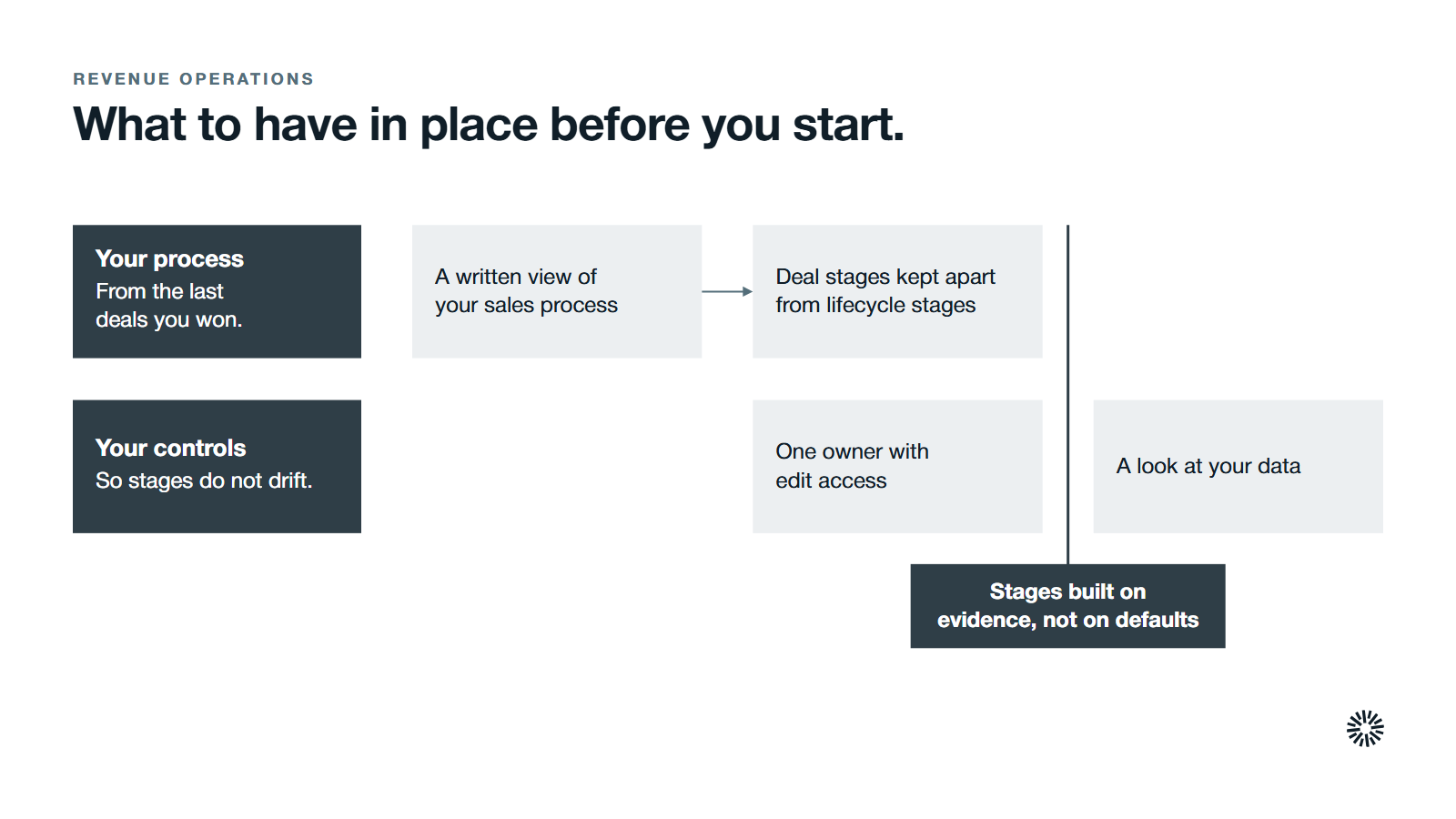
Stage design is a decision about how you sell, not a settings task. A little preparation keeps the stages from becoming a copy of whatever the CRM tool shipped with.
A written view of your sales process
Sit down with two or three of your best sales reps and their manager and walk through the last ten deals you won, from first meeting to contract signed.
Note how long each took, because the length of your sales cycle shapes how many stages make sense. Write down what the buyer did at each turning point.
Those turning points are the raw material for your stages.
A clear line between deal stages and lifecycle stages
Deal stages belong to a single deal and track one sale through the pipeline. Lifecycle stages belong to a contact or company and track the wider relationship, from first interest to customer. Mixing the two is a common reason reports disagree.
Our guide to HubSpot lifecycle stages covers the contact and company side, so this article stays on deals.
Edit access and one owner
In HubSpot, users need the Edit property settings permission to create or edit pipelines and stages, according to HubSpot's pipeline help page. Decide who holds that permission and who approves changes, so the stages do not drift one rep request at a time.
A sense of where the data stands
Data quality sets the ceiling on trust. Salesforce's 2024 State of Sales research found that only 35% of sales professionals completely trust the accuracy of their organization's data.
Check how many open deals lack an amount, a close date or an owner before you redesign anything. Good pipeline management starts with records that can be trusted.
Sales pipeline stages in seven steps
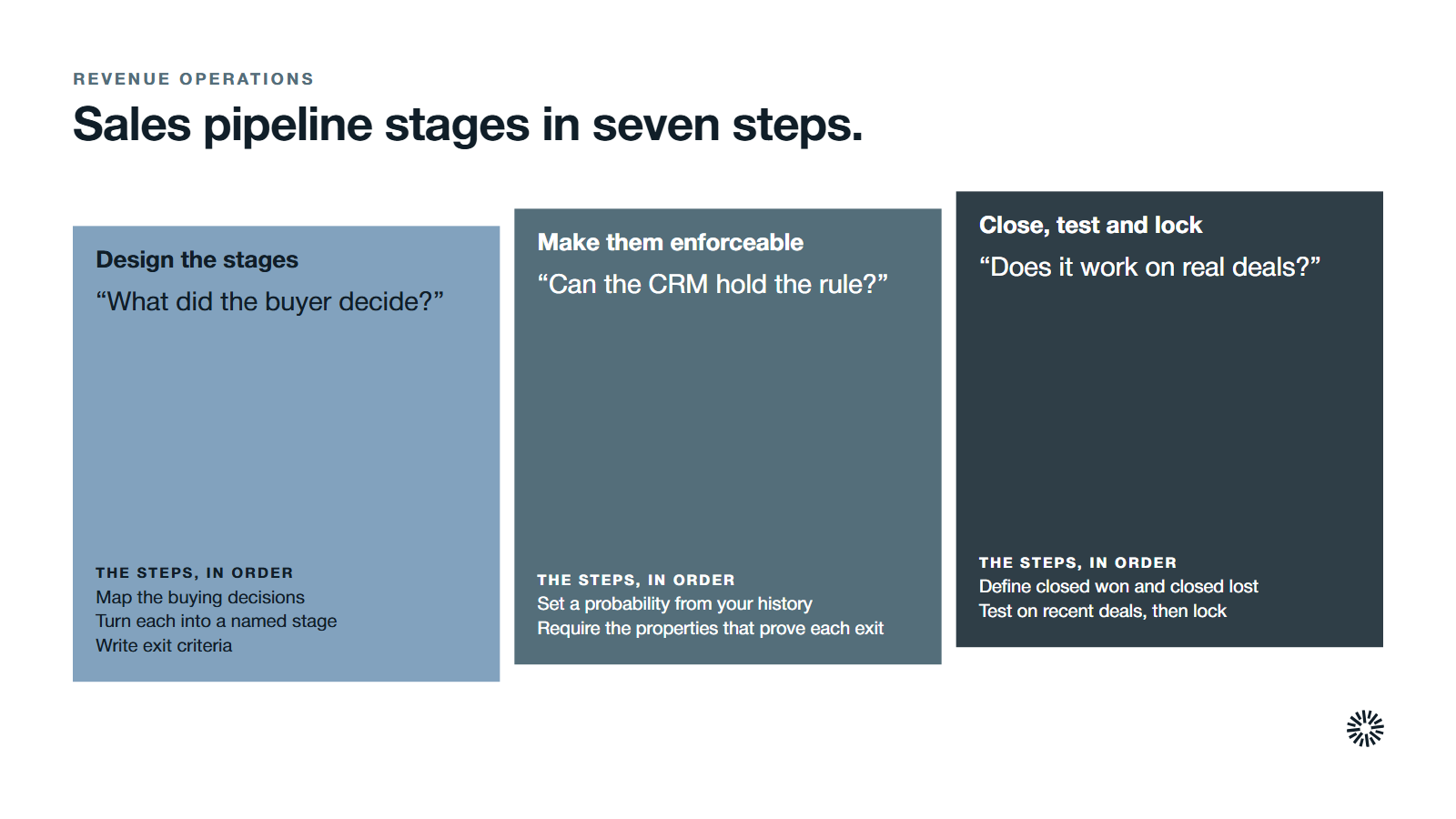
Work through these in order. Each step ends with what done looks like, so you know when to move on.
1. Map the buying decisions your customers actually make
Start from the buyer, not the rep. Potential customers move forward when they make buying decisions: they agree a problem is worth solving, the right person joins the conversation, a budget is confirmed, a contract is signed.
List those decisions in the order they usually happen across your last wins and losses. Where wins and losses diverge, you have found a stage boundary worth defending. Those sales stages are the ones your reps will rely on to reach their sales goals.
A sales pipeline is the sequence of steps a deal follows from first prospecting to close, so the order matters as much as the names. Sales prospecting comes first, and qualification follows it.
Website chatbots that engage visitors instantly and tools that reveal which companies visit your site can feed new leads into the top of the pipeline.
Keep lead handling upstream of the stages themselves: our guide to MQL vs SQL covers the handoff that opens the pipeline.
Done looks like this: one page listing the buyer decisions in order, agreed by the people who close deals.
2. Turn each decision into a named stage
Name each stage after the buyer outcome it represents. A stage called "Qualified to buy" says something about the buyer. A stage called "Following up" only says something about the rep. Stages that follow the buyer also make more sense to the people using them.
HubSpot's default sales pipeline is a useful reference. Its seven stages are Appointment scheduled, Qualified to buy, Presentation scheduled, Decision maker bought-in, Contract sent, Closed won and Closed lost, as the HubSpot pipeline help page shows.
Most sales pipelines also share a common shape, from prospecting to closing:
- Initial contact builds rapport and books a discovery call or demonstration.
- Qualification checks that the prospect fits your target market and shows real buying intent.
- Needs analysis uncovers the prospect's specific pain points and goals.
- The proposal stage sets out scope and pricing, and it is critical for closing deals.
- Negotiation addresses objections and refines contract terms while protecting your margins.
- Closed won or closed lost ends the deal.
Start from your own sales process and only then compare it to those patterns and the defaults. Many teams rename a few of the defaults and add one or two additional stages for steps the defaults skip, such as a legal review.
Different industries need different stages: in the tech industry a security review often becomes its own step, and a company that sells into formal procurement may need a separate legal check. If a candidate stage would not trigger different work, it is a task, not a stage.
Done looks like this: an ordered list of stage names, each one describing something the buyer has done.
3. Write exit criteria for every stage
Exit criteria are the proof a deal must show before it moves to the next stage. They turn a vague hunch into a test that anyone on the sales team can run.
Write each criterion as something a system can check or a manager can verify in minutes: a meeting held, a buyer contact named, a quote sent, a signed order form received. Avoid words like "interested" or "engaged". They cannot be audited.
Defining exit criteria for each stage is essential for data integrity: without them, two reps can record the same deal differently.
For the qualification stage, a framework gives you a ready-made set of tests. BANT checks budget, authority, need and timeline, while ANUM checks authority, need, urgency and money. Researching the lead before the first call makes either test faster and more reliable.
Keep the list short. Two or three criteria per stage is enough. If a stage needs ten, it is probably two stages.
| Stage | Exit criteria (illustration of format) | Owner |
|---|---|---|
| Qualification stage | Need, budget range and timeline confirmed in a call | Sales rep |
| Solution fit | The budget holder has seen a demo built on their use case | Sales rep |
| Proposal | Pricing sent, and the buyer has named a decision date | Sales rep |
| Contract | Terms agreed and order form out for signature | Sales leader |
The table shows the format, not a recommended set of stages. Your own buying decisions from step 1 should drive the rows.
Done looks like this: every stage has two or three testable exit criteria and one named owner.
4. Set a stage probability you can defend
HubSpot asks you to pick a probability for each stage. It uses that figure to calculate the weighted amount shown in board view, which multiplies each stage's total by its probability, per HubSpot's pipeline help page.
That makes the probability a forecasting input, so it should come from your own history, not a default. Look at your closed deals over several quarters and ask what share of those that reached each stage later closed won.
Revisit these numbers each quarter, and keep your sales goals in view so the forecast and the plan tell one story. If a stage has too few deals to tell, say so and keep the number conservative. A blunt estimate you can explain beats a precise one you cannot.
Sales forecasts are only as honest as these inputs, and a rep who knows the next stage and its test can plan the follow up that earns it. Our guide to sales velocity metrics shows how stage movement and win rate combine into a forward view.
A well-run sales pipeline enhances revenue forecasting and helps you identify bottlenecks. Conversion rates between stages point to the weak points in your sales process, and a structured pipeline helps you shorten the sales cycle and raise sales velocity.
Done looks like this: each open stage has a probability based on your own history, with the source noted.
5. Require the properties that prove each exit
A written rule that the CRM cannot enforce will be skipped on a busy Friday. Use the CRM tool to make the exit criteria real, and the sales team will find it easier to follow the rules than to work around them.
HubSpot supports conditional stage properties: you add dependent properties to a stage and mark them as required, and then, per the HubSpot pipeline help page, users cannot create or update the record until they enter a value.
Read-only properties such as score or calculation properties cannot be used, and the property must exist before you configure the rule.
Beyond required fields, a CRM can also save time by automating appointment scheduling and follow-up emails when a deal reaches a stage, which spares reps the manual chasing.
Map each exit criterion to a field. A named buyer contact becomes a contact association. A decision date becomes a close date. A quote sent becomes an amount.
Done looks like this: a rep cannot move a deal to the next stage without the evidence the stage demands.
6. Define closed won and closed lost, and capture the reason
Closing a deal is a stage decision too. HubSpot requires both outcomes: you must include stages for Won and Lost under deal probability, so sales reports and analytics process your deals correctly.
Closed won means a signed contract and agreed payment terms. Closed lost means the prospect has decided not to proceed. Closing often needs several approvals from decision makers, so the rep should keep in contact with the buyer through the final stretch.
Add a required loss reason from a short list your team agrees on, such as price, no decision, lost to a competitor or timing. Those reasons are the best input you will have for improving the process.
Treat a stalled deal as a decision, not a waiting room. Set a rule for how long a deal can sit with no activity before a manager reviews it, and close it lost if the buyer has gone quiet.
A won deal is not the end of the pipeline's usefulness. Follow-up after the sale supports customer retention and gives you a natural moment to discuss an upsell.
Done looks like this: every closed deal carries a reason, and no open deal has been idle past your limit.
7. Test your sales stages against real deals, then lock them
Before you announce the change, take ten recent deals and place each one in your new stages using only the evidence in the record. If two people place the same deal differently, a stage is still ambiguous.
Then decide whether you need more than one pipeline. HubSpot recommends separate pipelines only if your processes have unique stages that require different pipelines. Otherwise, one pipeline plus permissions is simpler to report on.
Before you remove a stage from a live pipeline, check the Used in column for records and rules that depend on it, as the HubSpot pipeline help page explains. Move open deals first and delete afterward.
Finish by building a sales pipeline view for managers, so pipeline visibility improves decisions well beyond the sales floor. Sales performance reviews can then track each rep against the same yardstick.
Done looks like this: a tested stage list, a decision on pipeline count, and a date for the next review.
Sales pipeline mistakes to avoid
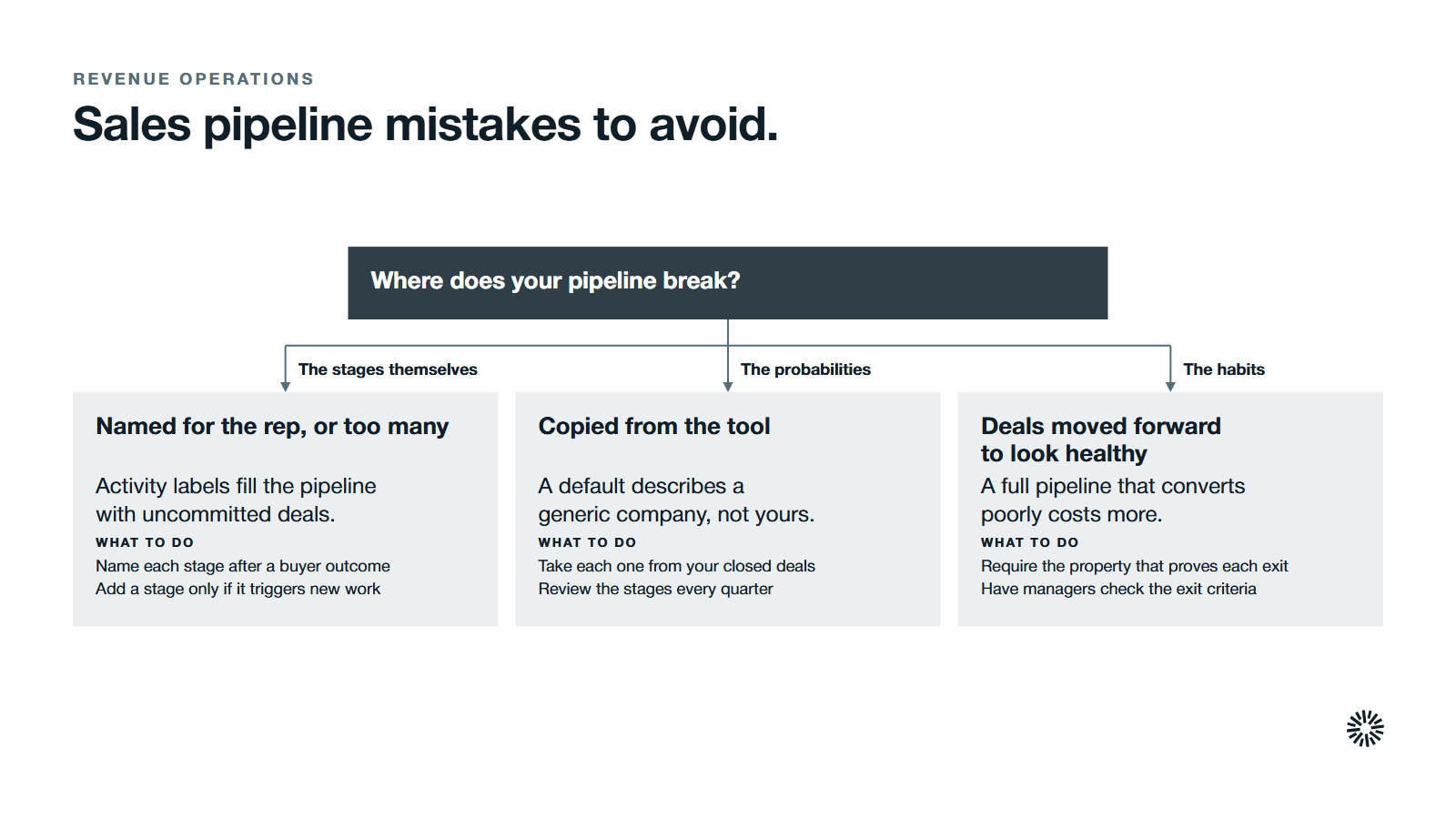
Most broken pipelines fail in a few predictable ways. Check yours against this list.
Stages that describe the rep's activity
"Follow up" and "Left voicemail" are tasks. They fill the pipeline with deals that look active but have no buyer commitment behind them.
Too many sales stages
Every stage adds a decision for the rep and a number for the forecast. A long list slows down data entry and invites guessing, and sales leaders end up with sales forecasts nobody believes. Add a stage only when it triggers different work.
Probabilities copied from the tool
Defaults are a starting point, not evidence about your market. If you never replace them, the weighted amount reflects a generic company, not yours.
Moving deals forward to look healthy
Reps sometimes push a deal up a stage to prepare for a pipeline review. Required properties and a manager check on exit criteria stop this. A pipeline that looks full but converts poorly costs more than an honest, smaller one, because the team focus drifts to deals that were never real.
Never reviewing the stages
Your offer and buyers change. Put a stage review on the calendar each quarter and compare stage definitions with how deals really closed. Our guide to keeping a HubSpot CRM clean covers the wider routine this review belongs to.
What you gain when this is done properly
The benefits show up in three teams, and each one gets something different.
Sales
Clear stages save time because reps spend less of it guessing what to do next. Salesforce's 2026 State of Sales report found that the average seller spends 40% of their time selling, so time lost to pipeline arguments and rework is time away from customers.
Every sales rep knows what the next stage demands, and each sales team lead can coach to a stage instead of to a story. Sound sales pipeline management also gives leaders sales forecasts they can defend.
Marketing
Marketing can see which campaigns produce new leads and new customers, not just first meetings. Conversion rate by stage shows where sourced deals stall and how long the sales cycle runs for each source, which tells you where to adjust content, handoff or targeting.
Customer success
Customer success inherits a deal with its history intact: who the buyer contacts were, what the client expected and why they bought. Onboarding starts from the exit criteria the sales team already captured, so the expectations set in the sale are not lost at handoff.
Pipeline management works when stages connect to the rest of your revenue system
Stages connect lead handoff, lifecycle stages, forecasting and reporting. If one of those is loose, the pipeline drifts. This is the design work behind a sound CRM architecture, and the work that revenue operations exists to own.
Propello is a HubSpot partner that designs and builds connected go-to-market (GTM) systems on HubSpot. If your stages exist but nobody trusts the pipeline, a GTM audit is the place to start.
