
If you lead revenue at a growing B2B company, HubSpot onboarding is the work that happens after your portal is built: adding users, setting permissions, bringing in customer data, training each team and checking use week by week until the new habits hold. Do it in order and your team can be working from HubSpot within 90 days.
This guide is for CEOs, founders, CROs and revenue leaders, and for the operations lead who runs the rollout. You get six steps with a finish line for each, what to line up first and the mistakes that leave a new HubSpot account half used.
|
HubSpot Onboarding The planned process of moving a team into a configured HubSpot account: setting up users and permissions, loading customer data, training each role and tracking use until daily habits form. |
By the end you will have a team that runs on HubSpot
A built portal is not a working one. People still have to be added, trusted with the right records, shown what to do and held to a routine. The HubSpot onboarding process turns a finished build into daily use, and the quality of the onboarding experience is what decides user adoption. A structured onboarding lowers the risk that the rollout fails and speeds up the return on your HubSpot investment, because the team starts using what you built sooner. Done well, it also gets marketing, sales and service teams working from the same goals and the same customer records.
At the end of the first 90 days you should have:
- One owner and a written goal for what the team does in HubSpot every week.
- Every user in the right team, with permissions that match the job.
- Customer data loaded once, without duplicates, and owned by the right people.
- Pipelines, views and dashboards that each team opens first thing.
- Training sessions built on live work, one per role.
- A weekly check and a 90-day review with a named decision at the end.
What to have in place before you start
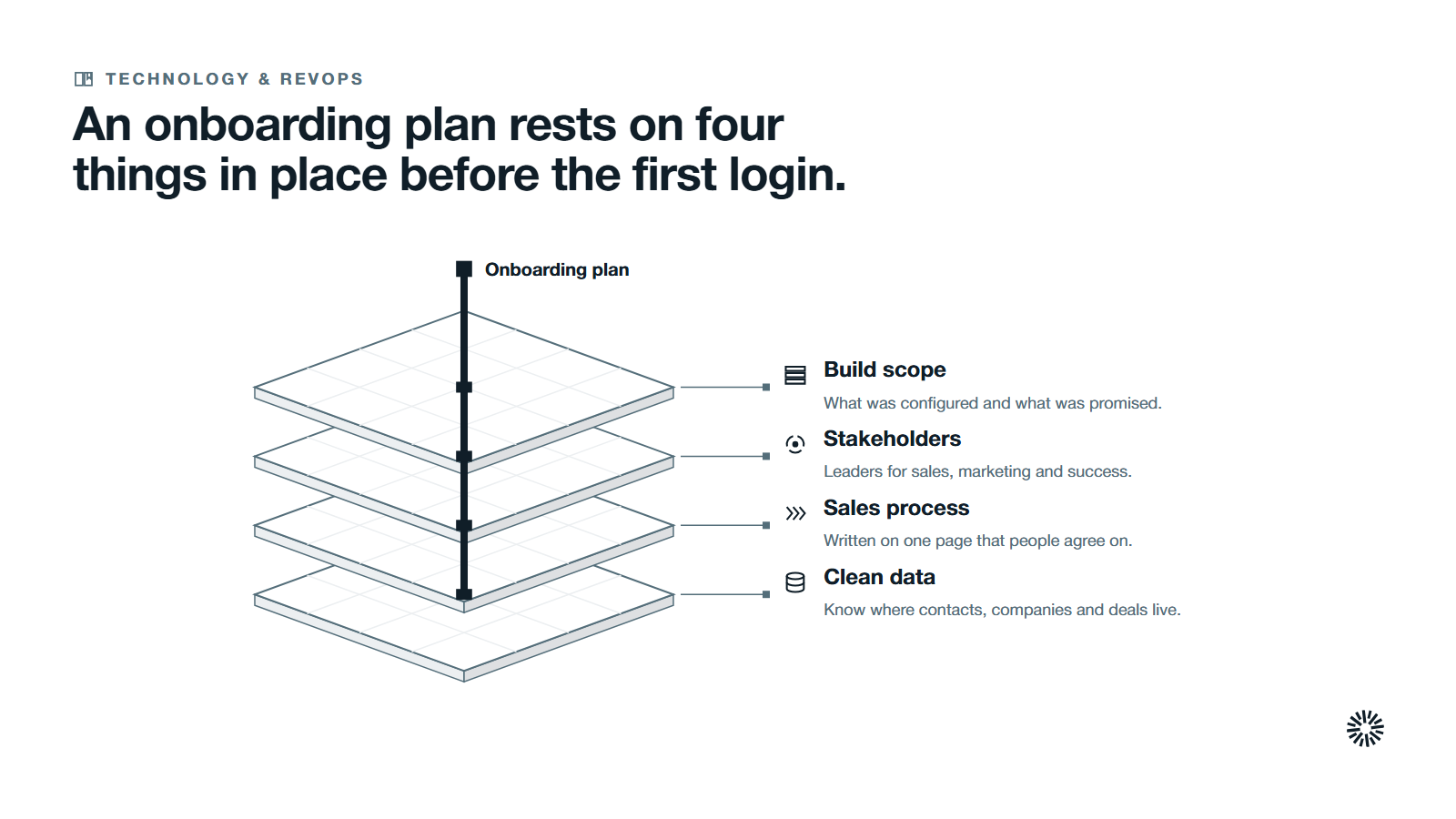
Onboarding assumes the build of your HubSpot portal is done. Even teams that implement HubSpot well need this step, and if the account is not yet configured, finish that first. Then line up four things before the first user logs in.
- The scope of the build. Know what was configured: which hubs are live, which pipelines exist, which properties were created and what each team was promised.
- Key stakeholders. Name the internal stakeholders, meaning the leaders for sales, marketing and customer success, plus one person who can decide quickly when they disagree. Ask each of them how their team works today, because those current processes are what the account has to support.
- A sales process written on one page. People cannot follow a system that encodes a sales process nobody agrees on.
- A clean source of customer data. Know where contacts, companies and deals live today and who maintains each file.
Add a start date and a review date to the plan. A personalized onboarding plan is simply this list with names and dates beside every line, and it should tie back to your business goals rather than to a list of features.
Where implementation ends and onboarding begins
Implementation builds the account. HubSpot setup covers the platform setup, the technical setup, the tool configuration, the properties, the pipelines, the integrations and the data model. Onboarding makes people productive in it. Complex data migrations and several hubs stretch the timeline, so scope the work honestly.
The two overlap at the edges, so agree who owns what before you start. Write down every setup decision as you go, so the next admin knows why a field or a stage exists. If your team is still deciding on stages, settle the definitions in HubSpot lifecycle stages before step four.
Choose your onboarding path
You have three realistic paths. Work through the onboarding on your own with a project lead on your side, buy onboarding services from HubSpot, or work with an onboarding partner that has delivered the same rollout before.
HubSpot describes its own services on hub pages such as Sales Hub Onboarding, which it designs for new customers using that hub for the first time. A certified HubSpot partner can add strategic guidance and hands-on help with data, custom integrations and the rest of the technical work.
Doing it yourself usually costs less up front, but it needs real HubSpot knowledge in house and carries a higher risk of errors. Working with a partner costs more, allows more customization to your business processes and can shorten the timeline.
Whichever path you pick, the right onboarding partner is the one that leaves your team able to run the account without them. Ask what they hand over, who trains your people and what ongoing support looks like after the first 90 days. The cost of HubSpot onboarding services depends on scope, so compare quotes on what each one includes, not on the headline figure.
What onboarding covers in each hub
The same six steps apply whichever tools you run, but the emphasis changes.
- Sales Hub. Deal stages, email templates, task routines and sales reports. The aim is a pipeline that reps update because it helps them sell.
- Marketing Hub. Forms, landing pages, marketing emails, lead capture and lead nurturing. The aim is leads that arrive with an owner and a source.
- Service Hub. The ticket pipeline, the shared inbox and the handoff from sales. The aim is service teams that see the whole customer journey.
Most revenue teams use several HubSpot tools together across marketing, sales and service, so plan the onboarding across all three teams at once. That is the only way to get one view of the customer.
Staff onboarding is different from customer onboarding
Some teams also want to use HubSpot to run their own customer onboarding process, with tickets, tasks and handoffs for new customers. That is a separate piece of work. This guide covers onboarding your own team onto the platform, which has to come first.
HubSpot onboarding in six steps
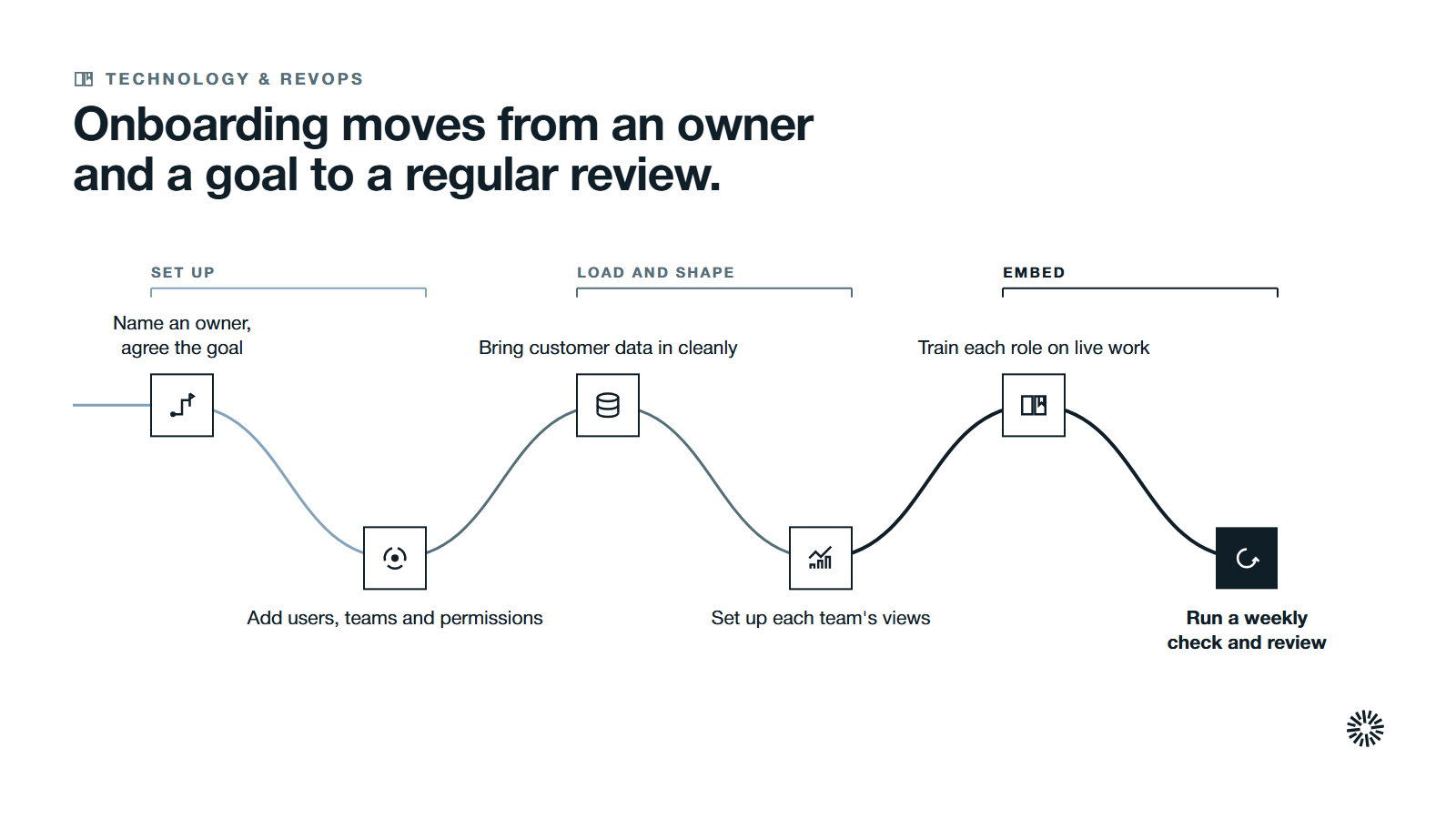
Each step ends with what done looks like. Work through them in order, because each one depends on the last.
1. Name an owner, bring in the key stakeholders and agree the 90-day goal
Pick one person who is accountable for onboarding, even though sales, marketing and customer success all take part. Give that project lead authority to say no to requests that would delay the rollout.
Then write the goal as a behavior. "Every open deal has a next step and a close date, and every rep updates deals in HubSpot before the Monday pipeline review" is a goal. "Everyone is on HubSpot" is not.
Agree the review points now: a first check at the end of the first month, a second at the end of the second month and a decision at day 90. Share the plan with the key stakeholders so no one is surprised by the dates. Document your internal process standards at the same time, such as how deals are named, what counts as a qualified lead and who owns each handoff.
Finally, decide how you will measure it. Pick three performance metrics from this list and write down where each one comes from in HubSpot:
- Active users each week.
- Deals with a next step and a close date.
- Contacts and companies with an owner.
- Tickets with a status and an owner.
You are done when one page names the owner, states the goal in one sentence, lists the metrics and gives the three review dates.
2. Add users, assign teams and set permissions
Start with access, because it decides what every person sees on the first day. In HubSpot, a Super Admin creates users by entering an email address, then selecting seats, permissions and teams. You can add people one at a time, import them from an integration or upload a CSV file.
Group people into teams that mirror how you work, such as regions or product lines. Teams control record access and team-based reports, so build them before you load data.
Then set user permissions by role. HubSpot's user permissions guide explains that you can give a sales rep permission to communicate only with contacts they own while a sales manager can communicate with all contacts. The same guide lets you control who can import, export, bulk delete and customize record layouts.
Give the fewest permissions that let each role do its job, and widen them later when someone asks. A short list works well:
- Reps: view and edit their own records, with no bulk delete.
- Managers: view and edit their team's records, plus reports.
- Marketing: access to the marketing tools they publish with, kept separate from CRM deletion rights.
- Admins: a small group of named people, not the whole leadership team.
Define one permission template per role and copy it from a similar user, so each new hire gets the same access as their peers and you save time on every addition. Send each new user an invite with a first task for day one: completing their profile, connecting their work email and calendar so meeting scheduling and email follow-up start at once, and opening their own list of records. Keep a short record of who has which access and why, so the next audit of the account takes minutes.
You are done when every person has a seat, a team and a permission set, and a test login for each role shows only what that role should see.
3. Bring your customer data in cleanly
Load the data once, after access is set, so ownership is assigned correctly from the start. Treat any data migration or data import as a project with its own checklist, not a spreadsheet upload on a Friday afternoon.
Messy imports lead to inaccurate reporting, unusable dashboards and frustrated users, so clean the files first. Remove duplicates, fix formats and decide which fields you will keep. Good data quality starts here, and so does data integrity: once two systems disagree about a customer, people stop trusting both. For a method, see how to clean a HubSpot CRM and keep it clean.
HubSpot's guide to setting up your import file states that each column header should correspond to a property in HubSpot. It also states that, to update existing records and avoid duplicates, your file must include a unique identifier for each object, such as Email for contacts or Company domain name for companies. Add an owner column so each record lands with the right person.
If your files hold information that has no matching field, create custom properties before you import, not after. Keep the list of custom properties short, and give every property a purpose that a report or a view will use.
Run a small test import first, check it with the owner of the data and only then load the existing contacts and companies. Importing records requires Import permission and Edit permission for the object, so confirm that your admin has both.
You are done when every record has an owner and a team, a spot check of records from each source matches the original files and no duplicates appear in a test search.
4. Set up each team's working views and routines
People adopt a system when the first screen they open helps them do their job. Build one starting point for every team, so the learning curve is short and every person finds what they need in under a minute.
Sales. Agree the deal stages with the sales team, set up the pipeline view reps will live in and create a few email templates for the messages they send most. Add a short list of required fields so the data stays useful for forecasting and for judging the sales cycle. Start with simple sales automation, such as lead assignment and follow-up reminders, and leave the rest until the basics hold. Rushing automation without a strategy creates confusion.
Marketing. Check that lead capture works end to end: HubSpot forms, landing pages and marketing emails. Confirm that a new contact reaches the right owner, that the first lead nurturing flow starts only for the right contacts and that the marketing team can see which channels drive lead generation.
Customer success and service. Set up the ticket pipeline, the shared inbox rules and the handoff from sales, so a new customer is not asked the same questions twice. Customer service teams work best when they can see the deal history before they reply. Add a simple way to capture customer satisfaction after a ticket closes.
Leadership. Combine the key reports in one of your reporting dashboards. HubSpot's dashboards guide notes that dashboard access does not override report sharing or the data permissions each report needs, so check each viewer can see the data behind the numbers. Add custom reports only when a standard report cannot answer the question.
Keep the first version small. A handful of views and one dashboard per team is enough. You can optimize workflows once people use the basics.
You are done when each team has a saved view, a short list of required fields and a dashboard it can open without help.
5. Train each role on live work to build user adoption
Train people on their own accounts and their own deals, not on sample data. A one-hour session per role beats a long general course, and it works best when it uses real records the person already cares about.
Give each role one job to complete in the session. A rep logs an email, updates a deal and sets a task. A marketer publishes a form and checks where the contact lands. A support agent works a ticket from open to closed.
Test the common workflows during each session, such as logging a call or closing a ticket, so problems surface early. Pair each new user with a buddy, a colleague who has used the account for a while and can answer quick questions. Record each session so new hires can watch it later. HubSpot Academy offers online lessons and certification courses that suit self-paced learning between sessions, and your own recordings cover what is specific to your process. Together with the knowledge base and your partners, they make up the HubSpot ecosystem you can draw on, and they make user training something people can return to rather than a one-off event.
Keep each session short and let people ask questions. Create a place where users can raise problems, and answer the same day while the habit is forming. For the full adoption routine, including how to remove data entry people resent, see HubSpot training that sticks.
You are done when every user has completed their role's live task and knows where to ask for help.
6. Run a weekly check and a 90-day review
The first weeks decide whether the habit forms, and effective onboarding needs continuous enablement and periodic check-ins, not a single launch. Hold a short weekly check for the first month: who has logged in, which records changed and what is blocking people. Ask each team lead one question each week: what is slowing your team down in HubSpot?
Move pipeline reviews into HubSpot from the first week. If leaders still ask for a spreadsheet, the team will keep both. Use the views you built in step four and make them the only source for the meeting.
Use the three review dates to change the pace:
- Day 30. Fix the top blockers, remove fields nobody uses and answer repeated questions with a short guide.
- Day 60. Compare team performance against the goal, and retrain any role whose numbers lag.
- Day 90. Decide what happens next: move to ongoing support, widen the rollout to another team or repair what the data shows is weak.
A HubSpot audit is a sensible next step if the review turns up problems you cannot trace. When the onboarding period ends, hand the weekly check to the account owner so it carries on without the project team.
You are done when the day-90 review has been held, the decision is recorded and someone owns the next quarter.
Mistakes to avoid in your first 90 days
Most stalled rollouts repeat the same few errors. Check your plan against this list.
- Starting without an owner. When everyone is responsible, no one chases the blockers.
- Giving everyone admin rights. Broad permissions let one mistaken bulk change damage the data for every team.
- Importing before cleaning. Duplicates and stray formats multiply once they are inside the account.
- Training everyone together on sample data. Roles do different work, and sample records teach no habits.
- Switching on automation too early. Automations built on unsettled stages and unclean data repeat the mistakes at scale.
- Letting leaders keep their spreadsheets. If leaders do not use the system, no one else will.
- Skipping training. Teams that skip it underuse the features they paid for.
- Ignoring user feedback. Dismissed complaints erode trust in the platform.
- Declaring victory at go-live. Use drops when attention moves elsewhere, so the weekly check has to continue.
What you gain when this is done properly
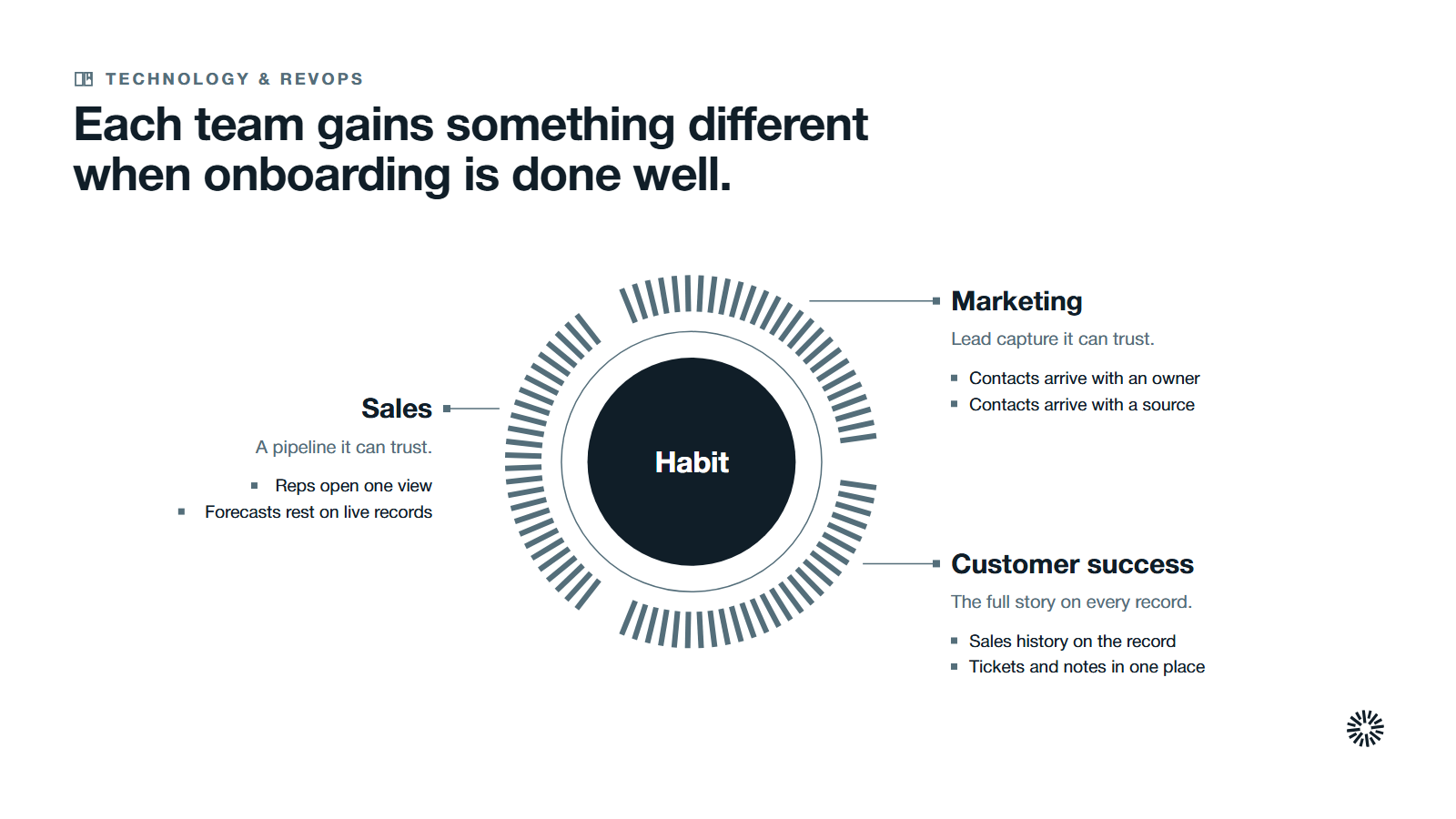
An onboarding with an owner, a plan and a review turns a new tool into a shared way of working. Each team gains something different.
Sales gets a pipeline it can trust
Reps open one view, see their own deals and know which fields matter. Managers run the pipeline review from live records, so forecasts rest on what is in the system rather than on side notes.
Marketing gets lead capture it can trust
Forms, landing pages and marketing emails feed contacts that arrive with an owner and a source. That makes it possible to see which activity produces leads that sales accepts.
Customer success gets the full story
Service teams see the sales history on every customer record, so first conversations start with context. Tickets, tasks and notes sit in the same record as the deal that started the relationship.
Make the first 90 days count
HubSpot onboarding works when it is treated as a project: one owner, a short plan, access set deliberately, data loaded once, training on live work and a review at the end. Skip any of those and adoption leaks away quietly.
Propello designs and builds connected GTM systems on HubSpot, and Propello is a HubSpot partner. If you want your account, permissions and reporting checked before you onboard a team, an audit is the place to start.
