
If you lead marketing or revenue at a growing B2B company, content decay is the slow loss of organic traffic, rankings and AI citations on pages that once worked. You find content decay by comparing two periods of data for specific pages, then fix each page by refreshing it, merging it or retiring it.
This article is for CEOs, founders, CROs and marketing leaders whose blog has grown old. You will get a plain definition, a picture of a healthy library, the metrics and formulas that expose decaying content, a way to triage each page, and a weekly, monthly and quarterly routine you can hand to your team.
|
Content Decay Content decay is the gradual decline in a page's organic traffic, search rankings and AI citations over time as its information ages, search intent shifts and competing pages take its place. |
What good looks like in a healthy content library
A healthy library does not mean every post grows. Some content decay is normal on any website that has published for years. What matters is that you know which pages are slipping and what you plan to do about each one.
A team that manages content decay well has four things in place:
- Every page that matters to pipeline has an owner and a date of its last substantive update.
- Your team can name the pages that lost clicks this quarter and the reason for each.
- A short list of decaying content is always in progress, so the backlog never becomes a crisis.
- You re-run the same buyer questions in AI search on a fixed schedule and know which pages are still cited.
That last point is the new part. A page can hold its place in search results and still drop out of AI generated answers, so you track traditional rankings and AI visibility separately.
Content decay has four causes, and only some of them sit on the page
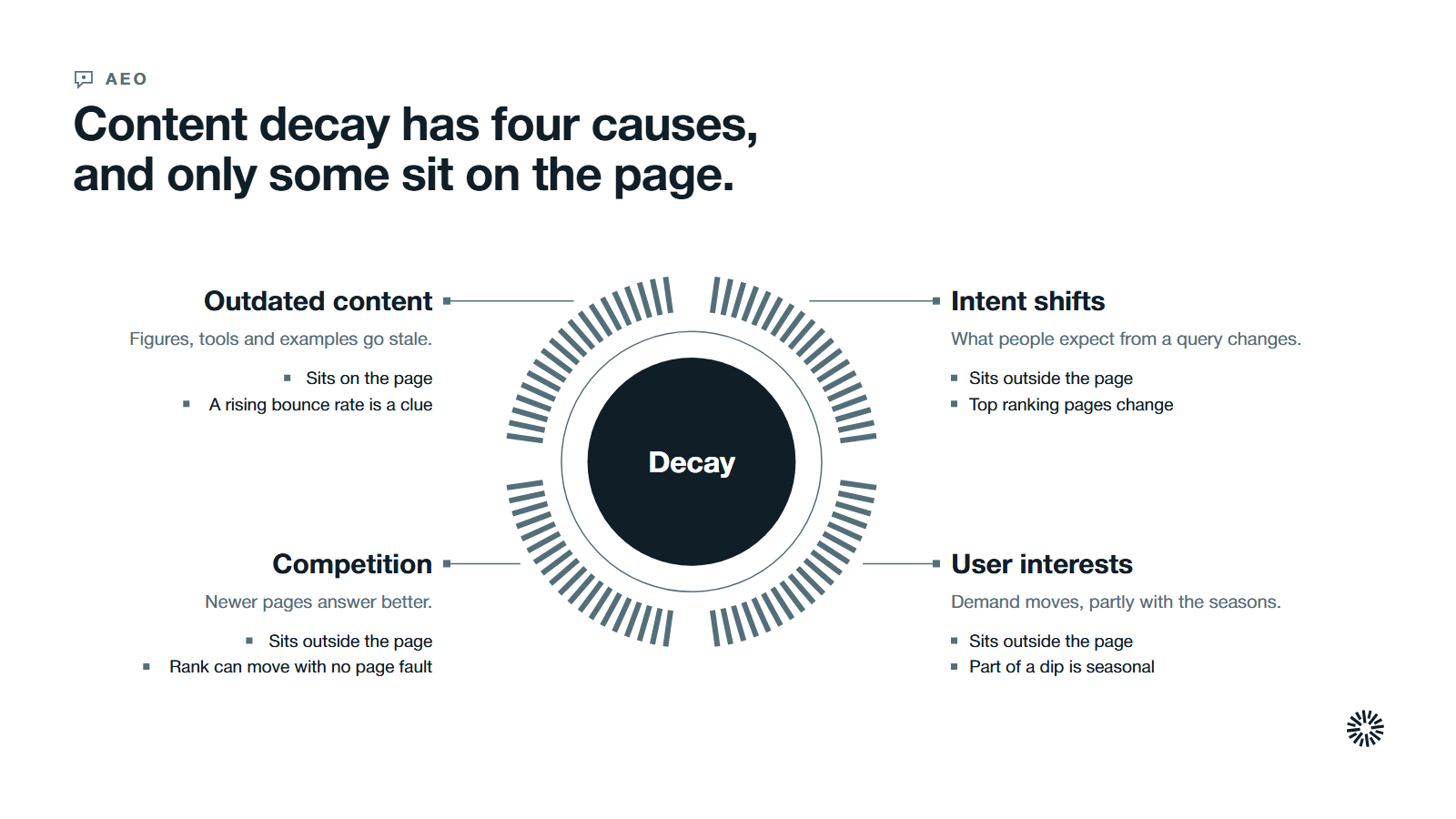
Google lists the usual reasons a site loses traffic in its guide to debugging drops in Google Search traffic. Four matter most when old content is slipping.
- Outdated content. Figures, images, tools and examples go stale. A rising bounce rate can be the first clue.
- Search intent shifts. What most people expect from a query can shift over the years, so the top ranking pages change too.
- Changing user interests. Google notes that shifts in user behavior change demand for certain queries, so part of a decline is seasonal.
- Competition and ranking changes. Newer pages answer the question better, and search engine algorithms update regularly, which can move SERP rankings without anything being wrong with your page.
AI search adds a fifth pressure on old content. In a July 2025 study of about 17 million citations, Ahrefs found that the average age of URLs cited by AI assistants was 1,064 days, compared with 1,432 days for URLs in organic results, which makes cited pages about 25.7% fresher.
A study from AirOps points the same way. In August 2025 it examined more than 4,000 pages cited by ChatGPT across 900 high-intent queries, and reported that pages not updated in over a year were more than twice as likely to lose citations.
These are patterns in what gets cited, not proof that an update earns a citation. Ahrefs says low-quality content that is updated every day will not gain visibility from the change alone.
The metrics that show content decay, with formulas
Use a small set of metrics, always compared against an earlier period of the same length. A number on its own tells you little. The change is the signal, and impression data shows whether a page is still being shown at all.
Click change
Click change is the share of organic traffic a page lost or gained between two periods, and it is the clearest sign of content decay on a single URL.
Formula: click change = (current clicks - comparison clicks) / comparison clicks x 100
Illustrative arithmetic, not a benchmark: a page with 400 clicks in the comparison period and 280 clicks now has (280 - 400) / 400 x 100 = -30%.
Impression change and click-through rate
Impressions count how many times your site appeared in search results, and Google defines click-through rate (CTR) as the click count divided by the impression count.
Formula: CTR = clicks / impressions x 100
Compare the two together. If both fell, the page is losing visibility. If impressions held but clicks fell, the page is still shown but fewer people choose it, which points to a weak title, snippet or a competing rich result.
Average position
Google defines average position as the average position of the topmost result from your site. Read it as a direction, not a verdict. Google's traffic-drop guide tells you to prioritize clicks and impressions, so use position to explain a change in clicks.
Citation rate on a fixed prompt set
Citation rate shows how often AI engines cite a page when your buyers ask the questions it answers.
Formula: citation rate = prompts where the page is cited / prompts tested x 100
Illustrative arithmetic, not a benchmark: if a page is cited in 3 of 12 tested prompts, its citation rate is 3 / 12 x 100 = 25%. Answers vary between runs, so look for a pattern across several runs.
Months since the last substantive update
This is not a loss metric. It flags outdated content that has not yet visibly declined, so an old, important page gets a review before its traffic drops.
Engagement is a supporting clue. Time on page and bounce rate show whether content still serves visitors.
Recoverable clicks
Recoverable clicks tell you which decaying page to fix first.
Formula: recoverable clicks = comparison clicks - current clicks
Multiply the result by a business weight your sales team assigns, from 1 for a page that attracts curious readers to 3 for a page that attracts buyers. The product is your priority score.
How to find content decay in Google Search Console
Google Search Console is the first place to identify decaying content on your website. The steps below follow Google's help pages for the Performance report and its advanced filtering and comparison.
Compare two periods in the Performance report
Open the Search results performance report and edit the date filter. Choose Compare, add the two periods and click Apply. Google's traffic-drop guide recommends a 16-month range to rule out yearly patterns, and suggests weekly or monthly granularity to reduce day-of-the-week effects.
Filter to your blog and sort by the difference
Click Add filter, choose Pages, and enter the part of the URL that covers your blog. Then use the Pages tab and sort by the Difference column, which Google says shows pages with significant change from a previous period. The largest losses are your decay candidates.
Separate lost impressions from lost clicks
For each candidate, read impressions and clicks side by side, then open its row to see the search queries behind it. Google's guidance is that when both fell you should investigate the causes above, and when impressions held but clicks fell you should improve titles and snippets.
Rule out technical and seasonal causes
Before you rewrite anything, check with the URL Inspection tool that Google can still crawl and index the page, and look at demand for the topic in Google Trends. Fix any technical cause first, because that restores traffic content decay did not take.
Check how your pages appear in AI features
Google's help page for the generative AI performance report says it shows impressions of your links in AI Overviews and AI Mode, with breakdowns by page, country, date and device. It may not appear if your site has too few impressions in these features.
Add your own prompt set for the engines Google does not report on, and record which pages each answer cites. Our guide to an AEO test-and-learn loop shows how to build that set.
Triage decaying content into refresh, merge or retire
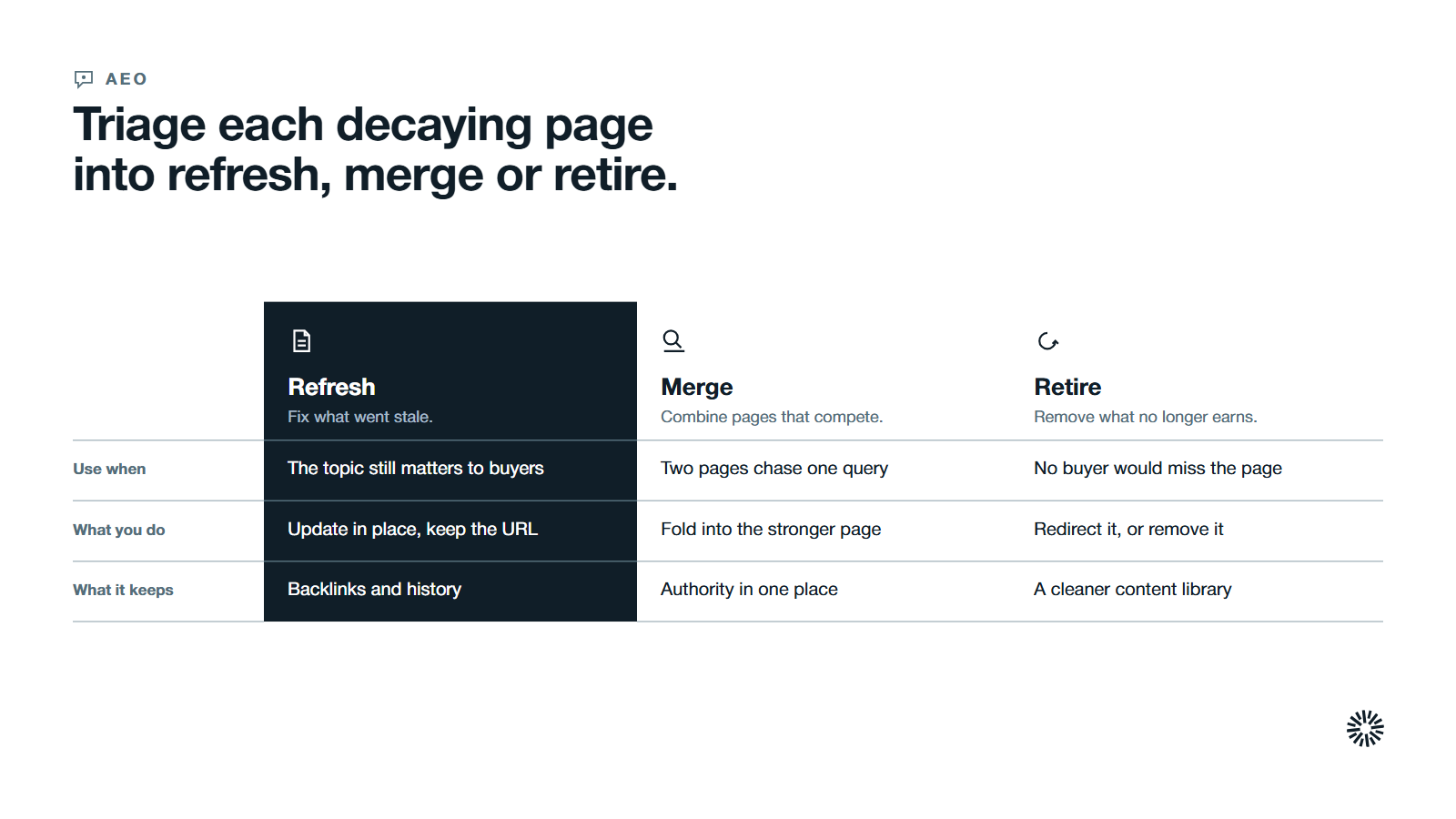
Finding decaying content is half the job. The other half is choosing the right treatment for each page, because the wrong one can cost you more than the content decay did.
| What you see | Likely cause | Treatment |
|---|---|---|
| Facts, tools or examples are out of date, and buyers still want the topic | Outdated content | Refresh: update the page in place and keep the URL |
| Impressions held, clicks fell | Weak title, snippet or a competing rich result | Rewrite the title and description, then re-measure |
| Two of your pages chase the same query | Competition between your own pages | Merge into the stronger URL and redirect the other |
| The topic no longer matches what buyers ask | Search intent shift or lost relevance | Retire, or rebuild around the new intent |
| Clicks dip in the same weeks every year | Seasonality | Leave it alone and watch the year-over-year view |
When refreshing content is the right call
Refresh when the topic still matters to your buyers and the page already has a good URL, a backlink profile and a history. A content refresh keeps those assets. It is usually the fastest fix for content decay, because you rebuild the answer around what readers need now.
When to merge two pages
Merge when two pages answer one question and split the signals between them. This keyword cannibalization is content decay that comes from your own publishing, because it divides authority among competing articles. Move the best material into the stronger page, then redirect the weaker URL to it.
Google recommends a permanent server-side redirect whenever possible, once you are sure the change is final.
When to retire a page
Retire a page when no buyer would miss it, it earns no traffic or links, and no refresh would give it a purpose. If a close replacement exists, redirect to it. If none does, removing the page is cleaner than keeping a weak one that dilutes the library.
What a content refresh changes on the page
A content refresh is a substantive edit that makes a page more accurate and more useful. It is not a new date on the same words. Google's guidance on helpful content warns against changing the date of pages to make them seem fresh when the content has not substantially changed.
When you are refreshing content, work through this list:
- Replace outdated figures with accurate information, each linked to its original publisher.
- Open with a direct answer to the question the page targets, then support it.
- Add a unique perspective from your own experience, such as your framework or a lesson from the work.
- Check that headings match what searchers ask, including any question a featured snippet or AI answer now shows.
- Update internal links so the page points to newer related posts and they point back, which keeps older content visible. Our guide on how to optimize content for AI search covers the structure that earns citations.
- Improve formatting for readers on phones, with short paragraphs and clear headings.
- Show a visible last updated date, as Google's documentation on publication dates suggests.
Then re-promote the page: send it to your newsletter and link it from current posts. To help Google notice the change, use the URL Inspection tool's Request indexing option. Google says this does not guarantee indexing, and that indexing typically takes a day or so but can take much longer.
A weekly, monthly and quarterly routine keeps content decay from stacking up
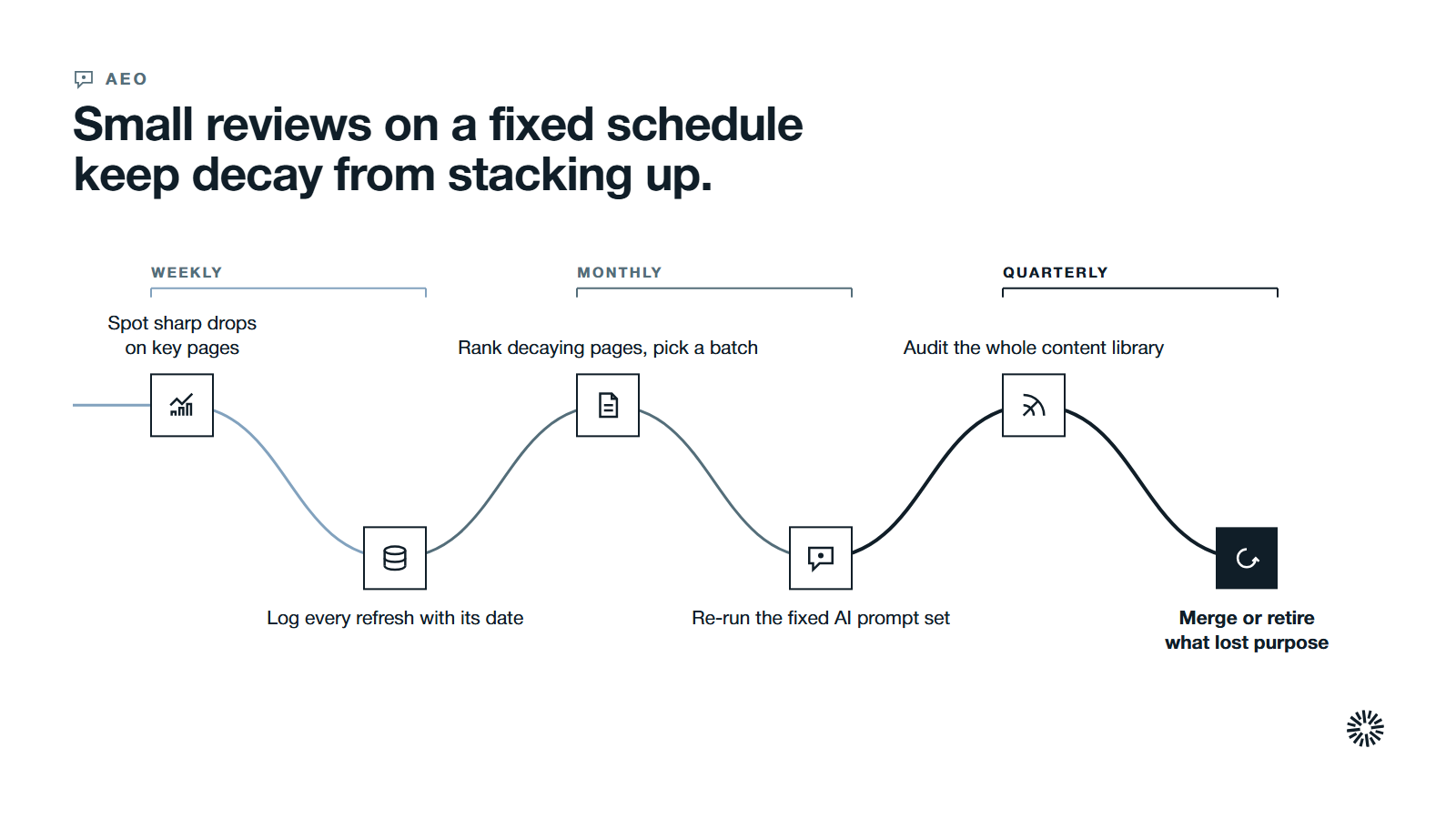
Treat content decay like any other revenue metric: small reviews on a fixed schedule beat one large rescue. A recurring workflow is the only way to address decay systematically, and this one fits a small content team.
Weekly
Compare the past week with the week before in the Performance report. You are looking for sharp drops on pages that matter, not for the gradual decline only a longer view shows. If a drop looks sudden, check the technical causes first.
Log every refresh you ship, with its date, so you can tie later movement to a change.
Monthly
Compare the latest month with the previous month and with the same month a year earlier. Rank the decaying pages by priority score, choose a small batch, and assign each page a treatment from the triage table.
Re-run your fixed AI prompt set and record citation rate per page. Review earlier refreshes only after a fixed window, because Google says changes can take days to months to show.
Quarterly
Audit the whole content library. Sort by months since the last substantive update and confirm that every page still has a purpose in your pipeline. Decide which pages to merge or retire, and which evergreen topics need a scheduled refresh each year.
Report results to your revenue team in terms they use: pages recovered, clicks regained and pipeline influenced. Our guide to how to measure inbound marketing ROI shows how to connect page performance to revenue.
Common content decay mistakes that waste a content refresh
Most failed refreshes come from the same few mistakes.
- Changing the date and nothing else. Readers and Google both look for substance.
- Refreshing everything. Start from the data and fix the pages that lost the most.
- Skipping the baseline. Without the before numbers, you cannot say whether the refresh worked.
- Treating a seasonal dip as decay. Check the year-over-year view and Google Trends before you edit.
- Merging without a redirect. The old URL's links and visitors end up at a dead page.
- Deleting pages that still earn links. Check the backlink profile before you retire anything.
- Judging too soon. Changes can take days to months to show, so measure after a fixed window.
- Treating rankings and AI visibility as one thing. A page can rank well and still not be cited.
What you gain when this is done properly
When a content decay review is a routine, the library stops leaking. The gain reaches every team that depends on your content.
Sales finds accurate pages to send
With content decay under control, sales can share a link without worrying that the figures are old. Buyers who arrive from search or an AI answer meet current information, so conversations start from facts you stand behind.
Marketing protects the traffic it already earned
Marketing spends part of its time on the content with the largest recoverable clicks and stops funding new content creation just to replace old content that quietly faded. You also learn which topics your buyers still search for, which guides your content strategy.
Customer success points customers to guidance they can trust
Customer success relies on help content that matches the current product. When those pages are reviewed on a schedule, customers find correct steps, and fewer routine questions reach the support queue.
Make decay review part of your go-to-market system
Content decay is not a failure of your writing. It is what happens to any piece of content in a world where facts, search intent and AI engines keep moving. The fix is a habit: measure, triage, fix and re-measure, on a calendar.
Propello organizes its work around the commercial problems of its clients, building connected go-to-market systems on HubSpot for CEOs and revenue leaders at growing B2B companies, using revenue operations and account-based marketing to build systems that learn and improve.
If you want help deciding which pages to refresh and which to retire, an audit is the place to start.
