
HubSpot Marketing Studio is a workspace inside HubSpot where a team plans a campaign, builds its assets, connects automations and reviews results in one place. This guide is for marketing leaders and founders at B2B companies who run on HubSpot and want to know what the tool does before changing how the team works.
The short answer: Marketing Studio gives your marketing campaigns one shared canvas, so campaign planning, tailoring for each channel and amplifying across channels happen in the same view. You will see what HubSpot says it does, how it maps to Loop Marketing, and what to check first. HubSpot labels it Beta.
|
HubSpot Marketing Studio HubSpot Marketing Studio is a Beta workspace in HubSpot's Marketing Hub where teams plan campaigns, create and organize assets, run automations and review performance on one shared canvas. |
Where Marketing Studio fits in HubSpot's Loop Marketing framework
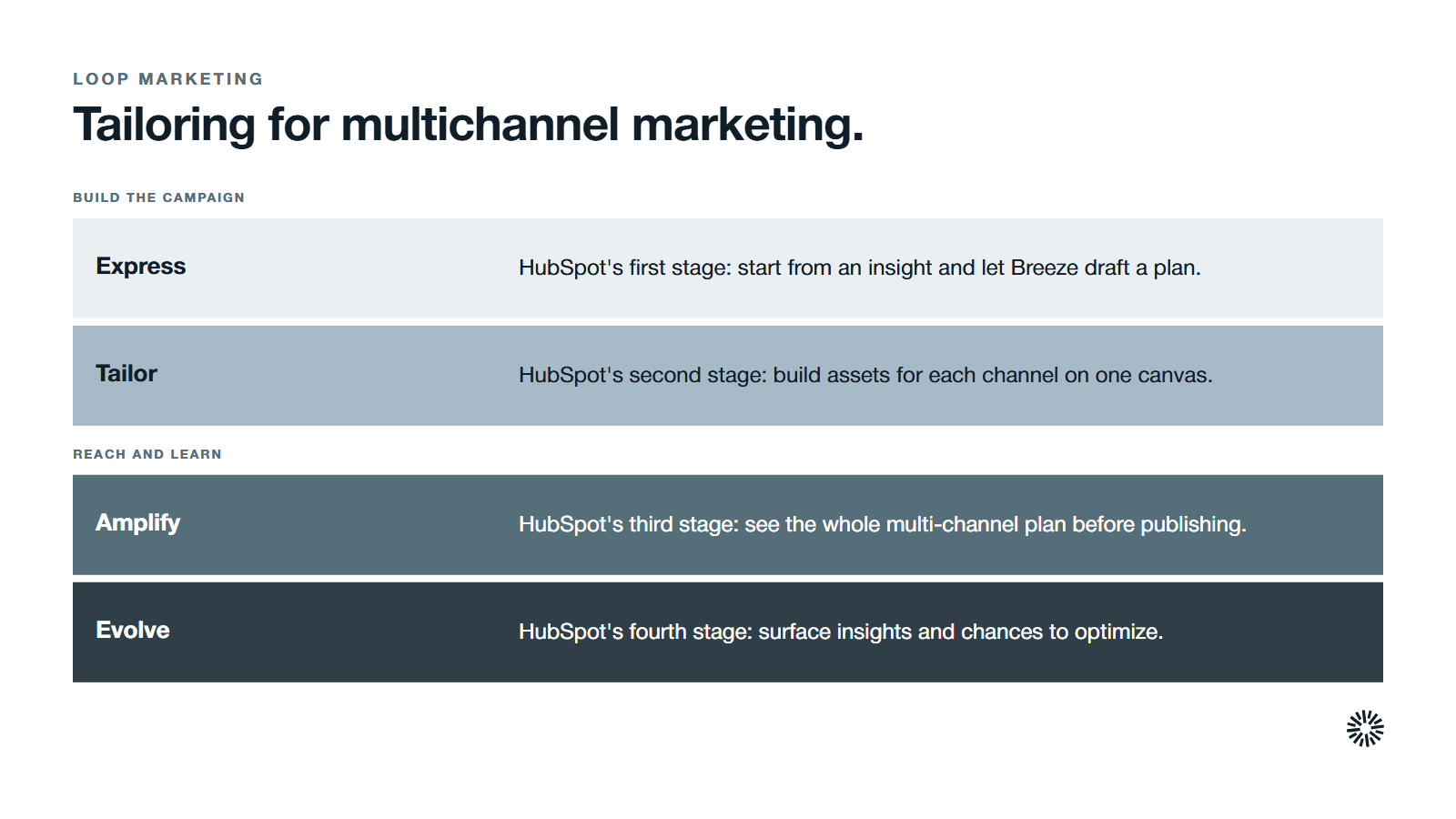
Loop Marketing is HubSpot's four-stage framework for growing in the AI era: Express, Tailor, Amplify and Evolve. HubSpot's own page names Marketing Studio (Beta) in every one of those stages, which tells you it is meant to be the working surface for the whole cycle, not a single feature.
HubSpot's page describes the roles this way. In Express, you start from an insight in Marketing Studio and Breeze, HubSpot's AI assistant, generates a campaign plan and marketing assets from your brand, audience and past performance. In Tailor, you create multi-channel campaign assets and automations on one shared canvas.
In Amplify, you get a holistic view of the multi-channel campaign strategy before anything is published. In Evolve, the tool surfaces insights, patterns and optimization opportunities. HubSpot's guide to Loop Marketing also says the framework works with or without HubSpot, so the tool is an option, not a requirement.
The parts of HubSpot Marketing Studio
HubSpot's help articles describe a handful of parts that work together.
- Campaigns table. The list of your campaigns. You open one from here, either to its details page or straight into the canvas.
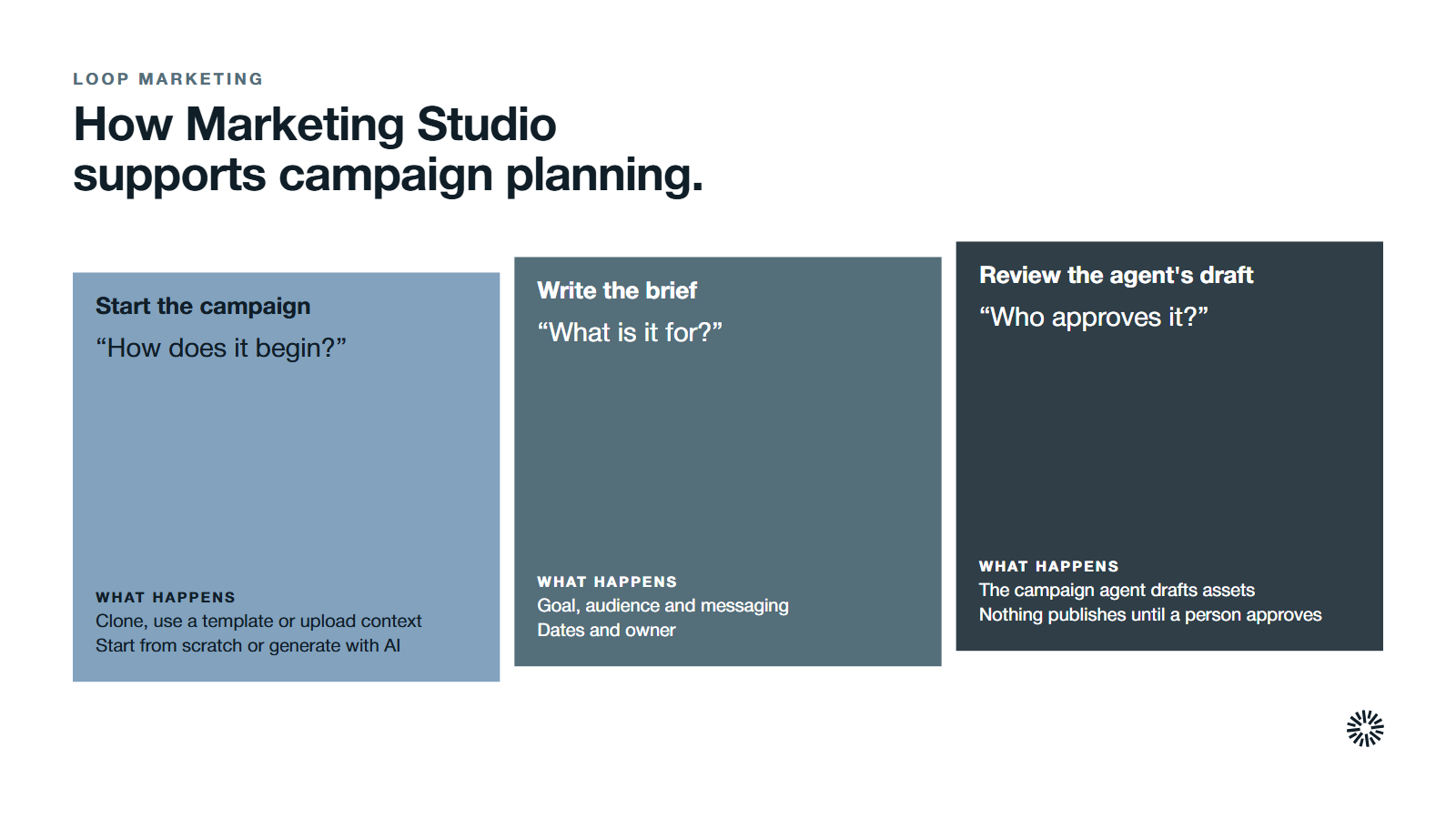
- Campaign brief. The goal, audience, messaging, dates and owner for a campaign. It also sets the context the campaign agent uses.
- Campaign agent. The AI helper that plans a multi-step campaign and drafts assets and automations. Nothing it creates is published automatically.
- Canvas. The shared visual space where each asset is a card with an owner, comments and links to other cards.
- Automate tab. Where campaign automations are built, and where existing workflows can be added to the same canvas.
- Details page. Shows the budget, goal, properties and tracking URLs, plus tabs for assets, automations, tasks and activity.
- Analyze view. The Beta view for reviewing campaign performance, filtered to one campaign when you open it from the details page.
How Marketing Studio supports campaign planning
Campaign planning is where most marketing efforts lose time, with the brief in one document and the owners in a chat thread. Marketing Studio puts the plan and the work in the same place, replacing a scatter of separate tools with one environment where content, tasks and results are linked.
Centralizing the work also trims preparation time. The campaign agent draws on your CRM data, so audience targeting starts from records you already hold.
There are a few ways to start a campaign, and HubSpot's help article lists five:
- Clone an existing campaign and choose which assets to link or copy.
- Start from a template that fills the canvas with placeholder cards.
- Upload documents such as PDFs, slide decks or text files as context.
- Start from scratch and enter the details yourself.
- Generate a campaign with AI, which fills in the name, goal and audience.
Each campaign has a brief that holds the goal, the target audience, the messaging and the dates and owner. HubSpot says changes save automatically and the brief guides the campaign agent when it generates content. That makes the brief the place to state your marketing strategy in plain words.
Effective marketing campaigns begin with a brief that names the audience, the goal and the date. A product launch is a good first test, because it has a fixed date, a clear audience and a short campaign duration.
Write the goal as a SMART goal: specific, measurable, achievable, relevant and time-bound. Add a timeline and a budget allocation, and sequence the messages with the AIDA model of awareness, interest, desire and action. Templates, whether HubSpot's or your own, help teams move faster when they define goals, audience, messaging and budget.
What the campaign agent does and does not do
HubSpot describes the campaign agent as a helper that can define goals, design a multi-step campaign and draft assets such as forms, landing pages and marketing emails. It draws on your brief, past performance and brand identity, and asks follow-up questions when it needs more.
The important detail is control. HubSpot states that the campaign and its assets are not published automatically, and that you can review and edit the drafts first. Treat the agent as a fast first draft that a named person approves.
The campaign canvas keeps assets, owners and automations together
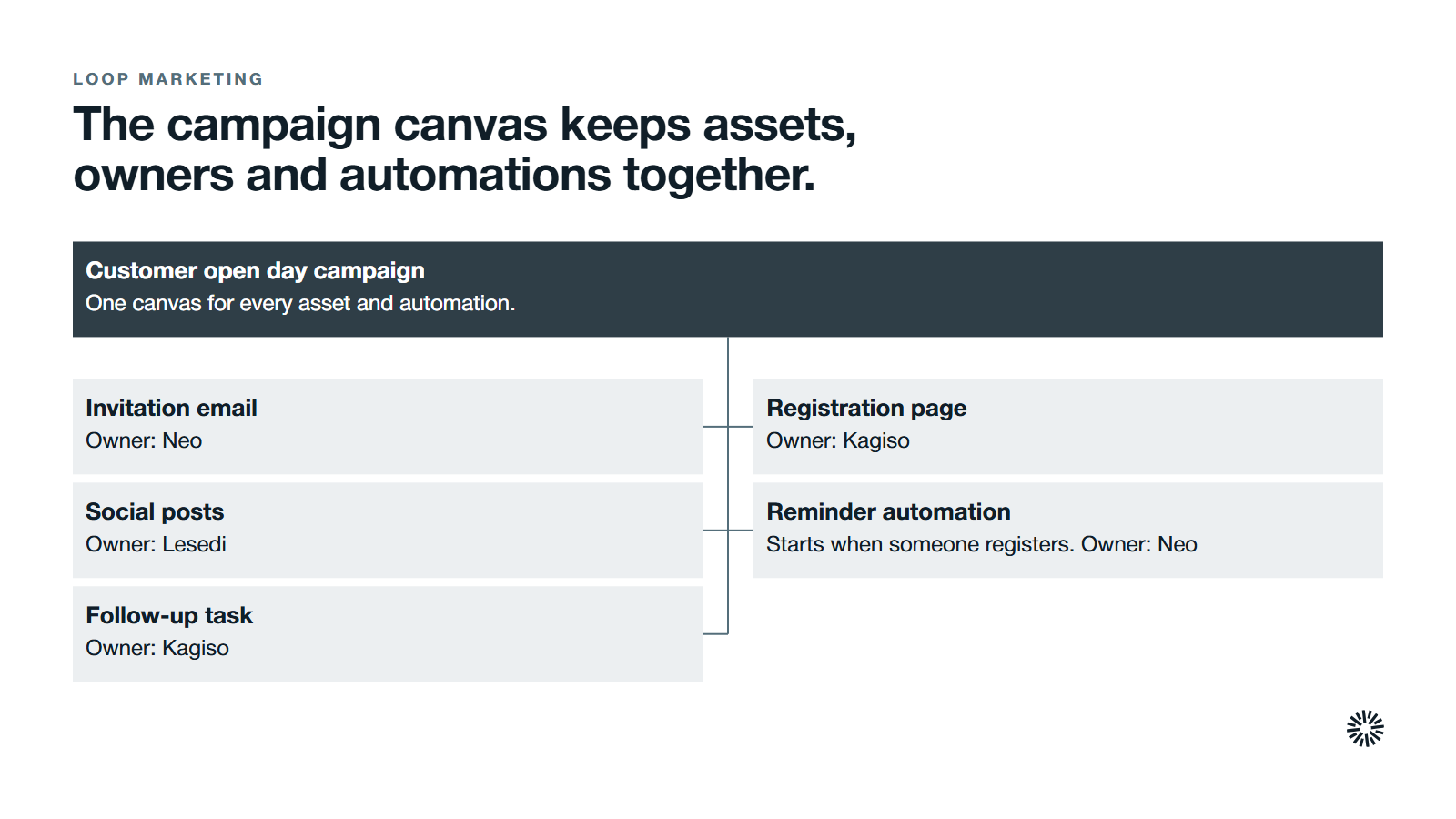
The canvas is the core of the tool. You open a campaign from the campaigns table, choose Edit in canvas, and see every asset as a card. Cards can be grouped, connected with lines, cloned and arranged automatically.
Each card can have an owner, a task or an annotation, and teammates can leave comments on the campaign or on a single asset. HubSpot's product page calls this a shared workspace where teams map campaigns, assign asset owners and track progress, and it describes real-time collaboration.
A shared visual canvas improves communication and reduces siloing, because everyone looks at the same plan.
Automations sit on the same canvas
From the Automate tab, a team can build a campaign automation, choose a trigger and an associated asset, and add actions. Existing workflows can sit on the same canvas, so the people running the campaign see every automation attached to it.
HubSpot's product page lists personalizing individual emails among the things an automation can do, so interactions can reflect how a contact behaves.
HubSpot notes that changes are not applied until you update or turn the automation on. Map each automation to the customer journey you intend, then publish deliberately.
Tailoring for multichannel marketing
Multichannel marketing means reaching people across multiple channels with a message that fits each one. It builds brand awareness through visibility at several touchpoints and lets a business track customer engagement across multiple platforms. The risk is that the team copies one asset everywhere.
In HubSpot's 2026 State of Marketing data, 49.4% of teams reuse the same content across platforms while 39.5% tailor it for each platform, from a survey of more than 1,500 marketers.
Tailoring is the stage that closes that gap. In Marketing Studio, the campaign brief carries your key messages, brand voice and audience, and the assets for each channel sit next to one another on the canvas.
Customer behavior differs by channel. A buyer may see a post on social media, open an email a week later and return through a search result. Those multiple touchpoints should read as one integrated experience, which matters more for a B2B buying group than for a consumer buying a single item.
Consistent messaging does not mean identical wording. It means the same promise, adapted to the format and to where the reader is in the sales funnel. A first-time visitor and an existing customer need different next steps, and the canvas lets you plan both.
Some assets suit certain channels better than others. When the message must run on multiple platforms, keep the core claim fixed and change only the format for each of the different platforms.
Amplifying across online and offline channels
Amplify is the stage where the campaign reaches the market and builds awareness. For multichannel campaigns, the difficulty is coordination: the different channels run on different schedules and belong to different people.
HubSpot says you can map social platforms and ad networks on the canvas and attach links to external assets. That lets a team see online channels, and the work done outside HubSpot, in one plan.
Decide which marketing channels carry the first message and which carry the follow-up. Content marketing such as guides and webinars can travel through partner sites, and offline advertising, if you use it, should point to a landing page you can track.
HubSpot's pages do not name offline channels such as events or print, so treat those as your own planning choice and add them as linked assets if you want one view.
HubSpot's Loop Marketing guide adds that content remix, the video clip agent and the video editor can be used from Marketing Studio to scale production, for example turning one core asset into video ads and posts for social media. Check each version against your brand voice first.
Measuring campaigns with key performance indicators
A plan is only as good as the way you measure it. HubSpot says Marketing Studio connects campaign activity to revenue and shows attributed revenue, return on investment, deal influence and the effect on contact lifecycle stage, for one campaign or a whole program.
The detail matters. HubSpot's help article says influenced contacts appear only for interactions after an asset is associated with the campaign, and that attribution is not applied retroactively. Its performance view shows published assets only. Associate assets early, or you will under-count.
Campaign analytics show how marketing activities relate to business outcomes, and the same metrics support continuous improvement of your marketing strategy.
Choose your key performance indicators before launch. A short list is better than a long one: one measure of reach, one of engagement and one of pipeline.
Measurement is also a live problem for marketers. In the same HubSpot report, measuring marketing ROI was the number one challenge, cited by 33% of respondents.
How Marketing Studio differs from the campaigns tool and other HubSpot features
HubSpot's campaigns tool organizes, tracks and reports on one campaign's assets in one place, and it includes a campaign calendar to review work by day, week or month. Marketing Studio is where you plan and build those campaigns, with a canvas, an AI agent and automations.
The difference is plain. The campaigns tool records and reports on the assets in a campaign. Marketing Studio is the workspace in which the team plans, creates and connects those assets. HubSpot lists creating campaigns in Marketing Studio as an alternative to the standard setup.
Two neighbors are worth separating:
- Workflows. In Marketing Studio, automations are built from a campaign's Automate tab and sit on the canvas beside the assets they serve. Existing workflows can be added to that view, and removing one leaves it in the workflows tool.
- Campaign analytics. HubSpot says the Analyze view replaces the existing campaign analytics tool, and the legacy version is still reachable by searching for campaign analytics in global search.
What to check before you rely on Marketing Studio
Because it is a Beta product, test it on one real campaign before you move the whole team. HubSpot's help articles flag several conditions worth confirming first.
- Access. Managing campaigns needs the right user permissions, and a Super Admin must switch on the AI settings the campaign agent uses.
- Change. HubSpot warns that the feature set may change while the product is in Beta.
- Reporting on clones. Cloning an asset does not carry over its reporting data.
For the portal-side setup that sits underneath a campaign, read our guide on how to implement Loop Marketing in HubSpot.
What you gain when this is done properly
The benefits of a shared canvas depend on the team using it as the single source for the campaign. Used that way, each function gains something different, and the business gets a plan it can inspect.
Sales: campaigns that match what reps are told
Sales can see which landing page, email and follow-up belong to a campaign, so a rep can identify what a contact has already read. Fewer surprises lead to better conversations with potential customers, and a better chance to win more customers who fit the profile.
Marketing: less coordination work and clearer ownership
The marketing team stops spending time chasing files and status updates. Every asset has a card, an owner and a place in the plan. That leaves room to focus on ideas, a deep understanding of the audience and a successful message.
Customer success: campaigns for existing customers too
Campaigns are not only for new customers. A customer success lead can plan a campaign for current customers on the same canvas, with its own audience and automations, so customer loyalty and adoption work does not depend on a spreadsheet.
Get the campaign process right before the tool
Marketing Studio organizes a process. It cannot create one. If the team has no agreed brief, no owner per asset and no shared definition of success, a canvas only makes the gaps visible.
Start with one campaign, one brief and one owner per card. Review what the tool shows, then widen it.
Propello is a HubSpot partner and designs and builds connected go-to-market systems on HubSpot (see about Propello). If you want to see whether your campaign process is ready for a tool like this, an audit is the place to start.
